
Item Access Restrictor
Added a block used to restrict item transportation.
Screenshots
About this Mod
Item Access Restrictor | 物品存取限制器

Introduction
This is a Minecraft mod that adds a functional block: Item Access Restrictor.
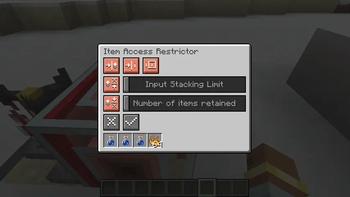
It has no inventory itself, but when attached to a container, it can serve as the surface for inserting and extracting items.
You can configure input blocking, retain a certain number of items, etc. You can also use a comparator to read redstone signals.
Configurations
| Name | Additional Information | Scope | Default Value |
|---|---|---|---|
| Blocking input if target is not empty | Disabled slots and retained items are not included in the target. | Enabled, Disabled | Enabled |
| Blocking input if receiving redstone signal | None | Enabled, Disabled | Enabled |
| Comparator Output Mode | When set to 'Only count effective items and slots', it uses the same calculation method as typical containers like chest or hopper, with a minimum of 0 and a maximum of 15. | Only count effective items and slots, Same with facing block | Only count effective items and slots |
| Input Stacking Limit | Once the number of items inserted in a slot reaches the configured limit, no more items can be inserted to this slot; It will affect the calculation of the redstone signal output by a comparator. | Unlimited, 1–64 | Unlimited |
| Number of items retained | Once the number of items in a slot is reduced to the configured number, items can no longer be extracted from this slot; It will affect the calculation of the redstone signal output by a comparator. | No retain, 1–64 | No retain |
| Enable or disable insertion and extraction of the slot | When the number of slots facing the container changes, it will automatically switch back to the enabled; Disabled slots cannot be inserted into or extracted from, and they will not be included in the calculation for comparator output redstone signals. | Enabled, Disabled | Enabled |
Features
- Cannot be used nested.
- Unable to insert or extract items from the contact face.
- After enabling 'Blocking input if target is not empty', it supports inserting multiple types of items at once. The behavior of mods verified so far: AE2 can successfully send multiple items at once when crafting.
Screenshot

Available Versions
How to Install Item Access Restrictor on Your Server
Order Server
Order a Minecraft Java server with at least 3 GB RAM (4 GB recommended).
Set neoforge Loader
In the panel under "Egg", select the neoforge loader and matching Minecraft version (1.21.1).
Install Mod
Open the mod browser in the dashboard and search for "Item Access Restrictor". Click "Install" – done! Alternatively, upload the .jar via SFTP to the /mods folder.
Compatibility
Mod Loaders
Minecraft Versions
1.21.1
Server-side
✓ RequiredRecommended RAM
4 GB(min. 3 GB)Frequently Asked Questions
Item Access Restrictor server crashes on startup – what to do?
Most common cause: wrong neoforge version or insufficient RAM. Check the server log (latest.log) for "OutOfMemoryError" or "Mixin" errors. With Mado Hosting: ensure at least 3 GB RAM is allocated and the loader matches the mod version (1.21.1). You can switch loaders with one click in the panel.
Is Item Access Restrictor compatible with neoforge?
Item Access Restrictor officially supports neoforge for Minecraft 1.21.1. The Mado dashboard automatically detects incompatible loader combinations.
Server lagging with Item Access Restrictor – how to optimize performance?
Recommended RAM: 4 GB (per 8 players). Use /spark profiler to check if Item Access Restrictor consumes the most tick time. Common fixes: reduce server view-distance to 8-10, install "performant" or "starlight" as supplementary mods on Forge. With Mado Hosting, your server runs on NVMe SSDs with dedicated CPU cores for minimal latency.
Similar Mods





Rent Modded Server
Install Item Access Restrictor with just one click on your server.