
Item Indicator
This mod shows detail information of some items.
Screenshots


About this Mod
🛠️ ItemIndicator: Elevate Your Minecraft Inventory Experience
ItemIndicator is not just another mod—it's your ultimate tool for streamlined inventory management in Minecraft. Say goodbye to the hassle of manually inspecting every item. With ItemIndicator, all the essential information is presented at a glance, making your gameplay smoother and more enjoyable.
🌟 Key Features
🧰 Shulker Box Indicator
Effortlessly monitor the contents of your Shulker Boxes. Never lose track of your stored treasures again—our intuitive visual indicators keep you informed without ever opening a box.

🐝 Bee Hive & Bee Nest Indicator
Keep an eye on your buzzing friends with ease. ItemIndicator provides a clear, instant readout of bee activity and honey levels, ensuring you're always in the know.

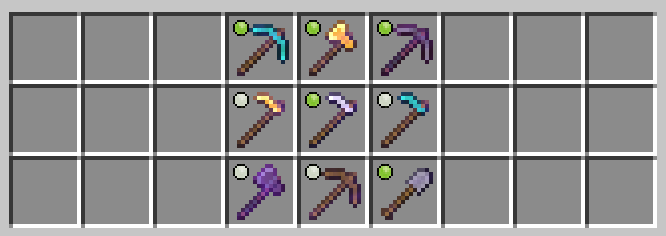
✨ Enchantment Indicator
you can easily see which tools have the Silk Touch or Fortune enchantments applied. No more guesswork—enchantment icons are displayed directly on the items, allowing you to quickly assess their capabilities at a glance.
💡 Ominous Bottle & Firework Rocket Level Indicator
Keep track of your ominous potions and rocket level at a glance. Instantly see how many ominous potions remain in each bottle and the remaining flight levels of your Firework Rockets, ensuring you're always prepared for any adventure.

🛡️ Waxed Icon Indicator
Stay informed about your copper blocks at a glance! The Waxed Icon Indicator visually distinguishes between waxed and unwaxed copper blocks, so you'll always know which blocks are protected from oxidization. Perfect for builders and collectors alike, this feature ensures your creations stay pristine.

🧪 Potion Effect Indicator
Easily identify the effects of your potions with the Potion Effect Indicator. Whether it's a splash potion, lingering potion, or a drinkable one, this feature highlights the potion's primary effect with clear icons. Never guess your potion's power or purpose again—see it all at a glance and use your potions with precision.

With ItemIndicator, elevate your Minecraft experience to new heights. Whether you're a meticulous organizer or just looking for a bit more convenience, this mod has got you covered. Download now and start playing smarter, not harder!
Available Versions
How to Install Item Indicator on Your Server
Order Server
Order a Minecraft Java server with at least 3 GB RAM (4 GB recommended).
Set fabric Loader
In the panel under "Egg", select the fabric loader and matching Minecraft version (1.21.4).
Install Mod
Open the mod browser in the dashboard and search for "Item Indicator". Click "Install" – done! Alternatively, upload the .jar via SFTP to the /mods folder.
Compatibility
Mod Loaders
Minecraft Versions
1.21.4, 1.21.3, 1.21.2 (+3 more)
Server-side
✗ UnsupportedRecommended RAM
4 GB(min. 3 GB)Frequently Asked Questions
Item Indicator server crashes on startup – what to do?
Most common cause: wrong fabric version or insufficient RAM. Check the server log (latest.log) for "OutOfMemoryError" or "Mixin" errors. With Mado Hosting: ensure at least 3 GB RAM is allocated and the loader matches the mod version (1.21.4). You can switch loaders with one click in the panel.
Is Item Indicator compatible with fabric and neoforge?
Item Indicator officially supports fabric, neoforge for Minecraft 1.21.4, 1.21.3, 1.21.2. The Mado dashboard automatically detects incompatible loader combinations.
Server lagging with Item Indicator – how to optimize performance?
Recommended RAM: 4 GB (per 8 players). Use /spark profiler to check if Item Indicator consumes the most tick time. Common fixes: reduce server view-distance to 8-10, install "performant" or "starlight" as supplementary mods on Forge. With Mado Hosting, your server runs on NVMe SSDs with dedicated CPU cores for minimal latency.
Rent Modded Server
Install Item Indicator with just one click on your server.