
InfiniteItems
Two items will give you one upgraded item.
Screenshots
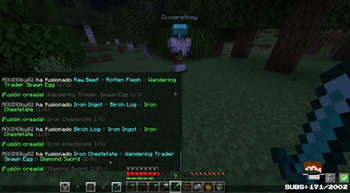
About this Mod
This mod adds an Infinicraft-style item fusion system to Minecraft (Fabric 1.21.1).
When a player drops two items on the ground, the mod detects the pair and, after a short delay, combines them into a new item.
How it Works
The player drops a first item.
The player drops a second item nearby.
If both items remain on the ground and are within the configured distance, the mod:
- Consumes 1 unit of each item,
- Calculates the fusion result using internal rules,
- Spawns the resulting item in the middle, with particles and sound,
- Shows a HUD/message to the player and can optionally broadcast the fusion to the server.
Result Logic
The fusion result is calculated in the following order:
Exact recipes: predefined combinations always take priority
(e.g. coal + stick = torch).Smart progression rules: when combining materials with tools or armor,
the system attempts to generate a coherent upgrade toward higher-tier gear.Rare pool: with enough fusion level, there is a chance to roll
a rare vanilla item (elytra, nether star, trident, etc.).Deterministic fallback: if no rule applies, the mod still returns
a valid vanilla item in a stable and deterministic way
(the same pair usually produces the same result).
Fusion Levels
Every item created through fusion can carry a Level (L) and a Maximum (Max).
- Chaining fusions using already-fused items increases the level.
- Higher levels increase the probability of rare results.
- If a fusion attempt exceeds the allowed maximum, the item breaks
and is consumed, preventing infinite risk-free progression.
Balance
The system is able to output all vanilla items and blocks, but is balanced
to avoid constant block flooding:
- Weighted fallback results
- Items are favored over blocks
- Rare items remain rare
👨💻 Authors & Credits
- Developer:
srmast3r_(SrMaster) - Twitter/X: @SrMaster
Available Versions
How to Install InfiniteItems on Your Server
Order Server
Order a Minecraft Java server with at least 3 GB RAM (4 GB recommended).
Set fabric Loader
In the panel under "Egg", select the fabric loader and matching Minecraft version (1.21.11).
Install Mod
Open the mod browser in the dashboard and search for "InfiniteItems". Click "Install" – done! Alternatively, upload the .jar via SFTP to the /mods folder.
Compatibility
Mod Loaders
Minecraft Versions
1.21.11, 1.21.10, 1.21.9 (+8 more)
Server-side
✓ RequiredRecommended RAM
4 GB(min. 3 GB)Frequently Asked Questions
InfiniteItems server crashes on startup – what to do?
Most common cause: wrong fabric version or insufficient RAM. Check the server log (latest.log) for "OutOfMemoryError" or "Mixin" errors. With Mado Hosting: ensure at least 3 GB RAM is allocated and the loader matches the mod version (1.21.11). You can switch loaders with one click in the panel.
Is InfiniteItems compatible with fabric?
InfiniteItems officially supports fabric for Minecraft 1.21.11, 1.21.10, 1.21.9. The Mado dashboard automatically detects incompatible loader combinations.
Server lagging with InfiniteItems – how to optimize performance?
Recommended RAM: 4 GB (per 8 players). Use /spark profiler to check if InfiniteItems consumes the most tick time. Common fixes: reduce server view-distance to 8-10, install "performant" or "starlight" as supplementary mods on Forge. With Mado Hosting, your server runs on NVMe SSDs with dedicated CPU cores for minimal latency.
Rent Modded Server
Install InfiniteItems with just one click on your server.