
InvSearch
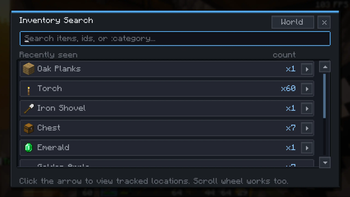
Find items across your inventory and known storage locations with a clean in-game search.
Screenshots
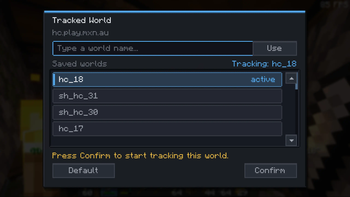
About this Mod
InvSearch is a lightweight Fabric client mod that adds fast item search to
Minecraft. It helps you find what your client has seen in your inventory and
tracked storage, so you can stop opening every chest in the room just to find
one missing stack.
It works as a practical storage memory aid: open containers as you play, then
search later to see known-current item locations and counts. Use it on its own,
or alongside InvSort and InvCatalogue as part of the wider inventory management
suite.
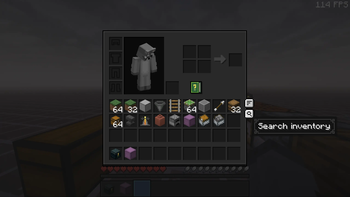
Open the search modal from the in-game Search button on supported screens. Type
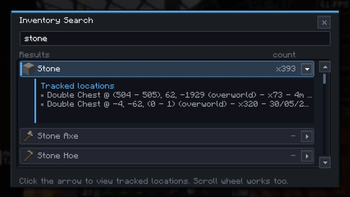
an item name or id to filter the known item list, then select an item to see
where it was last seen and how much is available.
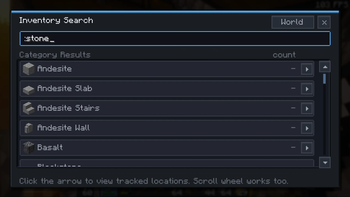
InvSearch now also understands category queries. Start a search with : to
match practical item groups from the shared sorting vocabulary, such as:wood, :stone, :tools, :food, :gear, or :storage.
Features
- In-game search UI for inventory and known storage
- Live results while you type
:categorysearches for broad groups such as wood, stone, tools, food, gear,
storage, and redstone- Known-current item location tracking
- Per-location item counts for searched stacks
- Held-versus-tracked counts so you can see what is on you and what is stored
elsewhere - Tracks standard containers, placed shulkers, ender chests, and storage
minecarts through the shared inventory tracking system - Keeps tracking data separated by singleplayer world or multiplayer server
- Works client-side in singleplayer, LAN, Realms, and multiplayer where
client-side utility mods are allowed
Good for
- Finding misplaced tools, blocks, and resources
- Large survival bases with too many storage chests
- Hardcore or seasonal worlds where storage changes often
- Players who want item search without server-side changes
- Using alongside InvSort and InvCatalogue for broader inventory management
Install note
InvSearch does not require a server install. Install Fabric Loader, Fabric API,
and the InvSearch jar for your Minecraft version.
It remembers what your client has seen. If another player moves items while you
are away, reopen that storage so InvSearch can refresh its known location data.
Available Versions
How to Install InvSearch on Your Server
Order Server
Order a Minecraft Java server with at least 3 GB RAM (4 GB recommended).
Set fabric Loader
In the panel under "Egg", select the fabric loader and matching Minecraft version (26.2-pre-3).
Install Mod
Open the mod browser in the dashboard and search for "InvSearch". Click "Install" – done! Alternatively, upload the .jar via SFTP to the /mods folder.
Compatibility
Mod Loaders
Minecraft Versions
26.2-pre-3, 26.1.2, 26.1.1 (+20 more)
Server-side
~ OptionalRecommended RAM
4 GB(min. 3 GB)Frequently Asked Questions
InvSearch server crashes on startup – what to do?
Most common cause: wrong fabric version or insufficient RAM. Check the server log (latest.log) for "OutOfMemoryError" or "Mixin" errors. With Mado Hosting: ensure at least 3 GB RAM is allocated and the loader matches the mod version (26.2-pre-3). You can switch loaders with one click in the panel.
Is InvSearch compatible with fabric?
InvSearch officially supports fabric for Minecraft 26.2-pre-3, 26.1.2, 26.1.1. The Mado dashboard automatically detects incompatible loader combinations.
Server lagging with InvSearch – how to optimize performance?
Recommended RAM: 4 GB (per 8 players). Use /spark profiler to check if InvSearch consumes the most tick time. Common fixes: reduce server view-distance to 8-10, install "performant" or "starlight" as supplementary mods on Forge. With Mado Hosting, your server runs on NVMe SSDs with dedicated CPU cores for minimal latency.
Similar Mods






Rent Modded Server
Install InvSearch with just one click on your server.