
JackItToMe (JEI/REI/EMI)
A mod that allows you to easily pull items from JEI/REI/EMI to your inventory from any container
Screenshots
About this Mod
JackItToMe
A NeoForge 1.21.x mod that pulls items from whatever inventory you have open
into your own — either one item at a time with a keybind, or a whole recipe's
worth with a button on your recipe viewer's recipe screen.
Works with JEI, EMI, or REI — install whichever you already use.
📦 Download: CurseForge · Modrinth
Two ways to grab items
1. Hover-and-press: pull items
Hover the cursor over any item in any open screen and press P. One of
that item moves into your inventory, sourced from whatever container is open
behind the cursor.
Modifier keys change how much you pull:
| Modifier | Effect |
|---|---|
| (none) | One item |
| Shift+P | One full stack (up to 64) |
| Ctrl+P | As much as fits in your inventory |
Ctrl beats Shift if you hold both.
Autocraft escalation: if the hovered item isn't in stock but your open
AE2/RS network has a pattern for it, pressing P opens the native autocraft
popup pre-filled with the amount your modifier asked for (1 / 64 / a lot).
Works on:
- Vanilla container slots (chest, barrel, shulker, etc.)
- Items in your recipe viewer's item list and favorites/bookmarks
- Slots inside a recipe view — including the cycling "any planks" tag slots,
where all variants are considered and whichever you actually have is what
gets pulled
2. Per-recipe button: start crafting (and optionally pull what's ready)
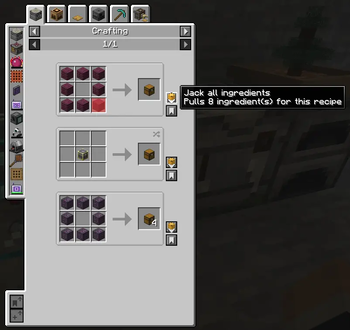
While viewing any recipe, a chest-icon J button appears on the recipe.
Hover it to preview the state of each slot, then click to act on the recipe.
- Hover the button: each input slot is checked against your open storage,
refreshing every ¾ second while you stay on the button.- Red = missing, and no AE2/RS pattern can produce it.
- Green = missing, but your network can autocraft it.
- Clear = in stock.
- Click the button:
- If every ingredient is in stock: pulls them all into your inventory.
- If any ingredient is missing: triggers autocraft popups (one after the
next) for the missing-but-craftable ones. Does not pull anything —
even in-stock items stay in storage until you Shift+click.
- Shift+Click: always pulls every in-stock ingredient and triggers
autocraft popups for any missing-but-craftable ones.
The rule in one sentence: Shift is the "always pull" modifier; plain click
pulls only when there's nothing to autocraft, otherwise it leaves your
inventory alone so you can review the autocraft popups without committing.
Recipe viewers
Install any one of these (or none). The mod adapts to whichever it finds:
| Viewer | Pull button | Hover tooltip | Red/green slot overlays |
|---|---|---|---|
| JEI | ✅ | ✅ | ✅ |
| REI | ✅ | ✅ | ✅ |
| EMI | ✅ | ✅ | — (counts shown in the tooltip instead) |
Without any viewer installed the mod still works for the P keybind on
vanilla container slots — you just won't get the recipe button or the ability
to pull from a viewer's item list.
Where items come from
Both modes pull from the menu open behind the cursor:
- Any vanilla container (chest, barrel, shulker, your own inventory)
- Applied Energistics 2 ME networks (any terminal-shaped menu)
- Refined Storage 2 grids (normal, crafting, pattern, wireless, portable)
Without AE2 or RS the mod still works for vanilla containers; with either or
both installed, the corresponding source activates automatically — respecting
that storage system's own access/security rules.
Install
Drop the jar into your mods/ folder alongside:
- NeoForge 1.21.1 (≥ 21.1.181) — required
- A recipe viewer — JEI (≥ 19), EMI (≥ 1.1), or REI (≥ 16) —
recommended (needed for the recipe button and viewer-list pulling) - AE2 (≥ 19) — optional, enables the ME-network source
- Refined Storage 2 (≥ 2.0) — optional, enables the RS-grid source
Configuring
Rebind the keybind from Options → Controls → JackItToMe → Jack hovered
item. Default is P. No other configuration needed.
Links
License
MIT — see LICENSE.
Available Versions
How to Install JackItToMe (JEI/REI/EMI) on Your Server
Order Server
Order a Minecraft Java server with at least 3 GB RAM (4 GB recommended).
Set neoforge Loader
In the panel under "Egg", select the neoforge loader and matching Minecraft version (1.21.11).
Install Mod
Open the mod browser in the dashboard and search for "JackItToMe (JEI/REI/EMI)". Click "Install" – done! Alternatively, upload the .jar via SFTP to the /mods folder.
Compatibility
Mod Loaders
Minecraft Versions
1.21.11, 1.21.10, 1.21.9 (+8 more)
Server-side
✓ RequiredRecommended RAM
4 GB(min. 3 GB)Frequently Asked Questions
JackItToMe (JEI/REI/EMI) server crashes on startup – what to do?
Most common cause: wrong neoforge version or insufficient RAM. Check the server log (latest.log) for "OutOfMemoryError" or "Mixin" errors. With Mado Hosting: ensure at least 3 GB RAM is allocated and the loader matches the mod version (1.21.11). You can switch loaders with one click in the panel.
Is JackItToMe (JEI/REI/EMI) compatible with neoforge?
JackItToMe (JEI/REI/EMI) officially supports neoforge for Minecraft 1.21.11, 1.21.10, 1.21.9. The Mado dashboard automatically detects incompatible loader combinations.
Server lagging with JackItToMe (JEI/REI/EMI) – how to optimize performance?
Recommended RAM: 4 GB (per 8 players). Use /spark profiler to check if JackItToMe (JEI/REI/EMI) consumes the most tick time. Common fixes: reduce server view-distance to 8-10, install "performant" or "starlight" as supplementary mods on Forge. With Mado Hosting, your server runs on NVMe SSDs with dedicated CPU cores for minimal latency.
Rent Modded Server
Install JackItToMe (JEI/REI/EMI) with just one click on your server.