
Jade Magnifying Glass
Only have your Jade UI active when you need it. Also, spyglass-flavored!
About this Mod
Jade: Magnifying Glass!

Want to see how many bees there are in that hive but don't want too much UI in your face? Well, then you are probably me— I mean, look no further!
This mod adds a Magnifying Glass that must be held in your main hand or offhand to activate Jade's UI. Being an upgrade to the Spyglass, Magnifying Glass functions both to inspect blocks and zoom in on distant objects. See? No inventory clutter—you were bringing your Spyglass anyway, right?
How to use the mod?
- Install Jade, of course
- Craft your Magnifying Glass: Spyglass + Quartz + Stick
- Clutch it tightly in either of your hands
- Look at stuff!
- Clean regularly with a dry cloth
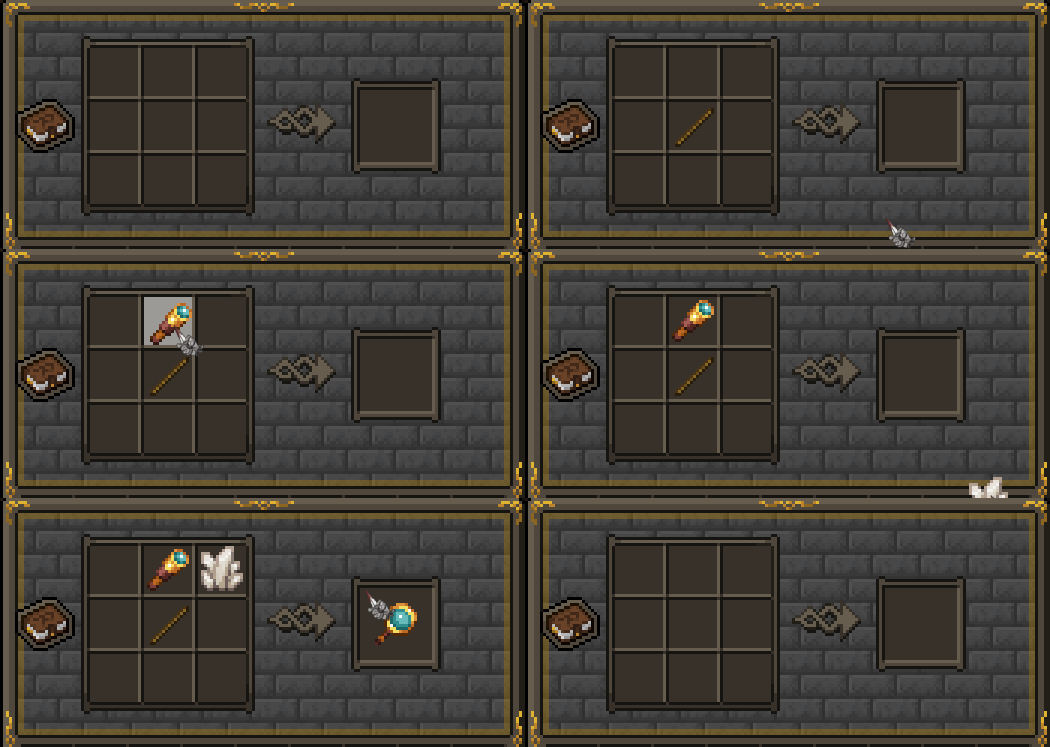
Why use the mod?
- Cleaner UI — Jade is there only when you need it
- Progression — Information feels earned (SevTech my beloved)
- Immersion — Your Jade-pilled cyborg eyes can't just scan whatever you want anymore
- Interactivity — Pressing buttons! Crafting items! Yaaay!
Compatibility
Almost sure that the mod will be compatible with anything that modifies the vanilla spyglass!
For instance, the Magnifying Glass inherits all mechanics from mods like the amazing Spyglass Improvements mod that improves makes the vanilla spyglass significantly better in a configurable way. Do check it out, seriously.
Credits
- Snownee, Jade Contributors, Waila/Hwyla devs — for the amazing mod
- Mojang — for making CubeWorld
- My mother — for yesterday's pancakes
- Your mother — ;D
Support
If you enjoy the mod, good for you.
Contacts
I'll leave my discord here for now. Just don't yell, okay?
Spoiler
oobica_zhenshy
Available Versions
How to Install Jade Magnifying Glass on Your Server
Order Server
Order a Minecraft Java server with at least 3 GB RAM (4 GB recommended).
Set forge Loader
In the panel under "Egg", select the forge loader and matching Minecraft version (1.20.1).
Install Mod
Open the mod browser in the dashboard and search for "Jade Magnifying Glass". Click "Install" – done! Alternatively, upload the .jar via SFTP to the /mods folder.
Compatibility
Mod Loaders
Minecraft Versions
1.20.1
Server-side
✓ RequiredRecommended RAM
4 GB(min. 3 GB)Frequently Asked Questions
Jade Magnifying Glass server crashes on startup – what to do?
Most common cause: wrong forge version or insufficient RAM. Check the server log (latest.log) for "OutOfMemoryError" or "Mixin" errors. With Mado Hosting: ensure at least 3 GB RAM is allocated and the loader matches the mod version (1.20.1). You can switch loaders with one click in the panel.
Is Jade Magnifying Glass compatible with forge?
Jade Magnifying Glass officially supports forge for Minecraft 1.20.1. The Mado dashboard automatically detects incompatible loader combinations.
Server lagging with Jade Magnifying Glass – how to optimize performance?
Recommended RAM: 4 GB (per 8 players). Use /spark profiler to check if Jade Magnifying Glass consumes the most tick time. Common fixes: reduce server view-distance to 8-10, install "performant" or "starlight" as supplementary mods on Forge. With Mado Hosting, your server runs on NVMe SSDs with dedicated CPU cores for minimal latency.
Similar Mods




Rent Modded Server
Install Jade Magnifying Glass with just one click on your server.