
JapaneseRomajiConverter
Automatically converts Romaji sent in chat to Hiragana. チャットでのローマ字を自動でひらがなに変換します。
Screenshots

About this Mod
Deprecated
This MOD is deprecated. Use Tsuki Chat instead.
このMODは非推奨です。代わりにTsuki Chatを利用してください。
Japanese Romaji Converter
チャットに送信されたローマ字を自動でひらがなに変換するMODです。
日本語版の説明は下部で閲覧可能です。
English Version
Description
This is a mod that automatically converts Romaji sent in chat to Hiragana.
Usage
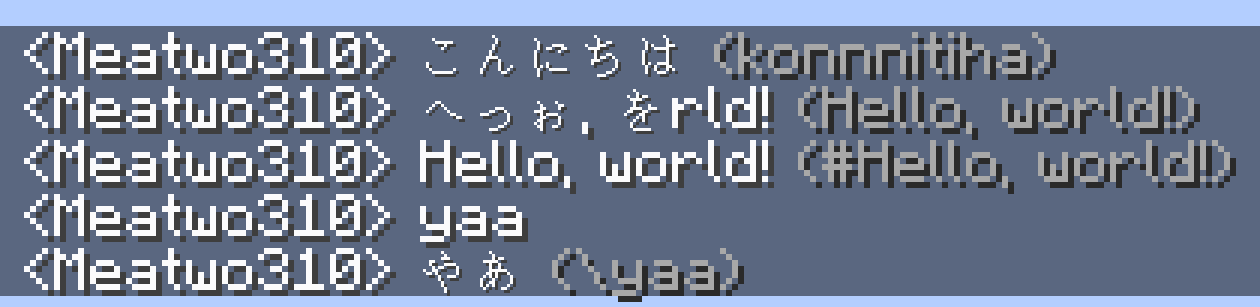
When you send a message in chat, it will be automatically converted to Hiragana. Example: konnnitiha → こんにちは
If you put one of the symbols !#; at the beginning of the message, it will not be converted. Example: #Hello, world! → Hello, world!
Also, messages with less than 5 characters will not be converted. To force conversion, put one of the symbols \¥¥ at the beginning of the message. Example: hi → hi, \yaa → やあ
Credits
Icon for this mod: Keyboard icon by Delapouite under CC BY 3.0 (Modified using https://game-icons.net)
In this mod, when converting Romaji to Hiragana,romaji_to_hiragana.csv in andree-surya/moji4j for use in this project. Special thanks to andree-surya! A copy of the license is as follows: Meatwo310/JapaneseRomajiConverter-Forge#credits
Contributors
Special thanks to those who contributed to the creation of this mod!
License
This project is licensed under the Apache License 2.0. See LICENSE for more details.
Japanese Version
概要
チャットで送信されたローマ字を、自動でひらがなに変換するMODです。
使い方
チャットでローマ字を送信すると自動的にひらがなに変換されます。 例:konnnitiha→こんにちは!#;のいずれかの記号をメッセージの先頭につけると、変換されなくなります。 例:#Hello, world!→Hello, world!
また、5文字未満のメッセージは変換されません。 強制的に変換するには、\¥¥のいずれかの記号をメッセージの先頭につけてください。 例:hi→hi,\yaa→やあ
クレジット
MODのアイコン: Keyboard icon by Delapouite under CC BY 3.0 (https://game-icons.net を用いて改変)
このMODでは、ローマ字をひらがなに変換する際に、 andree-surya/moji4j の romaji_to_hiragana.csv を変換辞書のベースとして使用しています。andree-surya氏にスペシャルなサンキューを。ライセンスのコピーはMeatwo310/JapaneseRomajiConverter-Forge#creditsを参照してください。
貢献者
このMODの作成に貢献してくださった方々にスペシャルなサンキューを!
ライセンス
このプロジェクトは、Apache License 2.0の下でライセンスされています。詳細はLICENSEを参照してください。
Available Versions
How to Install JapaneseRomajiConverter on Your Server
Order Server
Order a Minecraft Java server with at least 3 GB RAM (4 GB recommended).
Set fabric Loader
In the panel under "Egg", select the fabric loader and matching Minecraft version (1.19.2).
Install Mod
Open the mod browser in the dashboard and search for "JapaneseRomajiConverter". Click "Install" – done! Alternatively, upload the .jar via SFTP to the /mods folder.
Compatibility
Mod Loaders
Minecraft Versions
1.19.2, 1.18.2
Server-side
✓ RequiredRecommended RAM
4 GB(min. 3 GB)Frequently Asked Questions
JapaneseRomajiConverter server crashes on startup – what to do?
Most common cause: wrong fabric version or insufficient RAM. Check the server log (latest.log) for "OutOfMemoryError" or "Mixin" errors. With Mado Hosting: ensure at least 3 GB RAM is allocated and the loader matches the mod version (1.19.2). You can switch loaders with one click in the panel.
Is JapaneseRomajiConverter compatible with fabric and forge?
JapaneseRomajiConverter officially supports fabric, forge for Minecraft 1.19.2, 1.18.2. Note: Forge and Fabric mods are NOT cross-compatible – pick one loader and stick with it. The Mado dashboard automatically detects incompatible loader combinations.
Server lagging with JapaneseRomajiConverter – how to optimize performance?
Recommended RAM: 4 GB (per 8 players). Use /spark profiler to check if JapaneseRomajiConverter consumes the most tick time. Common fixes: reduce server view-distance to 8-10, install "performant" or "starlight" as supplementary mods on Forge. With Mado Hosting, your server runs on NVMe SSDs with dedicated CPU cores for minimal latency.
Similar Mods






Rent Modded Server
Install JapaneseRomajiConverter with just one click on your server.