Jay's Minigame Network
This project adds popular minigames such as bedwars, mace survival, survival games, and other gamemodes coming out soon! In beta right now!
Screenshots
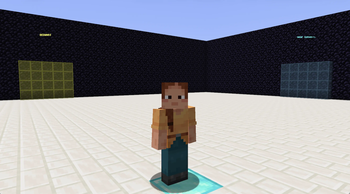
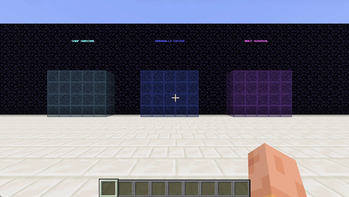
About this Mod
Jay's Minigame Network is a Fabric mod for Minecraft 1.21.11 that turns your singleplayer world into a fully self-contained minigame network. It adds six game modes accessible through colored walk-through portals in a central hub: Sword PvP with five kit tiers, Bedwars with resource generators and a villager shop, Survival Games with randomized themed arenas, Mace Survival with open-world combat and a death kit system, Shop Survival with an economy, /sethome, /rtp, and a full TPA system, and Armadillo Soccer with bot players to duel against. Every game mode has completely isolated inventories that save and restore automatically when you switch.
There is zero setup required. Load the mod, create a new Superflat world with the Void preset enabled and the entire hub and all arenas generate automatically on first launch. All textures are included in the mod file — nothing extra to install or configure.
Important: This mod is designed for singleplayer only and requires Minecraft 1.21.11 and Fabric API. It will not work on other Minecraft versions or with Forge/NeoForge. A Superflat or Void world type is strongly recommended, as the mod generates all its own structures and arenas at specific coordinates that may conflict with natural terrain.
Please note that all minigames are in beta development right now and might have many errors. This is an unfinished project. The description above explains the goal of this project. The description above was made using AI.
Available Versions
How to Install Jay's Minigame Network on Your Server
Order Server
Order a Minecraft Java server with at least 3 GB RAM (4 GB recommended).
Set fabric Loader
In the panel under "Egg", select the fabric loader and matching Minecraft version (1.21.11).
Install Mod
Open the mod browser in the dashboard and search for "Jay's Minigame Network". Click "Install" – done! Alternatively, upload the .jar via SFTP to the /mods folder.
Compatibility
Mod Loaders
Minecraft Versions
1.21.11, 1.21.10, 1.21.9 (+8 more)
Server-side
✓ RequiredRecommended RAM
4 GB(min. 3 GB)Frequently Asked Questions
Jay's Minigame Network server crashes on startup – what to do?
Most common cause: wrong fabric version or insufficient RAM. Check the server log (latest.log) for "OutOfMemoryError" or "Mixin" errors. With Mado Hosting: ensure at least 3 GB RAM is allocated and the loader matches the mod version (1.21.11). You can switch loaders with one click in the panel.
Is Jay's Minigame Network compatible with fabric?
Jay's Minigame Network officially supports fabric for Minecraft 1.21.11, 1.21.10, 1.21.9. The Mado dashboard automatically detects incompatible loader combinations.
Server lagging with Jay's Minigame Network – how to optimize performance?
Recommended RAM: 4 GB (per 8 players). Use /spark profiler to check if Jay's Minigame Network consumes the most tick time. Common fixes: reduce server view-distance to 8-10, install "performant" or "starlight" as supplementary mods on Forge. With Mado Hosting, your server runs on NVMe SSDs with dedicated CPU cores for minimal latency.
Similar Mods





Rent Modded Server
Install Jay's Minigame Network with just one click on your server.