
Jenga Mod
A recreation of that one systemzee video where they have jenga with realistic physics.
Screenshots

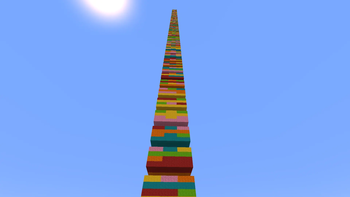
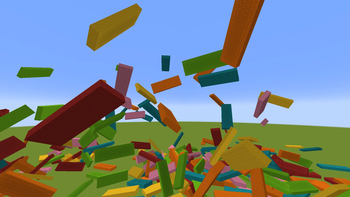
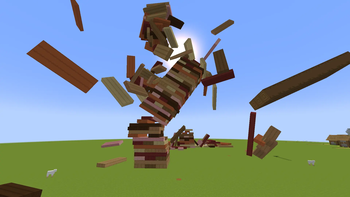
About this Mod
Real physics Jenga for Minecraft. A recreation of the systemzee video where the tower actually leans, wobbles, and comes crashing down — built on the Sable physics engine, so every piece is its own physics object that falls, tips, and collides on its own.
How it plays
Run /stack to drop a full tower in front of you, then play it for real — grab a piece with an empty hand, ease it out, and try not to be the one who brings the whole thing down. Each piece is a 1×3×9 block of stripped logs, and the layers alternate direction exactly like the real game.
Commands
| Command | What it does |
|---|---|
/stack <N> |
Build an N-layer tower (1–999), one layer per tick |
/stack cancel |
Stop a build that's in progress |
/stack status |
Check whether a build is running for you |
/gamerule jengaMaxLayers <N> |
Cap tower height for the world (default 999) |
/jenga start, /jenga turn next, /jenga turn last |
Turn-based play — heavily in beta |
Controls
| Action | Result |
|---|---|
| Right-click a piece (empty hand) | Grab it |
| Scroll while holding | Rotate the piece 90° |
| Ctrl + scroll (rebindable) while holding | Move the piece closer or further from you |
| Right-click again | Let go and let physics take over |
Config
Open the Jenga button in the options menu to choose which blocks the tower is built from. (Turn enforcement is still very early beta, so it may not be finished yet.)
Before you download — please read
[!IMPORTANT]
- Requires Fabric Loader, Fabric API, and Sable for Minecraft 1.21.1.
- Sable is the physics engine that makes the pieces move — the mod will not work without it.
- In multiplayer, install it on both the client and the server, on the same version.
Known limitations
Honest trade-offs, not bugs:
- The
/jengaturn-based commands (start, turn enforcement) are heavily in beta and may not behave correctly yet. - Big towers take a moment to build — one layer per tick, so
/stack 999is intentionally slow.
How does it work under the hood? (optional reading)
Each Jenga piece is a 1×3×9 group of stripped logs assembled into its own Sable sub-level, so it falls, tips, and collides independently of every other piece. Grabbing a piece follows your view and your scroll rotation, dispatching Sable teleports to whichever sub-level you're looking at.
Compatibility
| Minecraft | 1.21.1 |
| Loader | Fabric |
| Dependencies | Fabric API, Sable |
| Java | 21+ |
Found a bug or have an idea? Open an issue on GitHub with what you did and what happened — it really helps.
Available Versions
How to Install Jenga Mod on Your Server
Order Server
Order a Minecraft Java server with at least 3 GB RAM (4 GB recommended).
Set fabric Loader
In the panel under "Egg", select the fabric loader and matching Minecraft version (1.21.1).
Install Mod
Open the mod browser in the dashboard and search for "Jenga Mod". Click "Install" – done! Alternatively, upload the .jar via SFTP to the /mods folder.
Compatibility
Mod Loaders
Minecraft Versions
1.21.1
Server-side
✓ RequiredRecommended RAM
4 GB(min. 3 GB)Frequently Asked Questions
Jenga Mod server crashes on startup – what to do?
Most common cause: wrong fabric version or insufficient RAM. Check the server log (latest.log) for "OutOfMemoryError" or "Mixin" errors. With Mado Hosting: ensure at least 3 GB RAM is allocated and the loader matches the mod version (1.21.1). You can switch loaders with one click in the panel.
Is Jenga Mod compatible with fabric?
Jenga Mod officially supports fabric for Minecraft 1.21.1. The Mado dashboard automatically detects incompatible loader combinations.
Server lagging with Jenga Mod – how to optimize performance?
Recommended RAM: 4 GB (per 8 players). Use /spark profiler to check if Jenga Mod consumes the most tick time. Common fixes: reduce server view-distance to 8-10, install "performant" or "starlight" as supplementary mods on Forge. With Mado Hosting, your server runs on NVMe SSDs with dedicated CPU cores for minimal latency.
Similar Mods





Rent Modded Server
Install Jenga Mod with just one click on your server.