
Sleep Deprivation
Extremely customizable mod that adds progressively negative effects as you go without sleep
Screenshots
About this Mod
Sleep Deprivation
As you go without sleep, you start to feel weird. You get brief feelings of nausia, and your eyes start to go black out of exhaustion. You start to forget where you put items in your inventory, things appear to shift and move right in front of your eyes. Should you keep pushing onward, you will be overcome by insanity.
Overview & Config
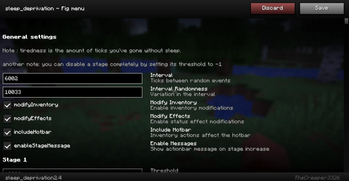
When players go without sleep, they will begin to get negative visual effects and their inventory will start to scramble itself and items will appear to duplicate There are 10 stages of sleep deprivation. You can configure each stage with the following settings :
- Threshold - When the stage begins
- Set to -1 to disable that stage
- Inventory modification - How much inventory scrambling will occur
- Include hotbar - include hotbar when modifying inventory
- Effects intensity - 0-10 scale of how potent effects will be
- Message - a message to be displayed in the players actionbar when they pass a threshold
- Ghost items - amount of fake duplicates allowed at one time per player
Apart from individual configuration you can also modify percent chances of all the events independantly.
Inventory modification, effects, and messages can be turned on or off independantly if any of them are undesired.
Environment and requirements
The mod is only required server-side, and can be configured with the configuration JSON file. It can also be configured through a GUI if an operator has it installed on their client.
Available Versions
How to Install Sleep Deprivation on Your Server
Order Server
Order a Minecraft Java server with at least 3 GB RAM (4 GB recommended).
Set fabric Loader
In the panel under "Egg", select the fabric loader and matching Minecraft version (26.1.2).
Install Mod
Open the mod browser in the dashboard and search for "Sleep Deprivation". Click "Install" – done! Alternatively, upload the .jar via SFTP to the /mods folder.
Compatibility
Mod Loaders
Minecraft Versions
26.1.2, 26.1.1, 26.1
Server-side
✓ RequiredRecommended RAM
4 GB(min. 3 GB)Frequently Asked Questions
Sleep Deprivation server crashes on startup – what to do?
Most common cause: wrong fabric version or insufficient RAM. Check the server log (latest.log) for "OutOfMemoryError" or "Mixin" errors. With Mado Hosting: ensure at least 3 GB RAM is allocated and the loader matches the mod version (26.1.2). You can switch loaders with one click in the panel.
Is Sleep Deprivation compatible with fabric?
Sleep Deprivation officially supports fabric for Minecraft 26.1.2, 26.1.1, 26.1. The Mado dashboard automatically detects incompatible loader combinations.
Server lagging with Sleep Deprivation – how to optimize performance?
Recommended RAM: 4 GB (per 8 players). Use /spark profiler to check if Sleep Deprivation consumes the most tick time. Common fixes: reduce server view-distance to 8-10, install "performant" or "starlight" as supplementary mods on Forge. With Mado Hosting, your server runs on NVMe SSDs with dedicated CPU cores for minimal latency.
Similar Mods





Rent Modded Server
Install Sleep Deprivation with just one click on your server.