
Journey Titles
Lets you add Titles to Areas with Signs
Screenshots
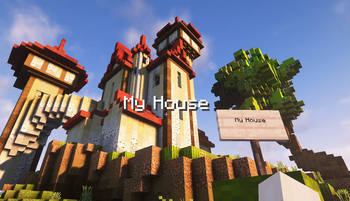


About this Mod
Want to add Titles to the regions your buint in your map?
This is a reworked version of the Original Datapack by HopeVox
This Datapack lets you add Titles to Signs and displays them for everyone coming in range.
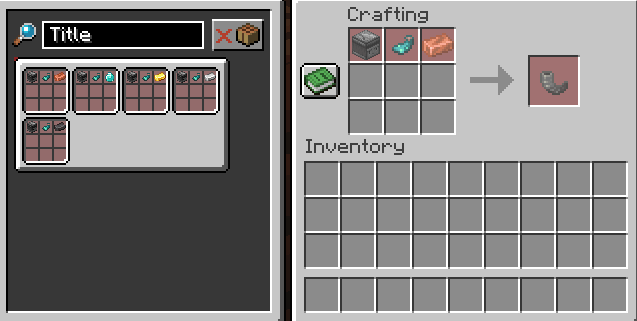
Craft different tiers of Titles to set the Signs range:
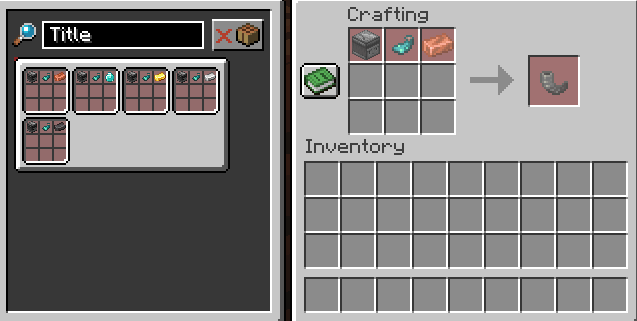
- Copper Title: 10 Blcoks range
- Iron Title: 20 Blocks range
- Gold Title: 50 Blocks range
- Diamond Title: 100 Blocks range
- Netherite Title: 200 Blocks range
To Create a Title, place a Sign, write something on its front side (the one facing you when placed) and right-klick any of the Titles on that Sign.
You can't place multiple Titles on one Sign.
If the Sign is broken, the Title item you used on it will drop.
If you add glow ink after adding the Title, it will be displayed underlined.
If you can't remember wich Signs have Titles, hold a Title Item and all Signs with Titles on them will display their Title tier as a small block.
This Datapack also supports Titles in the range of other Titles.
The Titles will only be displayed if you enter the range of a specific Title after you have left it.
Since I had to use Integer UUIDs for the Titles, the pack will stop working if you place more than 2147483647 Titles in one World.
Available Versions
How to Install Journey Titles on Your Server
Order Server
Order a Minecraft Java server with at least 3 GB RAM (4 GB recommended).
Set datapack Loader
In the panel under "Egg", select the datapack loader and matching Minecraft version (1.21.5).
Install Mod
Open the mod browser in the dashboard and search for "Journey Titles". Click "Install" – done! Alternatively, upload the .jar via SFTP to the /mods folder.
Compatibility
Mod Loaders
Minecraft Versions
1.21.5, 1.21.4, 1.21.3 (+1 more)
Server-side
✓ RequiredRecommended RAM
4 GB(min. 3 GB)Frequently Asked Questions
Journey Titles server crashes on startup – what to do?
Most common cause: wrong datapack version or insufficient RAM. Check the server log (latest.log) for "OutOfMemoryError" or "Mixin" errors. With Mado Hosting: ensure at least 3 GB RAM is allocated and the loader matches the mod version (1.21.5). You can switch loaders with one click in the panel.
Is Journey Titles compatible with datapack and fabric and forge and neoforge and quilt?
Journey Titles officially supports datapack, fabric, forge, neoforge, quilt for Minecraft 1.21.5, 1.21.4, 1.21.3. Note: Forge and Fabric mods are NOT cross-compatible – pick one loader and stick with it. The Mado dashboard automatically detects incompatible loader combinations.
Server lagging with Journey Titles – how to optimize performance?
Recommended RAM: 4 GB (per 8 players). Use /spark profiler to check if Journey Titles consumes the most tick time. Common fixes: reduce server view-distance to 8-10, install "performant" or "starlight" as supplementary mods on Forge. With Mado Hosting, your server runs on NVMe SSDs with dedicated CPU cores for minimal latency.
Similar Mods




Rent Modded Server
Install Journey Titles with just one click on your server.