
Journey To a Millennium
This Mod adds a progression based system which increases the difficulty every 10 days.
Screenshots
About this Mod
🌍 Journey to a Millennium
Journey to a Millennium is a long-term survival challenge mod for Minecraft 1.21.1 (Fabric) where the world becomes more dangerous every 10 days.
Each day represents one year, and surviving 1,000 days means you’ve survived a full millennium.
This mod is designed for players who want a slow-burn, escalating difficulty that permanently changes the world as time passes.
⏳ How It Works
1 Minecraft day = 1 year
Every 10 days, a new permanent difficulty effect is added
Effects stack forever and apply globally per world
Progress is:
Saved per world
Shared across all players
Never reset on death
Survive longer → the world gets harsher.
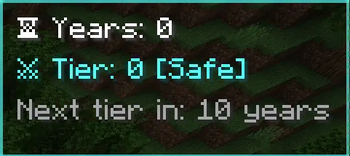
📊 On-Screen Progress HUD
A small HUD in the corner shows your journey in real time:
Years Survived: 347
Difficulty Tier: 34
So you always know how far you’ve made it.
⚔️ Escalating Difficulty (Every 10 Days)
Each 10-day tier introduces a new unique effect, such as:
Increased mob damage and health
Faster and smarter enemies
Longer nights
Higher spawn rates
Stronger explosions
Reduced player regeneration
No two tiers feel the same — the challenge constantly evolves.
🌩️ Major Milestones
🟡 100 Days (100 Years)
Charged Creepers spawn naturally in the Overworld
🔵 500 Days (500 Years)
A lightning strike every 10 minutes
Spawns randomly within 30 blocks of players
Works even in clear weather
🟣 1000 Days (1000 Years)
Displays the message: “Journey Completed”
Grants a full Netherite armor set
Armor includes all four protection enchantments at max level
Items are added to inventory or dropped if full
🌐 Multiplayer Friendly
Works in singleplayer and multiplayer
Difficulty scaling is world-based, not player-based
Perfect for long-running servers and hardcore worlds
🧠 Technical Info
Loader: Fabric
Minecraft Version: 1.21.1
Fully automatic (no commands required)
🎯 Who Is This Mod For?
Players who enjoy hardcore survival
Long-term worlds and SMP servers
Challenges inspired by time-based progression
Anyone who wants Minecraft to fight back harder every year
Survive the years. Endure the centuries. Complete the millennium.
Available Versions
How to Install Journey To a Millennium on Your Server
Order Server
Order a Minecraft Java server with at least 3 GB RAM (4 GB recommended).
Set fabric Loader
In the panel under "Egg", select the fabric loader and matching Minecraft version (1.21.11).
Install Mod
Open the mod browser in the dashboard and search for "Journey To a Millennium". Click "Install" – done! Alternatively, upload the .jar via SFTP to the /mods folder.
Compatibility
Mod Loaders
Minecraft Versions
1.21.11, 1.21.10, 1.21.9 (+8 more)
Server-side
✓ RequiredRecommended RAM
4 GB(min. 3 GB)Frequently Asked Questions
Journey To a Millennium server crashes on startup – what to do?
Most common cause: wrong fabric version or insufficient RAM. Check the server log (latest.log) for "OutOfMemoryError" or "Mixin" errors. With Mado Hosting: ensure at least 3 GB RAM is allocated and the loader matches the mod version (1.21.11). You can switch loaders with one click in the panel.
Is Journey To a Millennium compatible with fabric?
Journey To a Millennium officially supports fabric for Minecraft 1.21.11, 1.21.10, 1.21.9. The Mado dashboard automatically detects incompatible loader combinations.
Server lagging with Journey To a Millennium – how to optimize performance?
Recommended RAM: 4 GB (per 8 players). Use /spark profiler to check if Journey To a Millennium consumes the most tick time. Common fixes: reduce server view-distance to 8-10, install "performant" or "starlight" as supplementary mods on Forge. With Mado Hosting, your server runs on NVMe SSDs with dedicated CPU cores for minimal latency.
Similar Mods




Rent Modded Server
Install Journey To a Millennium with just one click on your server.