
Js Turret
A Turret which can be controlled by Javascript
Screenshots
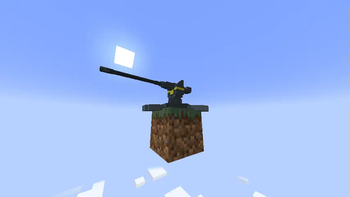
About this Mod
Have you ever wanted to have a smart super lethal unbalance infinite ammo sentry? No? Well here it is.
With Js turret™ you can now terrorise your friends in a way smarter and way more targetable manner. Just place one down write some simple code in java script insert the code into the turret and let her rip.
With one single barrel and a fire rate of sixty shots per minute which all do an untested amount of damage she's a real threat to anyone.
All you have to do is to write some basic code to target that one friend and you're good to go (or just copy the code from below).
Code
for (const target of entities) {
    if (target.name === "YourFriend") {
        block.lookAt(target.position.x, target.position.y, target.position.z)
        block.shoot();
    }
}
The crafting recipie is this
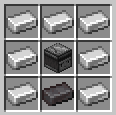
To insert the written code you can paste it into a book and quill and right click the turret block with it. All pages of the book will be combined and put one after the other.
Available Javascript functions
All of these functions are only available through the block structure.
lookAt(number x, number y, number z)
Makes the barrel look at a given coordinate.
Example:
block.lookAt(0, 1, 0);
shoot()
Shoots in the direction of the current facing.
Example:
block.shoot();
getPosition() -> Vec3dJS
Should return the position of the block with the Vec3dJS struct which contains x, y, z
Example:
const pos = block.getPosition();
rotatePitch(number degrees)
Rotates the turrets pitch by the given degrees.
Example:
block.rotatePitch(1);
rotateYaw(number degrees)
Rotates the turrets yaw by the given degrees.
Example:
block.rotateYaw(1);
In addition to these functions you have access to a list of near by entities with the entities const.
The entities const is a list of MinecraftEntity which is a structure with these values:
Vec3dJS position
The position of the entity in the Vec3dJS struct which contains x, y, z
String type
The entity type.
Example: entity.minecraft.player
String name
The name of the entity. This is either the player name or the entities name when renamed with a name tag. If neither of those are the case it is just the entity times name. Example: Squid or for items Slimeball or for players just the player name.
Available Versions
How to Install Js Turret on Your Server
Order Server
Order a Minecraft Java server with at least 3 GB RAM (4 GB recommended).
Set fabric Loader
In the panel under "Egg", select the fabric loader and matching Minecraft version (1.21.5).
Install Mod
Open the mod browser in the dashboard and search for "Js Turret". Click "Install" – done! Alternatively, upload the .jar via SFTP to the /mods folder.
Compatibility
Mod Loaders
Minecraft Versions
1.21.5
Server-side
✓ RequiredRecommended RAM
4 GB(min. 3 GB)Frequently Asked Questions
Js Turret server crashes on startup – what to do?
Most common cause: wrong fabric version or insufficient RAM. Check the server log (latest.log) for "OutOfMemoryError" or "Mixin" errors. With Mado Hosting: ensure at least 3 GB RAM is allocated and the loader matches the mod version (1.21.5). You can switch loaders with one click in the panel.
Is Js Turret compatible with fabric?
Js Turret officially supports fabric for Minecraft 1.21.5. The Mado dashboard automatically detects incompatible loader combinations.
Server lagging with Js Turret – how to optimize performance?
Recommended RAM: 4 GB (per 8 players). Use /spark profiler to check if Js Turret consumes the most tick time. Common fixes: reduce server view-distance to 8-10, install "performant" or "starlight" as supplementary mods on Forge. With Mado Hosting, your server runs on NVMe SSDs with dedicated CPU cores for minimal latency.
Similar Mods





Rent Modded Server
Install Js Turret with just one click on your server.