
Jub
Jub The Description says all Basically the mod is stuff revolving around the word Jub exept 2 mobs.
Screenshots
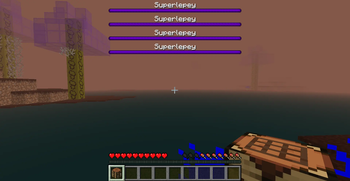
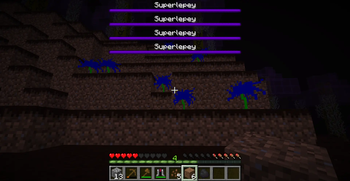
About this Mod
Basically the mod is Stuff revolving around the word jub Minus 2 entities. The portal to the Juber Dimension is made out of cobblestone. The Juber Dimension Portal ignitor is made out of 8 Dirt and one of my new plants the Jubant And the mod adds 2 new mobs and a new boss which I could not get it to spawn one of so it spawns a lot I added new tools and new armor which the armor does not have a recipe right now but I will add it in the next update and the mod has a new painting a new enchantment a new structure that spawns in the juber dimension and a new biome the Jub biome that is in the juber dimension and a new block and a new liquid.
Also one of the new mobs is a creature that if you know the reference then cool.
I'm so sorry for what you're going to endure.
Also this is my first mod.
Stone pickaxes break the Jubock which is the new blocks name.
I used the word Jub because i think It's a funny word.
Also I originally named the mod Why again Before I changed it to Jub mod and in Mcreator you can't change the name which is the name before the items and everything in the mod says Why again.
Also the only wood in the dimension will be the structures like my custom one and the plains villages so if you want wood before you enter the dimension then grab as much wood as you would want in the overworld or just leave my dimension and enter the overworld and then go back to my dimension.
Also ruined portals genarate in the Juber Dimension but Nether portals Don't work so if anything those are there for the blocks and loot.
Available Versions
How to Install Jub on Your Server
Order Server
Order a Minecraft Java server with at least 3 GB RAM (4 GB recommended).
Set neoforge Loader
In the panel under "Egg", select the neoforge loader and matching Minecraft version (1.21.8).
Install Mod
Open the mod browser in the dashboard and search for "Jub". Click "Install" – done! Alternatively, upload the .jar via SFTP to the /mods folder.
Compatibility
Mod Loaders
Minecraft Versions
1.21.8
Server-side
✓ RequiredRecommended RAM
4 GB(min. 3 GB)Frequently Asked Questions
Jub server crashes on startup – what to do?
Most common cause: wrong neoforge version or insufficient RAM. Check the server log (latest.log) for "OutOfMemoryError" or "Mixin" errors. With Mado Hosting: ensure at least 3 GB RAM is allocated and the loader matches the mod version (1.21.8). You can switch loaders with one click in the panel.
Is Jub compatible with neoforge?
Jub officially supports neoforge for Minecraft 1.21.8. The Mado dashboard automatically detects incompatible loader combinations.
Server lagging with Jub – how to optimize performance?
Recommended RAM: 4 GB (per 8 players). Use /spark profiler to check if Jub consumes the most tick time. Common fixes: reduce server view-distance to 8-10, install "performant" or "starlight" as supplementary mods on Forge. With Mado Hosting, your server runs on NVMe SSDs with dedicated CPU cores for minimal latency.
Rent Modded Server
Install Jub with just one click on your server.