
JumpAndRun
A JumpAndRun Mod for Fabric Server.
Screenshots

About this Mod
Jump and Run
An exciting parkour minigame for Minecraft Fabric!
Transform your Minecraft server into an action-packed jump-and-run arena! This mod adds a fully functional parkour system where players must jump through randomly generated wool blocks to reach their goal.
Features
Core Gameplay
- 30 Block Challenge: Reach 30 randomly generated wool blocks floating in the air
- Smart Block Generation: Blocks spawn automatically at manageable jumping distances
- Multi-colored Wool Blocks: Each player gets assigned a random color
- Dynamic Gameplay: Only 2 blocks are active at once - the next appears only when reached
Timer & Statistics
- Live HUD: Real-time display of time and progress
- Precise Time Tracking: Accurate to the millisecond
- Persistent Leaderboards: Best times are permanently saved
- Detailed Statistics: Best time, completion count, and rank position
Multiplayer Support
- Concurrent Players: Multiple players can play simultaneously
- Individual Sessions: Each player has their own blocks
- Collision Avoidance: Blocks don't overlap between players
Admin Features
- Zone System: Define areas with
/startjumpandrun pos1/pos2 - Custom Spawnpoints: Set special respawn locations
- Debug Mode: Extended logging options for server admins
- Automatic Configuration: Settings are automatically saved
Commands
For Players
/startjumpandrun- Start your jump and run/startjumpandrun stop- End your current game/leaderboard- Show the leaderboard
For Admins (OP Level 2)
/startjumpandrun pos1 <position>- Set first corner of the zone/startjumpandrun pos2 <position>- Set second corner of the zone/startjumpandrun spawnpoint <position>- Set respawn point/startjumpandrun info- Show configuration status/startjumpandrun debug- Toggle debug mode/startjumpandrun <playername>- Start game for another player
Installation & Setup
Quick Start
- Installation: Download the mod and place it in your
modsfolder - Pressure Plate: Place a Heavy Weighted Pressure Plate
- Play: Step on the plate or use
/startjumpandrun - Setup Zone (Optional): Use
/startjumpandrun pos1andpos2for defined areas
Technical Requirements
- Minecraft Version: 1.20+ (Fabric)
- Dependencies: Fabric API
- Configuration: Automatically saved to
config/jumpandrun.properties - Leaderboard: Stored in
config/jumpandrun_times.properties - Performance: Optimized for multi-player servers
Gameplay
How It Works
- Start: Step on a heavy weighted pressure plate or use the command
- Jump: Navigate through randomly spawned wool blocks
- Progress: Only 2 blocks exist at once - reach one to spawn the next
- Complete: Reach all 30 blocks to finish and set your time
- Compete: Check the leaderboard to see how you rank!
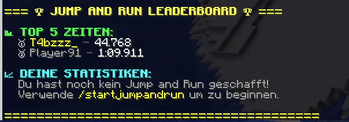
Leaderboard System
- Top 5 Display: Best times are prominently shown
- Personal Statistics: Each player sees their own records
- Ranking Position: Find out where you stand in comparison
- Persistent Data: Times survive server restarts
Wool Colors
The system uses 10 different wool colors:
- White, Red, Blue, Green, Yellow
- Purple, Orange, Pink, Cyan, Lime
Performance & Safety
- Automatic Cleanup: Blocks are automatically removed
- Fall Protection: Players are safely teleported when falling
- Resource Efficient: Minimal server impact
- Collision Detection: Prevents block conflicts between players
Support
This mod is actively developed and maintained. Bug reports and feature requests are welcome!
Ready for the ultimate parkour experience? Download Jump and Run and leap into adventure!
Available Versions
How to Install JumpAndRun on Your Server
Order Server
Order a Minecraft Java server with at least 3 GB RAM (4 GB recommended).
Set fabric Loader
In the panel under "Egg", select the fabric loader and matching Minecraft version (1.21.1).
Install Mod
Open the mod browser in the dashboard and search for "JumpAndRun". Click "Install" – done! Alternatively, upload the .jar via SFTP to the /mods folder.
Compatibility
Mod Loaders
Minecraft Versions
1.21.1
Server-side
✓ RequiredRecommended RAM
4 GB(min. 3 GB)Frequently Asked Questions
JumpAndRun server crashes on startup – what to do?
Most common cause: wrong fabric version or insufficient RAM. Check the server log (latest.log) for "OutOfMemoryError" or "Mixin" errors. With Mado Hosting: ensure at least 3 GB RAM is allocated and the loader matches the mod version (1.21.1). You can switch loaders with one click in the panel.
Is JumpAndRun compatible with fabric?
JumpAndRun officially supports fabric for Minecraft 1.21.1. The Mado dashboard automatically detects incompatible loader combinations.
Server lagging with JumpAndRun – how to optimize performance?
Recommended RAM: 4 GB (per 8 players). Use /spark profiler to check if JumpAndRun consumes the most tick time. Common fixes: reduce server view-distance to 8-10, install "performant" or "starlight" as supplementary mods on Forge. With Mado Hosting, your server runs on NVMe SSDs with dedicated CPU cores for minimal latency.
Similar Mods





Rent Modded Server
Install JumpAndRun with just one click on your server.