
Junkyard Utils
Adds miscellaneous items that fit into Create and Create: Aeronautics
Screenshots
About this Mod
Junkyard Utils adds numerous items that assist with making effective machinery and vehicles!
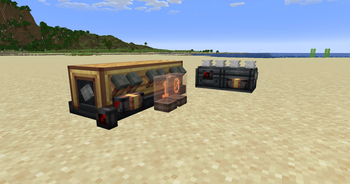
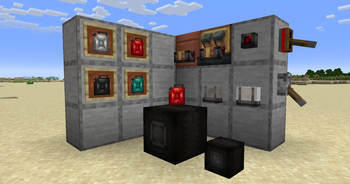
- Jerrycan: Similar to a bucket, but can transfer fluid to any container (such as directly to engine blocks) and with higher precision.
- Redstone Dial: A compact dial, designed for use with Drive By Wire, that displays analog redstone level similarly to Nixie Tubes
- Fluid Meter: A side-mounted, compact, and fluid-focused comparator that reads fluid levels of containers
- Headlight: Slim, vehicle-oriented light source with configurable positioning designed for cosmetics
- Roller Wheel: Standalone wheel block with low friction. Raises friction when powered by redstone, allowing for compact landing gear with brakes.
Contact us and report bugs at our Discord Server!
Details:
- The Jerrycan fills itself with a normal right-click. It will empty into the targeted block by shift-right-clicking.
- The Redstone Dial, Tiny Roller Wheel, and Headlight's positions can be configured by shift-right-clicking them.
This mod is fully compatible with Sable and VS2.
Mod by Xodus4
Feel free to use in any modpack!
Made with hybrid MCreator
Available Versions
How to Install Junkyard Utils on Your Server
Order Server
Order a Minecraft Java server with at least 3 GB RAM (4 GB recommended).
Set neoforge Loader
In the panel under "Egg", select the neoforge loader and matching Minecraft version (1.21.1).
Install Mod
Open the mod browser in the dashboard and search for "Junkyard Utils". Click "Install" – done! Alternatively, upload the .jar via SFTP to the /mods folder.
Compatibility
Mod Loaders
Minecraft Versions
1.21.1
Server-side
✓ RequiredRecommended RAM
4 GB(min. 3 GB)Frequently Asked Questions
Junkyard Utils server crashes on startup – what to do?
Most common cause: wrong neoforge version or insufficient RAM. Check the server log (latest.log) for "OutOfMemoryError" or "Mixin" errors. With Mado Hosting: ensure at least 3 GB RAM is allocated and the loader matches the mod version (1.21.1). You can switch loaders with one click in the panel.
Is Junkyard Utils compatible with neoforge?
Junkyard Utils officially supports neoforge for Minecraft 1.21.1. The Mado dashboard automatically detects incompatible loader combinations.
Server lagging with Junkyard Utils – how to optimize performance?
Recommended RAM: 4 GB (per 8 players). Use /spark profiler to check if Junkyard Utils consumes the most tick time. Common fixes: reduce server view-distance to 8-10, install "performant" or "starlight" as supplementary mods on Forge. With Mado Hosting, your server runs on NVMe SSDs with dedicated CPU cores for minimal latency.
Similar Mods




![[TaCZ] Timeless and Classics Zero](https://cdn.modrinth.com/data/SzzJttH8/fd27766d2bb8390d284696b1dbd358f87e081439_96.webp)

Rent Modded Server
Install Junkyard Utils with just one click on your server.