
Just add Craft!
With the "Just Add Craft!" mod, you can transform your cooking experience by creating powerful, enchanted meals from the "Just add Magic" series that grant incredible abilities! 🍲 But beware...
Screenshots
About this Mod
Just Add Craft! Mod: Bring Magic to Your Minecraft Kitchen 🧙♂️🍲
Tired of the same old bread and potatoes? With the "Just Add Craft!" mod, you're not just cooking you're crafting powerful, enchanted meals from the "Just add Magic" series. Forget about plain food and get into a world of magical recipes that offer way more than just filling your hunger bar.
🏆 Top Features
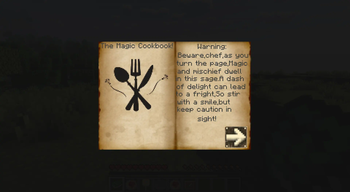
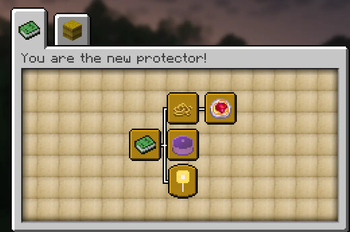
Mystical Recipe Book 📜
Unlock the ancient book filled with enchanted recipes that transform your cooking into a magical experience. From XP boosts to health regeneration, there’s a dish for every need.
Enchanted Food ✨
Cook meals that give you superpowers—run heal instantly, XP-Boosts or even stop time!
⚠️ Warning: Kitchen Chaos!
Magic isn’t always easy to control. If you mix the wrong ingredients there could be some side effects that you really dont want to experience.
Now get the Mod and start the game lika an protector of the Magic Cookbook!
-Have Fun
Just Enough Items (JEI) is recommended
Available Versions
How to Install Just add Craft! on Your Server
Order Server
Order a Minecraft Java server with at least 3 GB RAM (4 GB recommended).
Set neoforge Loader
In the panel under "Egg", select the neoforge loader and matching Minecraft version (1.21.1).
Install Mod
Open the mod browser in the dashboard and search for "Just add Craft!". Click "Install" – done! Alternatively, upload the .jar via SFTP to the /mods folder.
Compatibility
Mod Loaders
Minecraft Versions
1.21.1
Server-side
✓ RequiredRecommended RAM
4 GB(min. 3 GB)Frequently Asked Questions
Just add Craft! server crashes on startup – what to do?
Most common cause: wrong neoforge version or insufficient RAM. Check the server log (latest.log) for "OutOfMemoryError" or "Mixin" errors. With Mado Hosting: ensure at least 3 GB RAM is allocated and the loader matches the mod version (1.21.1). You can switch loaders with one click in the panel.
Is Just add Craft! compatible with neoforge?
Just add Craft! officially supports neoforge for Minecraft 1.21.1. The Mado dashboard automatically detects incompatible loader combinations.
Server lagging with Just add Craft! – how to optimize performance?
Recommended RAM: 4 GB (per 8 players). Use /spark profiler to check if Just add Craft! consumes the most tick time. Common fixes: reduce server view-distance to 8-10, install "performant" or "starlight" as supplementary mods on Forge. With Mado Hosting, your server runs on NVMe SSDs with dedicated CPU cores for minimal latency.
Rent Modded Server
Install Just add Craft! with just one click on your server.