
JustAPotionHud
JustAPotionHUD is basically a maintained & enhanced version by me of the mod: https://modrinth.com/mod/justpotionhud
Screenshots
About this Mod
🔧 Also by me! go check it out.
- PingLess Attack Indicator – Fixes the annoying attack cooldown sync bug and item bobbing up and down on high ping.
JustAPotionHUD is a maintained & enhanced version of the mod JustPotionHUD created by Coriand3rr
This project exists to keep the mod working on newer versions and to provide a cleaner Potion HUD to the community.
If you have a banner and/or icon for this mod I'd appreciate it! Reach out on Discord: YetAnotherFollowerOfChrist
You can use this to report bugs, crashes, incompatibilities or tell me suggestions!
What it does
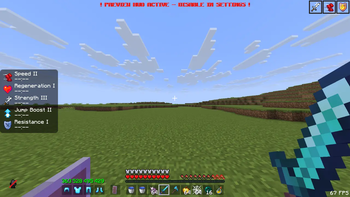
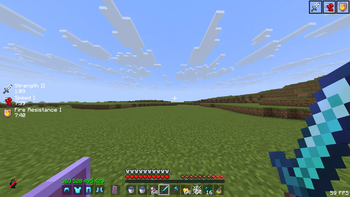
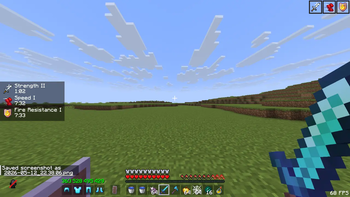
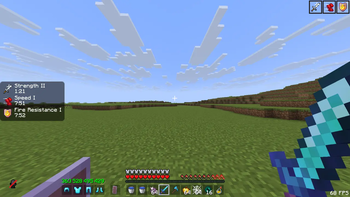
- Displays effect icons, names, amplifier levels, and remaining time in a clean custom HUD
- Flicker warnings when effects are about to expire — just like vanilla!
- Preview Mode — see how your HUD looks without any active effects, great for tweaking
- Icon side toggle — choose whether the icon appears on the left or right of the text
- Texture pack compatible
- Fully Vanilla, In-game config screen accessible directly from the pause menu — no ModMenu required
- Fully translated into 20+ languages
HUD Customization
- 7 anchor positions — Top Left, Center Left, Bottom Left, Top Right, Center Right, Bottom Right, and Center
- Adjustable scale (0.5× to 3.0×) and X/Y offsets
- Background transparency, rounded or square corners, and custom background color via hex color picker
- Advanced options: max HUD height and max visible effects override
- Reset everything back to defaults with one click
- Option to Hide Vanilla Potion HUD(the thingy on the top right of your screen)
- Hide Level I — An Option to hide Level "I". When turned on any effect with level show something like: "Speed" instead of "Speed I"
- Hide Vanilla effect Icons - you can choose whether to hide or not hide the vanilla effect icons at top right corner!
Preset System
- 3 built-in presets: OG (no background), Feather (rounded + semi-transparent), and Lunar (square + semi-transparent)
- Save and load your own custom presets as JSON files in the config folder
If you Just want a simple, clean HUD and dont care about any of this
Apply the OG preset In the Config screen, Just 1 click and you have a Minimalistic AND Clean Potion HUD! :)
Why this mod exists
The original mod was simple, clean and i just saw potential in it, but it wasnt maintained anymore :( This project was rebuilt completely from scratch — since I had no access to the original source code and never received a reply from the original author, this is a full reimplementation, not a fork. Most features present here were not in the original mod.
This mod was vibe coded by me (Lumynova/Lumyrix) using Mostly Claude AI. though it was manually tested by me.
Original mod by Coriand3rr(Go check it out!): https://modrinth.com/mod/justpotionhud
Jesus loves you!! If you repent of your sins He can save you :)
Available Versions
How to Install JustAPotionHud on Your Server
Order Server
Order a Minecraft Java server with at least 3 GB RAM (4 GB recommended).
Set fabric Loader
In the panel under "Egg", select the fabric loader and matching Minecraft version (26.1.2).
Install Mod
Open the mod browser in the dashboard and search for "JustAPotionHud". Click "Install" – done! Alternatively, upload the .jar via SFTP to the /mods folder.
Compatibility
Mod Loaders
Minecraft Versions
26.1.2, 26.1.1, 26.1 (+12 more)
Server-side
✗ UnsupportedRecommended RAM
4 GB(min. 3 GB)Frequently Asked Questions
JustAPotionHud server crashes on startup – what to do?
Most common cause: wrong fabric version or insufficient RAM. Check the server log (latest.log) for "OutOfMemoryError" or "Mixin" errors. With Mado Hosting: ensure at least 3 GB RAM is allocated and the loader matches the mod version (26.1.2). You can switch loaders with one click in the panel.
Is JustAPotionHud compatible with fabric?
JustAPotionHud officially supports fabric for Minecraft 26.1.2, 26.1.1, 26.1. The Mado dashboard automatically detects incompatible loader combinations.
Server lagging with JustAPotionHud – how to optimize performance?
Recommended RAM: 4 GB (per 8 players). Use /spark profiler to check if JustAPotionHud consumes the most tick time. Common fixes: reduce server view-distance to 8-10, install "performant" or "starlight" as supplementary mods on Forge. With Mado Hosting, your server runs on NVMe SSDs with dedicated CPU cores for minimal latency.
Similar Mods



![[TaCZ] Timeless and Classics Zero](https://cdn.modrinth.com/data/SzzJttH8/fd27766d2bb8390d284696b1dbd358f87e081439_96.webp)


Rent Modded Server
Install JustAPotionHud with just one click on your server.