
JustQuests
A lightweight, datapack-driven quest book for NeoForge. with GUI bloat, no complex dependencies — just quests
Screenshots
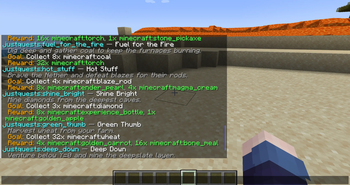
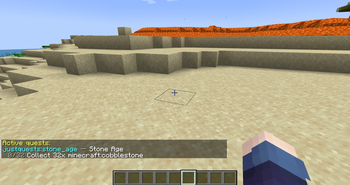
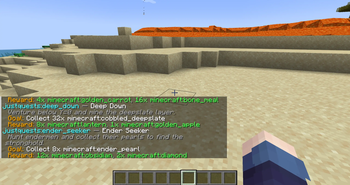
About this Mod
JustQuests
A lightweight quest book for NeoForge.
No GUI bloat, no heavy dependencies — just quests and a handful of commands.
Built as a focused, server-friendly alternative to FTB Quests and HQM for
packs that want questing without the weight.
New in 0.2.0: an in-game quest book GUI — press J to open it
(singleplayer for now). Plus support for Minecraft 1.21 – 1.21.10
(NeoForge), in singleplayer and on servers.The GUI is an early version — the final design is being chosen by a
community Discord poll. Come vote!
💬 Join the community — help shape the GUI
The big in-game GUI (v0.2) is being designed by the community: its
style, layout and features will be decided by polls on the Discord. The more
people vote, the better the GUI everyone gets.
👉 Join the JustQuests Discord to:
- 🗳️ Vote on the upcoming GUI — style, layout and which features land first
- 🛟 Get support, report bugs and follow update news
- 👀 See sneak peeks and try early builds before release
In-game you can run /quest discord anytime to get the invite.
✨ What JustQuests does
- In-game quest book (GUI) — press J to browse quests, track
objective progress, and accept/claim with a click (early version,
singleplayer for now). Plus the full/questcommand set. - Ready to play — ships with a built-in quest progression you can start
right away, no setup required. - Lightweight — tiny and fast, with no heavy dependencies.
- Make your own quests — drop them in a simple per-world JSON file or a
datapack. No restart needed: the file reloads automatically as you edit it. - Speaks the player's language — quest text can be written in multiple
languages, and item/mob/block names show up translated for each player
automatically. - Persistent progress — saved per world, kept across sessions and
through death. - Server-friendly — runs server-side with per-world storage; stays out
of the way of other mods and UI overhauls.
🧩 Objective & reward types
Quests are built from these objectives — mix and match, and choose whether a
quest needs all objectives or just any one of them:
- collect_item – gather items (mining, harvesting, mob drops)
- mine_block – break blocks of a type
- craft_item – craft a given item
- smelt_item – smelt items in a furnace
- consume_item – eat or drink an item
- place_block – place blocks
- kill_mob – defeat entities of a type
- tame_animal – tame animals
- breed_animal – breed animals of a type
- reach_level – reach an XP level
- reach_location – arrive at a position (optionally in a set dimension)
- visit_dimension – enter a dimension (vanilla or modded, by id)
- gain_advancement – earn an advancement
Item objectives accept a single id (minecraft:oak_log), a list, or a
tag (#minecraft:logs).
Rewards:
- give_item – hand over items
- loot_table – roll a loot table for a random reward
- xp – give experience points
- effect – apply a potion effect
- message – send the player a message (per-language supported)
- command – run any command as the player (
{player}is substituted) —
covers economy payouts, effects and more with no hard dependency
Quest logic: quests can require other quests first (requires →
chains, with a locked teaser until unlocked), and can be repeatable
with an optional cooldown (e.g. daily quests).
🎮 Commands
| Command | What it does |
|---|---|
/quest list [category] |
List all quests (grouped by category), or just one category |
/quest categories |
List the categories and how many quests each has |
/quest stats |
Your personal stats (completed %, per category, dates) |
/quest leaderboard |
Server top 10 by quests completed |
/quest accept <id> |
Start a quest (with tab completion) |
/quest progress |
Show your active quests and how far along you are |
/quest abandon <id> |
Drop an active quest (suggests your active ones) |
/quest discord |
Get the community Discord invite (vote on the GUI!) |
/quest reload |
(OP) reload custom quests |
/quest test |
(OP) run a self-test and write a diagnostics report |
/quest admin view|reset|complete <player> |
(OP) manage a player's quest progress |
Server admins: quest completions are announced to everyone by default
(toggle in <world>/justquests/settings.json).
Quest ids support tab completion — accept suggests every available
quest, abandon suggests only the ones you've taken.
✍️ Custom quests
On first launch, JustQuests writes a custom-quests.json file into your
world folder (<world>/justquests/) with an explained example and blank
slots to fill in. Save the file and your quests appear in-game within a few
seconds — no restart. A custom quest overrides a datapack quest with the
same id.
Quest titles and descriptions can be a plain string:
"title": "Mining Trip",
"description": "Mine 20 iron ore."
…or a per-language map keyed by language code (en_us, de_de,fr_fr, …), so a single quest reads correctly for everyone:
"title": { "en_us": "Mining Trip", "de_de": "<German title here>" },
"description": { "en_us": "Mine 20 iron ore.", "de_de": "<German text here>" }
Each player sees their own client language, falling back to English.
📦 Built-in quests
JustQuests ships with 25 ready-to-play quests across categories
(gathering, farming, combat, building, crafting, exploration, challenges,
survival, daily) — each in English, German, French and Spanish out of
the box, so you can jump in right away. A sample:
| Quest | Goal | Reward |
|---|---|---|
| First Steps | 16 oak logs | 4 bread |
| Stone Age | 32 cobblestone | 16 torches, stone pickaxe |
| Master Miner | mine 64 stone | iron pickaxe |
| Home Builder | place 64 oak planks | 16 torches |
| Animal Friend | tame a wolf | 16 bones |
| Into the Nether | enter the Nether | 4 obsidian |
| Level Up | reach XP level 20 | XP + Strength |
| Prospector | mine 3 diamond ore | mystery loot |
| Daily Bread | eat 3 bread (repeatable, 24h) | emerald |
| …and 16 more |
Good to know:
collect_itemcounts items picked up (mining,
harvesting, mob drops). To track items the player makes, usecraft_item.Want to make your own? A full
example datapack
with one quest per objective & reward type is on GitHub.
📥 Installation
- Install NeoForge for your Minecraft version (1.21 – 1.21.10)
- Download the JustQuests jar that matches your version (e.g.
JustQuests-neoforge-1.21.1-0.2.0.jar) into yourmodsfolder - Launch the game, press J for the quest book or run
/quest list
✅ Compatibility
- Minecraft: 1.21 – 1.21.10 (11 versions; more added over time)
- Loader: NeoForge (Fabric/Forge planned)
- Environment: singleplayer and servers (runs server-side)
🗺️ Roadmap
JustQuests is built step by step. Already shipped: a deep set of objective
and reward types, item tags, quest modes & categories, per-world custom
quests with live reload, and multi-language quest text.
Planned next:
- Final GUI design: chosen from 3 mockups by a
Discord community vote, with the polished
textures, a claim button, choice rewards, an optional HUD tracker — and
multiplayer support (the current GUI is singleplayer) - Server & QoL: admin commands, statistics/leaderboard, difficulty
settings, permission gating, completion broadcasts - Automatic quest generator: rotating, registry-aware generated quests
- Wider reach: more Minecraft versions, additional loaders
(Fabric/Forge), and a Paper/Bukkit plugin edition
Feedback shapes the priorities — bug reports and suggestions are very
welcome on the issue tracker.
📄 License
Released under the GNU LGPL v3. Free to use in any modpack, no
permission needed. Modified versions and forks must stay open source
under the same license.
💬 Community & GUI polls: https://discord.com/invite/F6tHQjNnsU
Source & issues: https://github.com/ErikEdits/JustQuests
Available Versions
How to Install JustQuests on Your Server
Order Server
Order a Minecraft Java server with at least 3 GB RAM (4 GB recommended).
Set neoforge Loader
In the panel under "Egg", select the neoforge loader and matching Minecraft version (1.21.10).
Install Mod
Open the mod browser in the dashboard and search for "JustQuests". Click "Install" – done! Alternatively, upload the .jar via SFTP to the /mods folder.
Compatibility
Mod Loaders
Minecraft Versions
1.21.10, 1.21.9, 1.21.8 (+8 more)
Server-side
✓ RequiredRecommended RAM
4 GB(min. 3 GB)Frequently Asked Questions
JustQuests server crashes on startup – what to do?
Most common cause: wrong neoforge version or insufficient RAM. Check the server log (latest.log) for "OutOfMemoryError" or "Mixin" errors. With Mado Hosting: ensure at least 3 GB RAM is allocated and the loader matches the mod version (1.21.10). You can switch loaders with one click in the panel.
Is JustQuests compatible with neoforge?
JustQuests officially supports neoforge for Minecraft 1.21.10, 1.21.9, 1.21.8. The Mado dashboard automatically detects incompatible loader combinations.
Server lagging with JustQuests – how to optimize performance?
Recommended RAM: 4 GB (per 8 players). Use /spark profiler to check if JustQuests consumes the most tick time. Common fixes: reduce server view-distance to 8-10, install "performant" or "starlight" as supplementary mods on Forge. With Mado Hosting, your server runs on NVMe SSDs with dedicated CPU cores for minimal latency.
Similar Mods




Rent Modded Server
Install JustQuests with just one click on your server.