KantoBlocks
480+ blocks for building Kanto-style towns, routes, caves, interiors, and adventure maps in Minecraft.
Screenshots
About this Mod
KantoBlocks
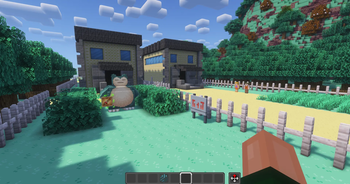
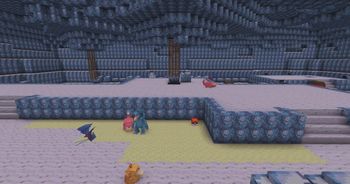
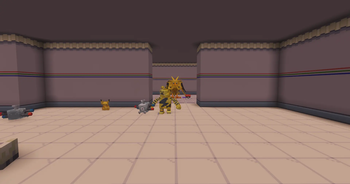
KantoBlocks is a building-block library made for creators who want to build classic Kanto-inspired towns, routes, interiors, caves, gyms, and adventure maps in Minecraft.
It was originally created for the CobbleKanto project, where we needed a lot more than a few decorative blocks. The map needed city floors, walls, carpets, cave tiles, route details, signs, furniture-like pieces, themed interiors, connected textures, and a cleaner way to give builders access to the whole block set.
Features
- 480+ Kanto-inspired building blocks
- City, route, cave, gym, interior, mansion, ship, tower, and endgame-themed block sets
- Connected texture blocks powered by Athena
- Custom block shapes for signs, carpets, panes, fences, slabs, stairs, doors, plants, and small details
- KantoBlocks Converter Block
- Converter support for copper ingots and compatible "ball-tag" currencies when available
- Loot tables and tool tags for normal block drops and mining behavior
What It Is For
KantoBlocks is not meant to be a generic “random blocks” mod. It is a focused building kit.
It works best for:
- survival Minecraft maps
- Cobblemon adventure maps
- multiplayer towns and routes
- gyms and challenge areas
- caves and tunnels
- server hubs
- decorative builds with a retro RPG feeling
- map makers who need consistent tiles across a large project
The main goal is to make it easier to build a full adventure region without having every house, route, cave, and interior depend only on vanilla blocks.
Block Themes
KantoBlocks includes sets inspired by many different map areas and building types, including:
- Celadon City
- Cerulean City
- Cinnabar Island
- Fuchsia City
- Lavender Town
- Pallet Town
- Pewter City
- Saffron City
- Vermilion City
- Viridian City
- Center & Mart interiors
- Caves
- Underground Path
- ship interiors
- endgame and elite4 inspired rooms
- global decorative blocks used across the map
Some blocks are full cubes, while others use custom shapes, directional placement, slabs, stairs, carpets, panes, fences, plants, signs, or connected textures.
Connected Textures
Several KantoBlocks use connected textures through Athena.
This helps walls, floors, carpets, cave tiles, and other surfaces blend more naturally when placed together. It is especially useful for large interiors or route sections where repeating the same square texture would look too harsh.
Because of that, Athena is required for the intended visual result.
KantoBlocks Converter
KantoBlocks includes a KantoBlocks Converter, a utility block made to help players access the block set more comfortably.
The converter has a scrollable GUI with a block palette. You insert a valid currency item, select the block you want, and receive the selected KantoBlock.

The converter is useful for:
- adventure servers
- controlled block access
- creative-style building stations
- server shops
By default, the converter can use pokéballs and copper ingots as currencies to get the blocks.
Dependencies
Required:
- Minecraft 1.21.1
- Fabric Loader
- Fabric API
- Java 21
- Athena
- GeckoLib
Recommended / ecosystem:
- Cobblemon
Cobblemon is part of the CobbleKanto ecosystem and is recommended for the intended adventure-map experience, but KantoBlocks itself is primarily a building-block mod.
Do not forget to install Athena and GeckoLib. Some blocks and visual features depend on them.
FAQ
Does this mod add natural world generation?
No. KantoBlocks is a building/decorative block library. It does not generate structures or terrain by itself.
Is this only for CobbleKanto?
No. It was made for CobbleKanto, but you can use it in your own maps, servers, modpacks, or builds.
Can I use this in my own map, server or content?
Yes. You can use it in maps, servers, modpacks, screenshots, videos, livestreams, and showcases, as long as you do not reupload or claim the mod/assets as your own.
Why does it require Athena?
Athena is used for connected texture blocks.
Why does it require GeckoLib?
GeckoLib is used by some custom rendered blocks and items.
Can I use WorldEdit with these blocks?
Yes. KantoBlocks is useful for map building workflows, including WorldEdit-based building, as long as your server/client has the mod installed.
Notes
- Some blocks are designed for very specific visual use cases.
- Connected textures may look wrong if Athena is missing.
- Custom rendered blocks may not work correctly if GeckoLib is missing.
- Always back up important worlds before adding or updating large building-block mods.
Building Note
KantoBlocks gives you the main visual foundation, but it works best when treated as part of a larger building palette. For more detailed areas, you may want to mix it with vanilla Minecraft blocks or other decoration mods, such as Chipped, to reach the exact look you want.
For the most complete building experience, we recommend combining KantoBlocks with KantoModels. While KantoModels provides the main floors, walls, paths, caves, and structural pieces, KantoModels adds the extra decorative models and small details that help towns, routes, interiors, and special areas feel more alive.
Credits
Special thanks to everyone following the CobbleKanto project and to the Cobblemon community for inspiring so many map makers to build bigger worlds.
KantoBlocks is an unofficial fan-made Minecraft mod.
This project is not affiliated with, endorsed by, sponsored by, or approved by Nintendo, Game Freak, Creatures Inc., The Pokémon Company, Mojang Studios, Microsoft, or the Cobblemon team.
Minecraft is a trademark of Microsoft Corporation. Pokémon and related names are trademarks of their respective owners. Cobblemon belongs to its respective creators.
Available Versions
How to Install KantoBlocks on Your Server
Order Server
Order a Minecraft Java server with at least 3 GB RAM (4 GB recommended).
Set fabric Loader
In the panel under "Egg", select the fabric loader and matching Minecraft version (1.21.1).
Install Mod
Open the mod browser in the dashboard and search for "KantoBlocks". Click "Install" – done! Alternatively, upload the .jar via SFTP to the /mods folder.
Compatibility
Mod Loaders
Minecraft Versions
1.21.1
Server-side
✓ RequiredRecommended RAM
4 GB(min. 3 GB)Frequently Asked Questions
KantoBlocks server crashes on startup – what to do?
Most common cause: wrong fabric version or insufficient RAM. Check the server log (latest.log) for "OutOfMemoryError" or "Mixin" errors. With Mado Hosting: ensure at least 3 GB RAM is allocated and the loader matches the mod version (1.21.1). You can switch loaders with one click in the panel.
Is KantoBlocks compatible with fabric?
KantoBlocks officially supports fabric for Minecraft 1.21.1. The Mado dashboard automatically detects incompatible loader combinations.
Server lagging with KantoBlocks – how to optimize performance?
Recommended RAM: 4 GB (per 8 players). Use /spark profiler to check if KantoBlocks consumes the most tick time. Common fixes: reduce server view-distance to 8-10, install "performant" or "starlight" as supplementary mods on Forge. With Mado Hosting, your server runs on NVMe SSDs with dedicated CPU cores for minimal latency.
Similar Mods




Rent Modded Server
Install KantoBlocks with just one click on your server.