Katton
Next-generation scripting framework for Minecraft
Screenshots
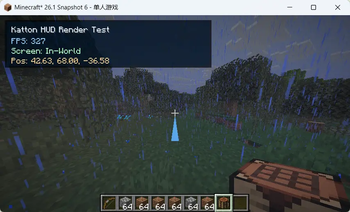
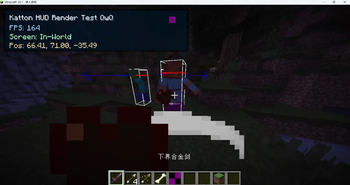
About this Mod
Katton supports both Fabric and NeoForge. We are trying to keep the API as consistent as possible between the two platforms, but there may be some differences in available events and features.
Why Katton?
- Ease of Use: Katton's intuitive API and hot-reload feature make it easy for modders of all skill levels to create and test their mods quickly.
- Flexibility: With Kotlin's powerful features, you can create complex mods that interact with Minecraft in unique ways.
- Performance: Katton uses Kotlin Scripts to directly interact with Java objects during the runtime of Minecraft, ensuring high performance and seamless integration.
- Powerful API: Katton provides a comprehensive API that allows you to access and modify various aspects of the game, from blocks and items to entities and world generation, even code injections like mixins, and ALL HOT-RELOADABLE.
- In-Game Management: Manage your script packs through a built-in GUI (press K!), toggle packs on/off, and monitor registries with diagnostic commands — all without leaving the game.
A simple example:
//nessary imports for the script
import net.minecraft.network.chat.Component
import top.katton.api.KattonEvents

// The function with @ServerScriptEntrypoint is the entry point of the script.
@ServerScriptEntrypoint
fun main(){
   // Register an event listener for when a player joins the server
   KattonEvents.ServerPlayer.onPlayerJoin += onJoin@
   fun(arg: KattonEvents.ServerPlayer.PlayerArg){
      // Get the player who joined and send them a message
      val player = arg.player
      // As same as you would do in a normal mod!
      player.sendSystemMessage(Component.literal("Hello Katton"))
   }
}
Available Versions
How to Install Katton on Your Server
Order Server
Order a Minecraft Java server with at least 3 GB RAM (4 GB recommended).
Set fabric Loader
In the panel under "Egg", select the fabric loader and matching Minecraft version (26.1.2).
Install Mod
Open the mod browser in the dashboard and search for "Katton". Click "Install" – done! Alternatively, upload the .jar via SFTP to the /mods folder.
Compatibility
Mod Loaders
Minecraft Versions
26.1.2, 26.1.1, 26.1
Server-side
✓ RequiredRecommended RAM
4 GB(min. 3 GB)Frequently Asked Questions
Katton server crashes on startup – what to do?
Most common cause: wrong fabric version or insufficient RAM. Check the server log (latest.log) for "OutOfMemoryError" or "Mixin" errors. With Mado Hosting: ensure at least 3 GB RAM is allocated and the loader matches the mod version (26.1.2). You can switch loaders with one click in the panel.
Is Katton compatible with fabric and neoforge?
Katton officially supports fabric, neoforge for Minecraft 26.1.2, 26.1.1, 26.1. The Mado dashboard automatically detects incompatible loader combinations.
Server lagging with Katton – how to optimize performance?
Recommended RAM: 4 GB (per 8 players). Use /spark profiler to check if Katton consumes the most tick time. Common fixes: reduce server view-distance to 8-10, install "performant" or "starlight" as supplementary mods on Forge. With Mado Hosting, your server runs on NVMe SSDs with dedicated CPU cores for minimal latency.
Similar Mods



Rent Modded Server
Install Katton with just one click on your server.