
Keep Inventory Orbs
A fully server-side approach to the gravestone concept introducing 'orbs' to store your inventory upon death.
Screenshots

About this Mod
Keep Inventory Orbs
A fully server-side approach to the gravestone concept introducing 'orbs' to store your inventory upon death.
Upon death:
- An Orb will spawn that will keep your inventory safe. [Incompatible with Backpack mods]
- A compass to help you locate your last orb will be given to you. [Customizable]
Recovering Inventory:
When an Orb is broken, it will attempt to restore its inventory only to its owner.
If the Orb's owner is not nearby (within 6 blocks), nothing will happen and the orb will not break.
Orb Stealing is [OFF] by default. To steal an Orb that is not yours, an Admin needs to enable it in the Menu [see below]
Orbs will re-equip your armor and items exactly into the slot they were.
If the slot is occupied by something else, the item will drop in the player's position.
Orb behavior:
- Orbs will always spawn on the player's death position
- Orbs will spawn in the world's minimum height if the player dies in the void
- Orbs will never despawn.
- Orbs have gravity and will fall if they have no support.
- Orbs will move upwards if they are inside of a block.
- Orbs cannot be moved by pistons
Server-side advantages
If you are a server owner or admin, installing this datapack/mod into the server makes it work for everyone!
There is no need to install it on the client side!
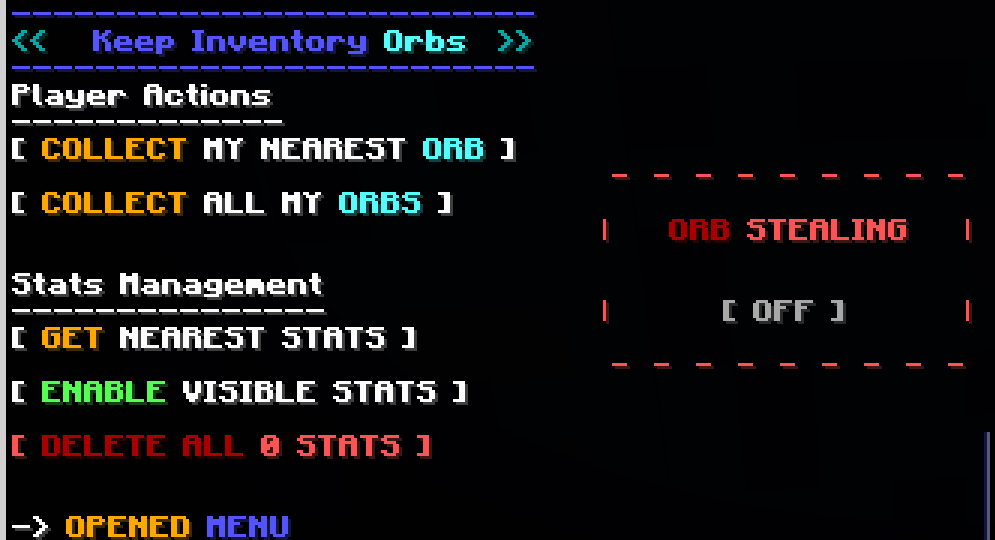
Menu (for Server Admins)
The following command opens the built-in Chat Menu:
/function #keep_inventory_orbs:menu

Orb Stealing
Orb Stealing will enable all players to steal an Orb even if it is not theirs
Buttons:
- Toggle [ON/OFF] orb stealing for all players
Give Orb Recovery Compass
Toggles whether players will receive an orb recovery compass pointing towards their last orb after respawning
Buttons:
- Toggle [ON/OFF] orb recovery compass for all players
Player Actions
These actions will apply to your own player only and orbs in loaded chunks
Buttons:
- Collect My Nearest Orb
- Collects your nearest orb
- Collect All My Orbs
- Collects all your orbs
Stats Management
Orbs keep 'Stats' with information about the player's death. These stats are kept even after the orbs are collected.
Buttons:
- Get Nearest Stats
- Shows the Stats from the nearest Stats/Orb
- Gives you options to:
- Show the inventory saved by the Stats/Orbs
- Collect/Destroy/Respawn specific Orbs
- Erase specific Stats
- Enable/Disible Visible Stats
- When enabled, shows particles locating Stats/Orb within 16 blocks, and points towards the nearest selected one
- Delete All Stats
- Counts all Stats/Orb in currently loaded chunks and deletes them
Available Versions
How to Install Keep Inventory Orbs on Your Server
Order Server
Order a Minecraft Java server with at least 3 GB RAM (4 GB recommended).
Set datapack Loader
In the panel under "Egg", select the datapack loader and matching Minecraft version (1.21.11).
Install Mod
Open the mod browser in the dashboard and search for "Keep Inventory Orbs". Click "Install" – done! Alternatively, upload the .jar via SFTP to the /mods folder.
Compatibility
Mod Loaders
Minecraft Versions
1.21.11, 1.21.10, 1.21.9 (+9 more)
Server-side
✓ RequiredRecommended RAM
4 GB(min. 3 GB)Frequently Asked Questions
Keep Inventory Orbs server crashes on startup – what to do?
Most common cause: wrong datapack version or insufficient RAM. Check the server log (latest.log) for "OutOfMemoryError" or "Mixin" errors. With Mado Hosting: ensure at least 3 GB RAM is allocated and the loader matches the mod version (1.21.11). You can switch loaders with one click in the panel.
Is Keep Inventory Orbs compatible with datapack and fabric and forge and neoforge and quilt?
Keep Inventory Orbs officially supports datapack, fabric, forge, neoforge, quilt for Minecraft 1.21.11, 1.21.10, 1.21.9. Note: Forge and Fabric mods are NOT cross-compatible – pick one loader and stick with it. The Mado dashboard automatically detects incompatible loader combinations.
Server lagging with Keep Inventory Orbs – how to optimize performance?
Recommended RAM: 4 GB (per 8 players). Use /spark profiler to check if Keep Inventory Orbs consumes the most tick time. Common fixes: reduce server view-distance to 8-10, install "performant" or "starlight" as supplementary mods on Forge. With Mado Hosting, your server runs on NVMe SSDs with dedicated CPU cores for minimal latency.
Rent Modded Server
Install Keep Inventory Orbs with just one click on your server.