
Keep My Sword
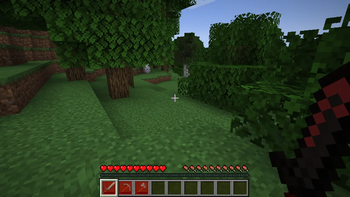
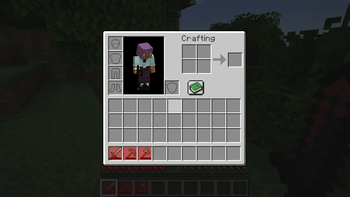
Broken gear stays in your inventory as repairable model-only items instead of disappearing.
Screenshots
About this Mod
Keep My Sword
Broken gear stays. Repair it later.
Keep My Sword prevents zero-durability tools and equipment from disappearing. When an item breaks, it remains in your inventory as a model-only item, so you can keep the sentimental sword, repair it later, or display it without losing it to one unlucky hit.
What it does
- Keeps damageable items at zero durability instead of deleting the stack.
- Makes broken items behave like model-only keepsakes.
- Disables broken-item interactions such as using, mining, attacking, and attribute bonuses.
- Marks broken items visually where supported by the active Minecraft/loader line.
- Supports many Minecraft versions through dedicated release branches.
Screenshots above are captured in a Minecraft 1.21.1 NeoForge development client.
Why install it?
Vanilla item breakage is final. That is clean mechanically, but it can feel bad when a named sword, old pickaxe, or modded tool disappears forever.
Keep My Sword changes that contract: breaking means disabled, not deleted.
You still need to repair or replace the item before using it again. The mod does not make equipment immortal; it simply keeps the physical stack around.
Loader and version support
The project uses one Git branch per incompatible Minecraft line. Each release file is built for its matching Minecraft version and loader.
Current target families:
- Forge: legacy and 1.20.1 where supported.
- NeoForge: 1.20.1, 1.21.1, and 26.1.x lines where tooling is available.
- Fabric: 1.16.5 and most modern 1.20.1+ lines where mappings/tooling are available.
Some versions are intentionally skipped when public mappings or loader tooling are not usable yet. Skips are recorded in the repository docs instead of blocking the whole release train.
Dependency
Keep My Sword requires RinLib on matching version/loader lines.
Source and issues
Available Versions
How to Install Keep My Sword on Your Server
Order Server
Order a Minecraft Java server with at least 3 GB RAM (4 GB recommended).
Set fabric Loader
In the panel under "Egg", select the fabric loader and matching Minecraft version (1.21.1).
Install Mod
Open the mod browser in the dashboard and search for "Keep My Sword". Click "Install" – done! Alternatively, upload the .jar via SFTP to the /mods folder.
Compatibility
Mod Loaders
Minecraft Versions
1.21.1
Server-side
✓ RequiredRecommended RAM
4 GB(min. 3 GB)Frequently Asked Questions
Keep My Sword server crashes on startup – what to do?
Most common cause: wrong fabric version or insufficient RAM. Check the server log (latest.log) for "OutOfMemoryError" or "Mixin" errors. With Mado Hosting: ensure at least 3 GB RAM is allocated and the loader matches the mod version (1.21.1). You can switch loaders with one click in the panel.
Is Keep My Sword compatible with fabric and neoforge?
Keep My Sword officially supports fabric, neoforge for Minecraft 1.21.1. The Mado dashboard automatically detects incompatible loader combinations.
Server lagging with Keep My Sword – how to optimize performance?
Recommended RAM: 4 GB (per 8 players). Use /spark profiler to check if Keep My Sword consumes the most tick time. Common fixes: reduce server view-distance to 8-10, install "performant" or "starlight" as supplementary mods on Forge. With Mado Hosting, your server runs on NVMe SSDs with dedicated CPU cores for minimal latency.
Similar Mods



![[TaCZ] Timeless and Classics Zero](https://cdn.modrinth.com/data/SzzJttH8/fd27766d2bb8390d284696b1dbd358f87e081439_96.webp)


Rent Modded Server
Install Keep My Sword with just one click on your server.