
KeyBind Bundles
Do you have too many keybinds but not enough physical keys for all of them? Are you tired of constantly changing rarely used keys to other bindings? Is it too hard to remember what each key does? Then this mod is for you.
About this Mod
Do you have too many keybinds but not enough physical keys for all of them? Are you tired of constantly changing rarely used keys to other bindings? Is it too hard to remember what each key does? Then this mod is for you.
This mod adds key bundles, which are basically multiple keybinds in one key.
Creating bundles
To create a new bundle, open the keybinds screen and under the KeyBind Bundles category (which should be the first) click the Add key bundle button, and then enter a name for your bundle.
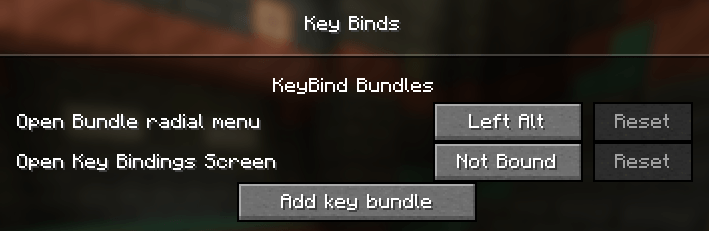
After that, click the Edit button on the bundle. In the new screen hover over the radial menu in the middle and click on Add entry. This will open the keybinds screen again but now each keybind has a select button. Here you can select the bindings you want to add to the bundle.
After selecting the bindings you may edit each entry in the radial menu and give it a custom name and item icon.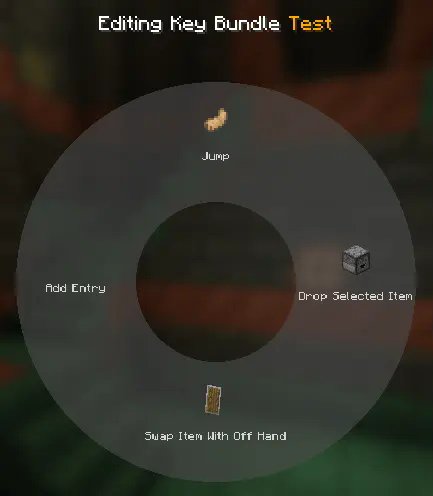
Using bundles
Exit the edit menu by pressing escape and bind the bundle to a key. Afterwards, while in-game you can press and hold the key you assigned to bring up the radial menu. Hover and left click over an entry to trigger that keybind. It's that simple!
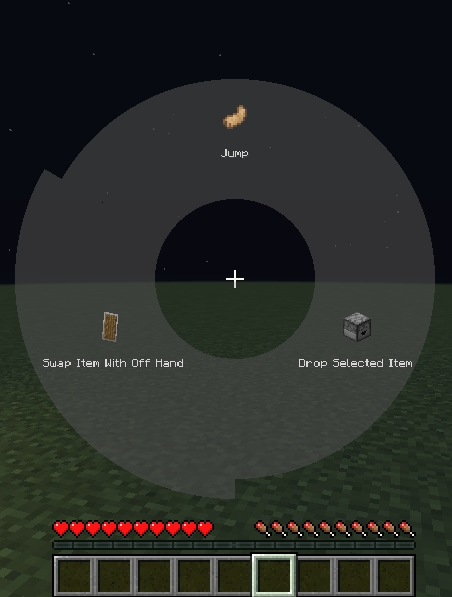
You can also bookmark a key mapping by right clicking it. Once bookmarked, pressing the key assigned to the bundle will immediately trigger that mapping without opening the radial menu. When a key is bookmarked, the radial menu can be opened again by holding the Radial menu modifier, which is Left alt by default. The current bookmarked key will be highlighted red in the radial menu.
This mod is compatible with Controlling
Available Versions
How to Install KeyBind Bundles on Your Server
Order Server
Order a Minecraft Java server with at least 3 GB RAM (4 GB recommended).
Set forge Loader
In the panel under "Egg", select the forge loader and matching Minecraft version (1.21.1).
Install Mod
Open the mod browser in the dashboard and search for "KeyBind Bundles". Click "Install" – done! Alternatively, upload the .jar via SFTP to the /mods folder.
Compatibility
Mod Loaders
Minecraft Versions
1.21.1, 1.20.4, 1.20.3 (+2 more)
Server-side
✗ UnsupportedRecommended RAM
4 GB(min. 3 GB)Frequently Asked Questions
KeyBind Bundles server crashes on startup – what to do?
Most common cause: wrong forge version or insufficient RAM. Check the server log (latest.log) for "OutOfMemoryError" or "Mixin" errors. With Mado Hosting: ensure at least 3 GB RAM is allocated and the loader matches the mod version (1.21.1). You can switch loaders with one click in the panel.
Is KeyBind Bundles compatible with forge and neoforge?
KeyBind Bundles officially supports forge, neoforge for Minecraft 1.21.1, 1.20.4, 1.20.3. The Mado dashboard automatically detects incompatible loader combinations.
Server lagging with KeyBind Bundles – how to optimize performance?
Recommended RAM: 4 GB (per 8 players). Use /spark profiler to check if KeyBind Bundles consumes the most tick time. Common fixes: reduce server view-distance to 8-10, install "performant" or "starlight" as supplementary mods on Forge. With Mado Hosting, your server runs on NVMe SSDs with dedicated CPU cores for minimal latency.
Similar Mods




![[TaCZ] Timeless and Classics Zero](https://cdn.modrinth.com/data/SzzJttH8/fd27766d2bb8390d284696b1dbd358f87e081439_96.webp)

Rent Modded Server
Install KeyBind Bundles with just one click on your server.