
Keybind Profiler
With this mod you can now save and load keybinds
Screenshots

About this Mod
Keybind Profiler
Your keybinds, your way — for every situation.
Ever jump into a PvP fight only to realize your keys are still set up for building? Or spend minutes rebinding everything before a speedrun? Keybind Profiler solves this by letting you save your entire keyboard layout as a profile and switch between them instantly.
What it does
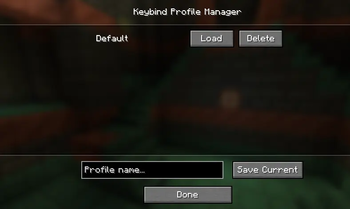
Save your current keybinds to a named profile (e.g. "PvP", "Building", "Redstone", "Default")
Load any saved profile to instantly apply all keybinds at once
Delete profiles you no longer need
Unlimited profiles — create as many as you want
How it works
Go to Options → Controls → Keybind Profiles
Enter a name and hit Save Current — done, your layout is saved
Rebind your keys however you want
Come back and hit Load on any profile to restore it
All profiles are saved as simple JSON files in .minecraft/config/keybindprofiler/, so they persist across game restarts and are easy to back up or share.
Use cases
PvP vs Creative — different hotbar binds, sprint toggles, perspective keys
Modpacks — save a profile per modpack since each one adds different keybinds
Shared computers — each player saves their own layout and loads it when they sit down
Experimentation — try new layouts without fear of losing your current setup
Technical details
Client-side only — works on any server, no server-side installation needed
Supports all keybinds, including those added by other mods
Minecraft 1.21 – 1.21.1
Requires Fabric Loader + Fabric API
Available Versions
How to Install Keybind Profiler on Your Server
Order Server
Order a Minecraft Java server with at least 3 GB RAM (4 GB recommended).
Set fabric Loader
In the panel under "Egg", select the fabric loader and matching Minecraft version (1.21.11).
Install Mod
Open the mod browser in the dashboard and search for "Keybind Profiler". Click "Install" – done! Alternatively, upload the .jar via SFTP to the /mods folder.
Compatibility
Mod Loaders
Minecraft Versions
1.21.11, 1.21.10, 1.21.9 (+9 more)
Server-side
✗ UnsupportedRecommended RAM
4 GB(min. 3 GB)Frequently Asked Questions
Keybind Profiler server crashes on startup – what to do?
Most common cause: wrong fabric version or insufficient RAM. Check the server log (latest.log) for "OutOfMemoryError" or "Mixin" errors. With Mado Hosting: ensure at least 3 GB RAM is allocated and the loader matches the mod version (1.21.11). You can switch loaders with one click in the panel.
Is Keybind Profiler compatible with fabric?
Keybind Profiler officially supports fabric for Minecraft 1.21.11, 1.21.10, 1.21.9. The Mado dashboard automatically detects incompatible loader combinations.
Server lagging with Keybind Profiler – how to optimize performance?
Recommended RAM: 4 GB (per 8 players). Use /spark profiler to check if Keybind Profiler consumes the most tick time. Common fixes: reduce server view-distance to 8-10, install "performant" or "starlight" as supplementary mods on Forge. With Mado Hosting, your server runs on NVMe SSDs with dedicated CPU cores for minimal latency.
Rent Modded Server
Install Keybind Profiler with just one click on your server.