
KeybindingLocker
Lock specific keybinding actions remotely from the server. Perfect for events and cutscenes.
Screenshots
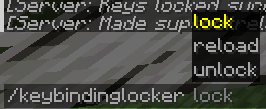

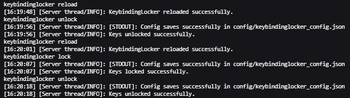
About this Mod
🔒 KeybindingLocker – Server-Controlled Keybind Locking for Fabric
KeybindingLocker is a lightweight Fabric mod designed for server administrators and event organizers who need to remotely lock specific keybind actions on connected clients.
It enables fine-grained control over player inputs by disabling configurable keybinds during events or gameplay scenarios, enhancing server-side control without client-side mod dependency.
✨ Key Features
- ⛔ Server-Side Keybind Locking
Block specific keybind actions like chat (
key.chat), inventory, or other controls based on server configuration.
- 🔄 Real-Time Sync
When activated via server commands, all connected clients receive updates and have the matching keys locked immediately.
- 🔧 Simple Configuration
Define which keybind actions are locked through an easy-to-edit config file.
- 🎮 Enhances Custom Gameplay & Events
Ideal for roleplay servers, minigames, or events where player controls must be limited temporarily.
⚙️ Compatibility & Requirements
✅ Mod Loader: Fabric
🧩 Minecraft Versions: Supports 1.20.1 and 1.20.4
📦 Dependencies: Fabric API
🔧 Use Cases
- 🎭 Roleplay servers needing to restrict player UI or chat during scenes
- 🎮 Minigames or custom events requiring temporary disabling of specific controls
- 🛡️ Servers aiming to control player input for balance or narrative reasons
📌 Notes
- Requires both client and server installation for full functionality.
- This mod does not modify vanilla keybind behavior outside the server lock state.
🌐 Source Code & Contributions
This mod is open-source and available on GitHub.
Contributions, bug reports, and feedback are welcome!
Available Versions
How to Install KeybindingLocker on Your Server
Order Server
Order a Minecraft Java server with at least 3 GB RAM (4 GB recommended).
Set fabric Loader
In the panel under "Egg", select the fabric loader and matching Minecraft version (1.20.4).
Install Mod
Open the mod browser in the dashboard and search for "KeybindingLocker". Click "Install" – done! Alternatively, upload the .jar via SFTP to the /mods folder.
Compatibility
Mod Loaders
Minecraft Versions
1.20.4, 1.20.1
Server-side
✓ RequiredRecommended RAM
4 GB(min. 3 GB)Frequently Asked Questions
KeybindingLocker server crashes on startup – what to do?
Most common cause: wrong fabric version or insufficient RAM. Check the server log (latest.log) for "OutOfMemoryError" or "Mixin" errors. With Mado Hosting: ensure at least 3 GB RAM is allocated and the loader matches the mod version (1.20.4). You can switch loaders with one click in the panel.
Is KeybindingLocker compatible with fabric?
KeybindingLocker officially supports fabric for Minecraft 1.20.4, 1.20.1. The Mado dashboard automatically detects incompatible loader combinations.
Server lagging with KeybindingLocker – how to optimize performance?
Recommended RAM: 4 GB (per 8 players). Use /spark profiler to check if KeybindingLocker consumes the most tick time. Common fixes: reduce server view-distance to 8-10, install "performant" or "starlight" as supplementary mods on Forge. With Mado Hosting, your server runs on NVMe SSDs with dedicated CPU cores for minimal latency.
Similar Mods






Rent Modded Server
Install KeybindingLocker with just one click on your server.