
Kill Feed
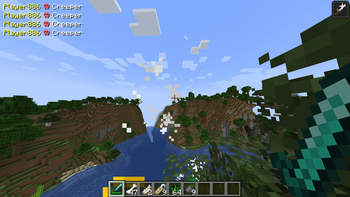
Adds a Kill Feed to the HUD that updates with every player and/or mob kill. Like the one in Call of Duty
Screenshots
About this Mod
This is a simple mod that adds a traditional fps game kill feed into Minecraft.
This was initially made just for single-player use on a raining mobs challenge video. Where I gave the mobs subscriber/member names https://www.youtube.com/watch?v=l9uzyX7wtak
But have since made it its own mod and added multiplayer support.
Both the client and server need the mod installed for use on a server.
This mod will be actively maintained only for the latest supported Minecraft version.
Older versions may be updated, but it's not guaranteed.

Commands
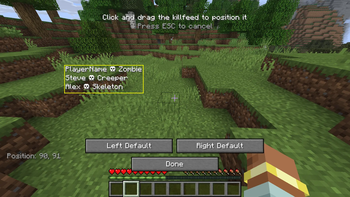
Clients can change where the kill feed is positioned on screen through the killfeed positioning editor. Accessed via the "K" key bind (configurable in controls). Click and drag the kill feed to place it anywhere on the screen!
"K" key - Killfeed position editor
What appears on the kill feed can be adjusted through commands
/killfeed toggle - enables/disables the kill feed. Enabled by default.
/killfeed nonamed - toggles whether the kill feed should show standard entity names for mobs or not. e.g. "Player killed Creeper" otherwise, only NAMED entities appear in the kill feed. Enabled by default.
/killfeed pvp - toggles whether the kill feed shows player vs player kills. Enabled by default.
/killfeed entityvsentity - toggles whether the kill feed shows other entity vs entity kills. e.g. "Wolf killed Sheep". Enabled by default
/killfeed status - shows the status of all settings
Players in a single-player world or server Op's can change these settings.
All of these settings can be adjusted in the config files as well.
Permissions
This mod is All Rights Reserved.
✅ Allowed:
Use in public or private modpacks with proper credit
Showcase in videos, livestreams, or other content
Share links to the official download page
❌ Not Allowed:
Redistributing the mod files on other sites without permission
Modifying, decompiling, or reusing the code/assets
Claiming ownership of the mod
If you’re unsure about something, feel free to contact me
Contact
For further questions or updates, join the discord and contact me @Angel6T4
I make mods mostly for use in YouTube videos. So if you want to further support me, check out my YouTube Channel or Patreon

Available Versions
How to Install Kill Feed on Your Server
Order Server
Order a Minecraft Java server with at least 3 GB RAM (4 GB recommended).
Set fabric Loader
In the panel under "Egg", select the fabric loader and matching Minecraft version (1.21.10).
Install Mod
Open the mod browser in the dashboard and search for "Kill Feed". Click "Install" – done! Alternatively, upload the .jar via SFTP to the /mods folder.
Compatibility
Mod Loaders
Minecraft Versions
1.21.10, 1.21.9, 1.21.8 (+2 more)
Server-side
✓ RequiredRecommended RAM
4 GB(min. 3 GB)Frequently Asked Questions
Kill Feed server crashes on startup – what to do?
Most common cause: wrong fabric version or insufficient RAM. Check the server log (latest.log) for "OutOfMemoryError" or "Mixin" errors. With Mado Hosting: ensure at least 3 GB RAM is allocated and the loader matches the mod version (1.21.10). You can switch loaders with one click in the panel.
Is Kill Feed compatible with fabric?
Kill Feed officially supports fabric for Minecraft 1.21.10, 1.21.9, 1.21.8. The Mado dashboard automatically detects incompatible loader combinations.
Server lagging with Kill Feed – how to optimize performance?
Recommended RAM: 4 GB (per 8 players). Use /spark profiler to check if Kill Feed consumes the most tick time. Common fixes: reduce server view-distance to 8-10, install "performant" or "starlight" as supplementary mods on Forge. With Mado Hosting, your server runs on NVMe SSDs with dedicated CPU cores for minimal latency.
Similar Mods





Rent Modded Server
Install Kill Feed with just one click on your server.