
KillClipper
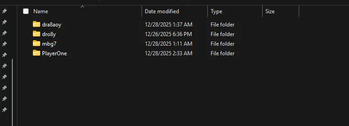
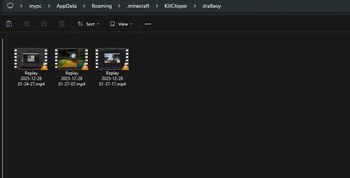
Automatically saves OBS replay buffer clips and sort them per player when you kill them.
Screenshots
About this Mod
This mod connects Minecraft directly to OBS Studio using the OBS WebSocket plugin, allowing the mod to automatically capture almost every kill using the Replay Buffer. The mod organizes all clips in player-specific folders and sorts them.


Kill detection works in two modes:
Packet Mode listens directly to Minecraft network packets to detect when a player dies, but it depends on the server sending complete data. If the damage source or attacker entity is missing, the mod will not function
Chat Mode watches the Minecraft chat for specific kill messages sent by the server.
Dependencies
- Cloth Config API
- Fabric api
- Mod Menu
Setup
OBS Studio
Open OBS Studio.
Go to Tools → WebSocket Server Settings.
Make sure the following are set:
Enable WebSocket Server is checked.
Enable Authentication is checked.
Copy the Server Port and Server Password. Press Show Connect Info to view them.
4. Go to Settings → Output → Replay Buffer:
Make sure Enable Replay Buffer is checked.
Set the Maximum Replay Time to your desired length.
Copy the Recording Path
Click Start Replay Buffer to make it active.
Minecraft
Make sure Cloth Config and Mod Menu are installed
Open the config screen through mod menu and enter your OBS WebSocket server information (port/password) and Recording Path.
Video Tutorial
Check this video out for a step-by-step tutorial
Available Versions
How to Install KillClipper on Your Server
Order Server
Order a Minecraft Java server with at least 3 GB RAM (4 GB recommended).
Set fabric Loader
In the panel under "Egg", select the fabric loader and matching Minecraft version (1.21.11).
Install Mod
Open the mod browser in the dashboard and search for "KillClipper". Click "Install" – done! Alternatively, upload the .jar via SFTP to the /mods folder.
Compatibility
Mod Loaders
Minecraft Versions
1.21.11, 1.21.10, 1.21.9 (+21 more)
Server-side
✗ UnsupportedRecommended RAM
4 GB(min. 3 GB)Frequently Asked Questions
KillClipper server crashes on startup – what to do?
Most common cause: wrong fabric version or insufficient RAM. Check the server log (latest.log) for "OutOfMemoryError" or "Mixin" errors. With Mado Hosting: ensure at least 3 GB RAM is allocated and the loader matches the mod version (1.21.11). You can switch loaders with one click in the panel.
Is KillClipper compatible with fabric?
KillClipper officially supports fabric for Minecraft 1.21.11, 1.21.10, 1.21.9. The Mado dashboard automatically detects incompatible loader combinations.
Server lagging with KillClipper – how to optimize performance?
Recommended RAM: 4 GB (per 8 players). Use /spark profiler to check if KillClipper consumes the most tick time. Common fixes: reduce server view-distance to 8-10, install "performant" or "starlight" as supplementary mods on Forge. With Mado Hosting, your server runs on NVMe SSDs with dedicated CPU cores for minimal latency.
Rent Modded Server
Install KillClipper with just one click on your server.