
Kitted
Easy kit management for single player worlds or your own servers.
Screenshots
About this Mod
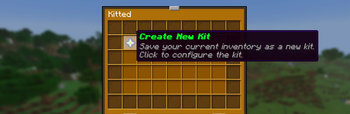
Kitted is a lightweight Fabric mod for saving and reloading personal inventory kits through a clean in-game GUI.
It’s made for players who want fast access to repeat loadouts, especially in PvP practice worlds, training servers where they have OP, or any setup where rebuilding the same inventory over and over gets old. Save a kit once, then bring it back in a couple clicks.
What it does
Kitted lets you save your current inventory as a reusable kit, including your hotbar, main inventory, armor, and offhand. From there, you can open the menu with /kitted, pick the loadout you want, and load it back quickly without manually replacing every item.
Each kit can be given its own name and icon, so it’s easy to keep different setups organized. That makes it useful for things like sword kits, axe kits, crystal kits, pot kits, or general testing loadouts.
Features
- Save your current inventory as a personal kit
- Load saved kits from a simple in-game GUI
- Rename kits anytime
- Set a custom kit icon using the item in your hand
- Delete kits you no longer need
- Animated kit loading with sound feedback
- Kits persist between sessions
Best for
- PvP practice worlds
- training servers where you have operator access
- testing and comparing loadouts
- quickly restoring favorite gear setups
- swapping between multiple personal kits
Command
/kittedopens the kit menu
Notes
Kitted is currently operator-only, so it works best in singleplayer worlds with cheats enabled, private practice worlds, or servers where you’ve been given OP. It is not designed as a full server-wide kit management system for many players.
Available Versions
How to Install Kitted on Your Server
Order Server
Order a Minecraft Java server with at least 3 GB RAM (4 GB recommended).
Set fabric Loader
In the panel under "Egg", select the fabric loader and matching Minecraft version (26.1.2).
Install Mod
Open the mod browser in the dashboard and search for "Kitted". Click "Install" – done! Alternatively, upload the .jar via SFTP to the /mods folder.
Compatibility
Mod Loaders
Minecraft Versions
26.1.2, 1.21.11
Server-side
✗ UnsupportedRecommended RAM
4 GB(min. 3 GB)Frequently Asked Questions
Kitted server crashes on startup – what to do?
Most common cause: wrong fabric version or insufficient RAM. Check the server log (latest.log) for "OutOfMemoryError" or "Mixin" errors. With Mado Hosting: ensure at least 3 GB RAM is allocated and the loader matches the mod version (26.1.2). You can switch loaders with one click in the panel.
Is Kitted compatible with fabric?
Kitted officially supports fabric for Minecraft 26.1.2, 1.21.11. The Mado dashboard automatically detects incompatible loader combinations.
Server lagging with Kitted – how to optimize performance?
Recommended RAM: 4 GB (per 8 players). Use /spark profiler to check if Kitted consumes the most tick time. Common fixes: reduce server view-distance to 8-10, install "performant" or "starlight" as supplementary mods on Forge. With Mado Hosting, your server runs on NVMe SSDs with dedicated CPU cores for minimal latency.
Similar Mods






Rent Modded Server
Install Kitted with just one click on your server.