
LagProfiler
This mod introduces a sleek, lightweight HUD overlay designed specifically to help players monitor their local game performance and diagnose client-side lag or stuttering in real-time.
Screenshots
About this Mod
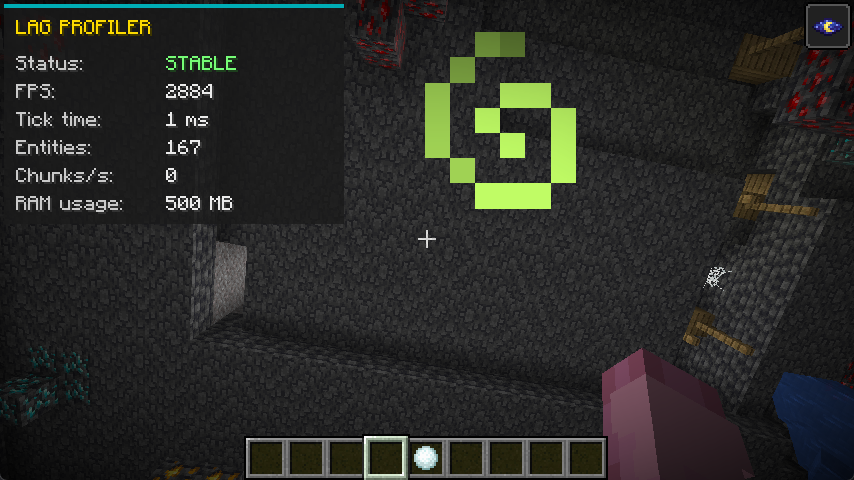
This mod introduces a sleek, lightweight HUD overlay designed specifically to help players monitor their local game performance and diagnose client-side lag or stuttering in real-time.
Instead of relying on the cluttered F3 debug screen, this mod provides a clean UI that tracks exactly what is impacting your PC's performance and causing your game to drop frames.
Key Features:
Dynamic Stutter Detection (Status): Automatically monitors the client's processing time. If the local tick/frame time spikes above 50ms (which causes noticeable stuttering or freezing), the status instantly turns red and alerts you with "LAG DETECTED". Otherwise, it displays a green "STABLE" status.
Live Client Metrics: The HUD continuously tracks five crucial data points to help you pinpoint the source of your lag:
FPS: Your current Frames Per Second. Drops here indicate rendering struggles.
Tick Time: The exact duration of the client's processing cycle in milliseconds. High numbers mean your game is freezing or struggling to process data.
Entities: The total number of entities currently rendered around you. Useful for spotting lag caused by mob farms or dropped items.
Chunks/s: The rate at which your client is loading new map chunks. Fast flying or high render distances can cause this to spike and create lag.
RAM Usage: The current amount of memory (in MB) actively being consumed by the game. Perfect for identifying memory leaks or stuttering caused by Java Garbage Collection.
Quick Toggle & Customization: You can easily hide or show the entire UI at any time by pressing F7. If this conflicts with your other controls, the shortcut can be fully rebound to any key of your choice in the game's standard controls/keybinds menu.
Available Versions
How to Install LagProfiler on Your Server
Order Server
Order a Minecraft Java server with at least 3 GB RAM (4 GB recommended).
Set fabric Loader
In the panel under "Egg", select the fabric loader and matching Minecraft version (1.21.11).
Install Mod
Open the mod browser in the dashboard and search for "LagProfiler". Click "Install" – done! Alternatively, upload the .jar via SFTP to the /mods folder.
Compatibility
Mod Loaders
Minecraft Versions
1.21.11, 1.21.10, 1.21.9 (+5 more)
Server-side
✗ UnsupportedRecommended RAM
4 GB(min. 3 GB)Frequently Asked Questions
LagProfiler server crashes on startup – what to do?
Most common cause: wrong fabric version or insufficient RAM. Check the server log (latest.log) for "OutOfMemoryError" or "Mixin" errors. With Mado Hosting: ensure at least 3 GB RAM is allocated and the loader matches the mod version (1.21.11). You can switch loaders with one click in the panel.
Is LagProfiler compatible with fabric?
LagProfiler officially supports fabric for Minecraft 1.21.11, 1.21.10, 1.21.9. The Mado dashboard automatically detects incompatible loader combinations.
Server lagging with LagProfiler – how to optimize performance?
Recommended RAM: 4 GB (per 8 players). Use /spark profiler to check if LagProfiler consumes the most tick time. Common fixes: reduce server view-distance to 8-10, install "performant" or "starlight" as supplementary mods on Forge. With Mado Hosting, your server runs on NVMe SSDs with dedicated CPU cores for minimal latency.
Similar Mods






Rent Modded Server
Install LagProfiler with just one click on your server.