
Lapis Trails
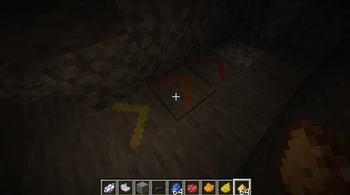
Lapis Trails lets players place directional arrows with a new item, lapis chalk, color them with dyes, and light them with glow items, creating trails in caves.
Screenshots




About this Mod
🟦 Lapis Trails
LapisTrail enables players to create chalk with 4 lapis, which can be used on the ground to create directional ground markers that help players navigate caves. Arrows blend into the world like a natural vanilla feature.
🎨 Recolor with Any Dye
Right-click an arrow with any vanilla dye to instantly swap it to one of 16 colors.
💡 Light Up Your Path
Use Glowstone Dust, Glow Ink Sacs, or Glow Berries to make an arrow emit a subtle light (level 8—about half a torch).
Great for marking spots in deep cave systems.
🔊 Immersive Sound Design
Placing, recoloring, and lighting arrows plays a soft bamboo-sapling hit sound.
Breaking arrows plays the rooted-dirt break sound.
🧱 Smart Placement Rules
Must be placed on the top of full blocks
Cannot float, cannot attach to walls
Automatically breaks if its supporting block is removed
Only 1 pixel tall—clean and unobtrusive
🧪 Lapis Chalk
Crafted 4 lapis → 4 chalk
Used exclusively for placing arrows.
🧩 Compatibility
Minecraft: 1.21.1
NeoForge: 21.1.x
Environment: Client & Server (required on both)
LapisTrail is designed to be lightweight and behave as close to vanilla as possible.
📜 License
Released under the MIT License.
You may use, modify, redistribute, or include this mod in any modpack—freely and without restriction.
Available Versions
How to Install Lapis Trails on Your Server
Order Server
Order a Minecraft Java server with at least 3 GB RAM (4 GB recommended).
Set neoforge Loader
In the panel under "Egg", select the neoforge loader and matching Minecraft version (1.21.1).
Install Mod
Open the mod browser in the dashboard and search for "Lapis Trails". Click "Install" – done! Alternatively, upload the .jar via SFTP to the /mods folder.
Compatibility
Mod Loaders
Minecraft Versions
1.21.1
Server-side
✓ RequiredRecommended RAM
4 GB(min. 3 GB)Frequently Asked Questions
Lapis Trails server crashes on startup – what to do?
Most common cause: wrong neoforge version or insufficient RAM. Check the server log (latest.log) for "OutOfMemoryError" or "Mixin" errors. With Mado Hosting: ensure at least 3 GB RAM is allocated and the loader matches the mod version (1.21.1). You can switch loaders with one click in the panel.
Is Lapis Trails compatible with neoforge?
Lapis Trails officially supports neoforge for Minecraft 1.21.1. The Mado dashboard automatically detects incompatible loader combinations.
Server lagging with Lapis Trails – how to optimize performance?
Recommended RAM: 4 GB (per 8 players). Use /spark profiler to check if Lapis Trails consumes the most tick time. Common fixes: reduce server view-distance to 8-10, install "performant" or "starlight" as supplementary mods on Forge. With Mado Hosting, your server runs on NVMe SSDs with dedicated CPU cores for minimal latency.
Similar Mods




Rent Modded Server
Install Lapis Trails with just one click on your server.