
LASERS!
Have you ever wanted a customizable laser drill in Minecraft?
Screenshots
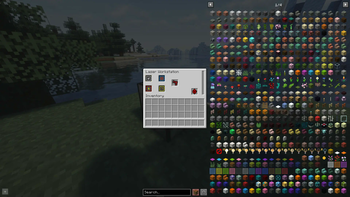
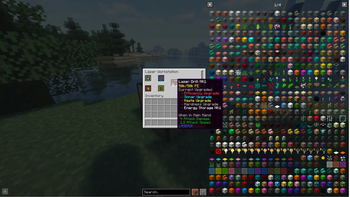
About this Mod
A mod to a upgradable laser drill!
Features:
- Laser Drill MK1
- 4 Upgrade Slots
- 1 Battery Slot
- Iron Pickaxe Mining Level
- 6 Attack Damage
- Spins!
- Battery
- 5k FE Storage
- Laser Workbench
- Change Upgrades in the drill
- Has a energy buffer of 50k FE
Upgrades
- Only one color type can be equipped at a time
- Yellow
- Haste
- Increases mining speed at 50%
- Increases energy usage
- Fortune
- 3x drop rate on ores
- 2x netherite scrap on ancient debris
- Haste
- Red
- Efficiency
- Reduces energy usage of drill
- Efficiency
- Gery
- Hardness
- Increases mining level to diamond
- Hardness
- Blue
- Sonar
- Press 'Z' to scan, can change keybind in settings
- Creates a visual field of nearby ores in 16 block radius, includes ore name
- Align crosshair to ore marker
- Costs a signifcant amount of energy
- Works for all ores
- Sonar
Requires:
- Fabric API
- Geckolib
- Any Energy Mod
Planned ports:
- Neoforge 1.20.1
- Forge 1.20.1
- Fabric 1.20.1
Available Versions
How to Install LASERS! on Your Server
Order Server
Order a Minecraft Java server with at least 3 GB RAM (4 GB recommended).
Set fabric Loader
In the panel under "Egg", select the fabric loader and matching Minecraft version (1.21).
Install Mod
Open the mod browser in the dashboard and search for "LASERS!". Click "Install" – done! Alternatively, upload the .jar via SFTP to the /mods folder.
Compatibility
Mod Loaders
Minecraft Versions
1.21
Server-side
✓ RequiredRecommended RAM
4 GB(min. 3 GB)Frequently Asked Questions
LASERS! server crashes on startup – what to do?
Most common cause: wrong fabric version or insufficient RAM. Check the server log (latest.log) for "OutOfMemoryError" or "Mixin" errors. With Mado Hosting: ensure at least 3 GB RAM is allocated and the loader matches the mod version (1.21). You can switch loaders with one click in the panel.
Is LASERS! compatible with fabric?
LASERS! officially supports fabric for Minecraft 1.21. The Mado dashboard automatically detects incompatible loader combinations.
Server lagging with LASERS! – how to optimize performance?
Recommended RAM: 4 GB (per 8 players). Use /spark profiler to check if LASERS! consumes the most tick time. Common fixes: reduce server view-distance to 8-10, install "performant" or "starlight" as supplementary mods on Forge. With Mado Hosting, your server runs on NVMe SSDs with dedicated CPU cores for minimal latency.
Similar Mods




![[TaCZ] Timeless and Classics Zero](https://cdn.modrinth.com/data/SzzJttH8/fd27766d2bb8390d284696b1dbd358f87e081439_96.webp)

Rent Modded Server
Install LASERS! with just one click on your server.