
Late Game Golems
Allows you to upgrade Iron Golem's to use guns, shields, swords, maces, armors, change AI and other upgrades.
Screenshots


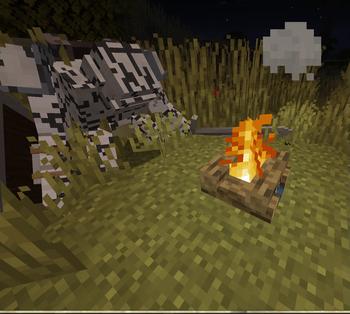
About this Mod
major version update for [NeoForge]-1.21.1, [Forge]-1.20.1
Modpack policy: you can add this to modpacks.
Client Config
#Settings for Late Game Golem
[upgraded_golem]
    #Display Death Message
    upgraded_golem_death_msg = false
Common Config
#Settings for Late Game Golem
[upgraded_golem]
	#Golem's target whitelist. Golem will not aggro at mob, Use modid to whitelist all entities from a mod, or modid:entityname to whitelist a specific entity only.
	entity_target_whitelist = ["modid", "modid:mobname"]
	#Golem's Retaliate whitelist. Golem will not retaliate against mob, Use modid to whitelist all entities from a mod, or modid:entityname to whitelist a specific entity only.
	entity_retaliate_whitelist = ["modid", "modid:mobname"]
	#Golem's target Blacklist. Golem will aggro at mob, Use modid to blacklist all entities from a mod, or modid:entityname to blacklist a specific entity only.
	entity_target_blacklist = ["modid", "modid:mobname"]
	#Item blacklist: if a player right-clicks a golem while holding an item in the blacklist, the inventory will not open. Use modid to ban all items from a mod, or modid:itemname to ban a specific item only.
	item_right_click_blacklist = ["mobbattle", "minecraft:bedrock"]

	#Golem Stats
	[upgraded_golem.stats]
		#stat change will not apply to existing golems
		#Golem Health Multiplier
		# Default: 1.0
		# Range: 0.001 ~ 1000.0
		health_multiplier = 1.0
		#Golem Ranged Damage Multiplier
		# Default: 1.0
		# Range: 0.001 ~ 1000.0
		ranged_damage_multiplier = 1.0
		#Golem Melee Damage Multiplier
		# Default: 1.0
		# Range: 0.001 ~ 1000.0
		melee_damage_multiplier = 1.0

	#Behavior
	[upgraded_golem.behavior]
		#If true, all monsters (or Enemy-type mobs) will be forced to target Upgraded Golems.
		#If false, only mobs that already target Iron Golems will gain Upgraded Golem targeting.
		all_monsters_target_golem = true
		#Golems can be angry at players.
		angry_at_player = false
		#Golem will target player that hurt golem's owner
		protect_owner = false
		#Only Golem's Owner can access its inventory
		owner_invetnory_lock = false
Upgrade iron golem into a Late Game Golem.
Upgrades include:
- Death Modules - which activate on golem's death.
- AI Chips - which change golem's behavior.
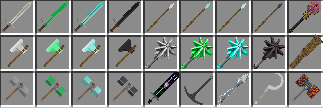
- Melee Weapons - golem can dual wield them.
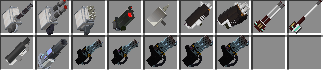
- Special Weapons - Guns, Shields, Lanterns.
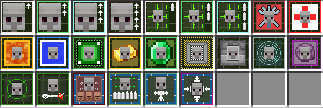
- Upgrade - Improves stats and provides abilities.
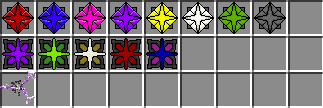
- Gems - additional stat improvements.






move control of entity in the Upgrade Painter Workshop UI.
- left click & drag to rotate entity,
- scroll wheel to zoom in and out.
- right click & drag to move entity position.
Gems
Shields

Melees
Upgrades
Guns
Death Modules

AI Chips

Misc

Available Versions
How to Install Late Game Golems on Your Server
Order Server
Order a Minecraft Java server with at least 4 GB RAM (6 GB recommended).
Set forge Loader
In the panel under "Egg", select the forge loader and matching Minecraft version (1.21.4).
Install Mod
Open the mod browser in the dashboard and search for "Late Game Golems". Click "Install" – done! Alternatively, upload the .jar via SFTP to the /mods folder.
Compatibility
Mod Loaders
Minecraft Versions
1.21.4, 1.21.3, 1.21.2 (+11 more)
Server-side
✓ RequiredRecommended RAM
6 GB(min. 4 GB)Frequently Asked Questions
Late Game Golems server crashes on startup – what to do?
Most common cause: wrong forge version or insufficient RAM. Check the server log (latest.log) for "OutOfMemoryError" or "Mixin" errors. With Mado Hosting: ensure at least 4 GB RAM is allocated and the loader matches the mod version (1.21.4). You can switch loaders with one click in the panel.
Is Late Game Golems compatible with forge and neoforge?
Late Game Golems officially supports forge, neoforge for Minecraft 1.21.4, 1.21.3, 1.21.2. The Mado dashboard automatically detects incompatible loader combinations.
Server lagging with Late Game Golems – how to optimize performance?
Recommended RAM: 6 GB (per 5 players). Use /spark profiler to check if Late Game Golems consumes the most tick time. Common fixes: reduce server view-distance to 8-10, install "performant" or "starlight" as supplementary mods on Forge. With Mado Hosting, your server runs on NVMe SSDs with dedicated CPU cores for minimal latency.
Similar Mods




![[TaCZ] Timeless and Classics Zero](https://cdn.modrinth.com/data/SzzJttH8/fd27766d2bb8390d284696b1dbd358f87e081439_96.webp)

Rent Modded Server
Install Late Game Golems with just one click on your server.