
Latitude
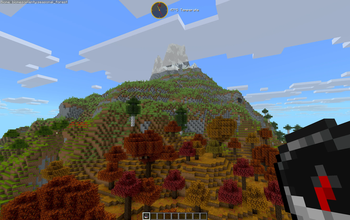
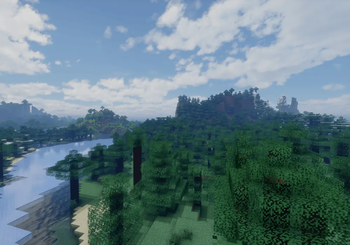
Latitude overhauls world generation so biomes follow realistic latitude bands—from equatorial jungles to polar tundras.
Screenshots


About this Mod

A world generation mod built around geography instead of randomness.
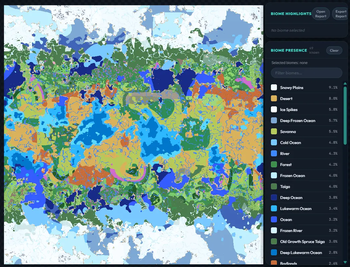
Latitude reorganizes Minecraft's biomes by latitude — jungles near the equator, tundra at the poles, and everything in between laid out the way it would actually be on a planet. The world has a center (the equator) and edges (the poles), and biomes shift as you move between them.
It doesn't add new biomes or terrain. It takes vanilla biomes and puts them where they'd geographically make sense. You get a world that feels like it has real geography instead of random noise.
⚠️ Latitude overhauls world generation and requires a new world to take effect.
🗺️ Climate Zones
Five climate bands radiate outward from the equator at the center of the world toward the poles at the edges (revised from 6 bands pre v.1.3.0):
| Zone | Character | Typical Biomes |
|---|---|---|
| 🌴 Tropical | Hot, humid, lush | Jungle, Mangrove Swamp, Bamboo Jungle |
| ☀️ Subtropical | Warm and varied, drier toward the edges | Savanna, Badlands, Plains |
| 🌿 Temperate | Mild, forested, familiar | Forest, Birch Forest, Meadow, Swamp |
| 🌨️ Subpolar | Cold, stark, increasingly sparse | Taiga, Snowy Plains, Grove |
| ❄️ Polar | Frozen and forbidding | Ice Spikes, Frozen Ocean, Snowy Slopes |
Zones blend into each other gradually — no hard lines where jungle suddenly becomes tundra. You'll also get edge warnings as you push toward the poles and east/west boundaries. Some biome tuning ongoing to balance biome diversity and smooth transitions. Latitude is very much a living project!
🌐 World Sizes
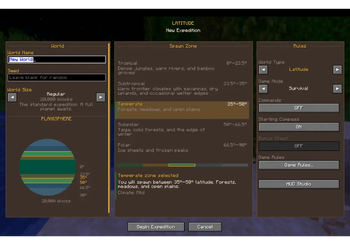
You pick a world size when you create the world. This controls how far the equator-to-pole journey is:
| Size | Diameter | Feel |
|---|---|---|
| Itty Bitty | 7,500 × 7,500 | Equator to pole in an afternoon |
| Tiny | 10,000 × 10,000 | Small but varied |
| Small | 15,000 × 15,000 | Compact with room to breathe |
| Regular | 20,000 × 20,000 | Recommended |
| Large | 30,000 × 30,000 | Long-haul survival |
| Ginormous | 40,000 × 40,000 | Continental-scale trek |
Everything scales with the size you pick — biome band widths, border behavior, latitude math. A "Tiny" world doesn't just cut off a "Regular" world; it compresses the whole climate system proportionally. Tuning is ongoing to make sure smaller world sizes still balance biome diversity.
🌐 World Creation
Latitude hooks into the world creation screen directly. It's on by default — you'll see the size picker and climate toggle right there when you make a new world. You can turn it off if you want a vanilla world.
🧭 Compass & HUD
Latitude comes with a built-in navigation HUD:
- Compass — digital (cardinal, 8-way, or degrees) or analog with color themes
- Latitude readout — your current latitude, updating live
- Climate zone indicator — shows on zone crossing, or keep it on all the time
- Everything is customizable — size, color, opacity, position, background
🛠️ HUD Studio:
Press F9 to open it (rebindable). Drag elements around on screen, snap to grid if you want. Press , to toggle the compass on/off.
🧩 Compatibility
Latitude works through biome tags, so it plays well with other worldgen mods like Tectonic, Geophilic, and William Wyther's Overhauled Overworld. Modded biomes can be slotted into climate bands without hard dependencies. Only Fabric API is required.
I plan on expanding default compatibility with modded biome packs in future updates.
Lithosphere compatibility is in active development.
👥 Who this is for
If you've ever thought vanilla biome placement felt random and disconnected — a mushroom island next to a desert next to a taiga — this fixes that. It's good for long-term survival worlds, exploration-focused playthroughs, and modpacks that want geographic coherence without adding a ton of new content.
🐛 Found a Bug?
Report issues or follow development on GitHub: https://github.com/peetsamods/latitude
Thank you for playing with Latitude. It's a solo passion-project and my first mod, so I hope you will enjoy it as much as I do! :D
If you're enjoying Latitude, consider leaving a ❤️ on Modrinth!
Available Versions
How to Install Latitude on Your Server
Order Server
Order a Minecraft Java server with at least 4 GB RAM (6 GB recommended).
Set fabric Loader
In the panel under "Egg", select the fabric loader and matching Minecraft version (26.1.2).
Install Mod
Open the mod browser in the dashboard and search for "Latitude". Click "Install" – done! Alternatively, upload the .jar via SFTP to the /mods folder.
Compatibility
Mod Loaders
Minecraft Versions
26.1.2, 26.1.1, 26.1 (+6 more)
Server-side
~ OptionalRecommended RAM
6 GB(min. 4 GB)Frequently Asked Questions
Latitude server crashes on startup – what to do?
Most common cause: wrong fabric version or insufficient RAM. Check the server log (latest.log) for "OutOfMemoryError" or "Mixin" errors. With Mado Hosting: ensure at least 4 GB RAM is allocated and the loader matches the mod version (26.1.2). You can switch loaders with one click in the panel.
Is Latitude compatible with fabric?
Latitude officially supports fabric for Minecraft 26.1.2, 26.1.1, 26.1. The Mado dashboard automatically detects incompatible loader combinations.
Server lagging with Latitude – how to optimize performance?
Recommended RAM: 6 GB (per 5 players). Use /spark profiler to check if Latitude consumes the most tick time. Common fixes: reduce server view-distance to 8-10, install "performant" or "starlight" as supplementary mods on Forge. With Mado Hosting, your server runs on NVMe SSDs with dedicated CPU cores for minimal latency.
Similar Mods




Rent Modded Server
Install Latitude with just one click on your server.