
Lattice
A mod designed for SMP servers, with a lot of useful features and utilities!
Screenshots
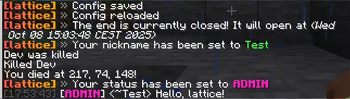
About this Mod
Lattice
Lattice is a Minecraft mod intended to be used on SMP servers to manage many useful features for players.
For it to work, it needs to be installed on the server and the client.
Features
- Player nickname and status management
- Night vision toggle for players
- Server configuration management (save/reload)
- Message of the Day (MOTD) rotation
- Detection of illegal/cheat mods
- Decorators for enhanced in-game experience (e.g., time/status decorators)
- Configurable PvP settings per player
- Server, end and nether opening dates
- Rules need to be accepted by players to play
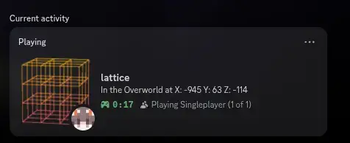
- Server configurable Discord RPC
Commands
Below is a list of all available commands and their functionality:
/nv
- Toggles Night Vision
/nick [nickname]
- Sets or removes your nickname
- If you pass your actual Minecraft name as the nickname, your nickname is removed
- If called without arguments, shows your current nickname
/status [<status>|reset]
- Changes your status message
- If you pass
resetas the status, your status is removed - If called without arguments, shows your current status message
/lattice <action> [subAction] [subActionArg]
- Performs administrative actions (requires permission level 2)
- Available actions:
config- Manage server configurationsave- Saves the current configuration to diskreload- Reloads the configuration from disk
motd- Manage Message of the Dayadd- Adds a new MOTDremove- Removes a MOTDlist- Lists all MOTDs
<illegal|allowed>- Manage illegal and allowed modsadd- Adds a new mod to the listremove- Removes a mod from the listlist- Lists all mods in the listpvp- Manage PvP settings<player>- Specifies the player<enable|disable>- Enables or disables PvP for the specified player
rules- Manage rules for a player<player>- Specifies the player<enable|disable>- Accepts or declines rules for the specified player
open- Manage server and end opening dates<dimension>- Specifies what to modify [nether, end, server]<date>- Sets the opening date in the formatYYYY-MM-DD hh:mm:ss
nick- Manage nickname for a player<player>- Specifies the playerremove- Removes the nickname for a player
<nickname>- Sets the nickname for a player
status- Manage status messages for a player<player>- Specifies the playerremove- Removes the status message for a player<status>- Sets the status message for a player
help- Shows a link to the repository
- Examples:
/lattice config save/lattice motd add Welcome to the server!/lattice illegal list/lattice pvp PlayerName enable/lattice open end 2024-12-31 23:59:59/lattice rules PlayerName disable/lattice nick PlayerName remove/lattice status PlayerName COOL
Configuration
- Config file is stored as
config.jsonunder lattice in the server config directory - You can change the time when the end or the server will be opened
- MOTDs and a list of illegal mods can be configured
- Each player has configurable options:
- PvP enabled/disabled
- Nickname
- Status message
- Rules enabled/disabled
Configuring the rulebook
To configure the rulebook, you need to manually edit the config.json file.
Example:
"rules": [
"{\"text\":\"Rule 1\",\"color\":\"aqua\"}",
"{\"text\":\"Rule 2\",\"color\":\"red\"}",
"{\"text\":\"Rule 3\",\"color\":\"aqua\"}",
"{\"text\":\"Rule 4\",\"color\":\"blue\"}",
"[\"\",{\"text\":\"Do you accept these rules?\\n\"},{\"text\":\"[\\u2713]\",\"color\":\"green\",\"click_event\":{\"action\":\"change_page\",\"page\":10000}},{\"text\":\" \",\"color\":\"reset\"},{\"text\":\"[\\u2717]\",\"color\":\"red\",\"click_event\":{\"action\":\"change_page\",\"page\":5000}}]"
]
Each entry in the rules array is a JSON object.
You have to use a JSON text component for each rule.
I recommend using this website to create it easier, but do
keep in mind that the generated JSON will need some adjustments to work properly in the config file.
For example, the website generates a click event as clickEvent but it needs to be click_event in the config file.
You can also modify what the player should click to accept or decline the rules by going to a page with a high number (
e.g., 10000) and a low number (e.g., 5000) respectively.
Known issues
- The hopper sort doesn't work with lithium's hopper optimizations enabled. Please disable them in the lithium config if you want to use hopper sorting. Add this to config/lithium.properties:
mixin.block.hopper=false
Available Versions
How to Install Lattice on Your Server
Order Server
Order a Minecraft Java server with at least 3 GB RAM (4 GB recommended).
Set fabric Loader
In the panel under "Egg", select the fabric loader and matching Minecraft version (1.21.10).
Install Mod
Open the mod browser in the dashboard and search for "Lattice". Click "Install" – done! Alternatively, upload the .jar via SFTP to the /mods folder.
Compatibility
Mod Loaders
Minecraft Versions
1.21.10, 1.21.1
Server-side
✓ RequiredRecommended RAM
4 GB(min. 3 GB)Frequently Asked Questions
Lattice server crashes on startup – what to do?
Most common cause: wrong fabric version or insufficient RAM. Check the server log (latest.log) for "OutOfMemoryError" or "Mixin" errors. With Mado Hosting: ensure at least 3 GB RAM is allocated and the loader matches the mod version (1.21.10). You can switch loaders with one click in the panel.
Is Lattice compatible with fabric and neoforge?
Lattice officially supports fabric, neoforge for Minecraft 1.21.10, 1.21.1. The Mado dashboard automatically detects incompatible loader combinations.
Server lagging with Lattice – how to optimize performance?
Recommended RAM: 4 GB (per 8 players). Use /spark profiler to check if Lattice consumes the most tick time. Common fixes: reduce server view-distance to 8-10, install "performant" or "starlight" as supplementary mods on Forge. With Mado Hosting, your server runs on NVMe SSDs with dedicated CPU cores for minimal latency.
Similar Mods






Rent Modded Server
Install Lattice with just one click on your server.