
Lava Dynamics
in world smelting, and dynamically created volcanoes.
About this Mod


We're BACK on RELEASE schedule!
The first update in a very long time.
There is more to come if you want to take part in the pre-tests come to my discord and subchannel for this mod. https://discord.gg/rx7D45x
The changes so far:
- Actual volcano cones
- in world smelting of full blocks to another when in contact with lava, we're referencing the furnace recipes correctly this time so it should not be causing massive stack dupes in a regular furnace any more.
- default 5% chance to spawn
- /spawnvolcano (for ops to test) (could be a spell later on)
- Lava core now comprised of magma blocks
- no longer checks all lava blocks
- configurable ore for the cones
- calderas
- pools of lava in the calderas
- spawn in the center of already generated chunks
- can be configured to only spawn during worldgen and not when a player walks by
- will spawn in range of a player configurable default 32 blocks
- random height
- random width
- generates a pool of lava at y=10 configurable
- all hard numbers are configurable
- a tile entity (sign, chest, piston, furnace, machine from a mod will prevent spawning of volcano in a chunk unless summoned)
- a check for spawning is done per chunk, if a chunk fails to spawn a volcano it is marked as been checked and will never be allowed to spawn a volcano unless one is summoned there. if a chunk passes the check for spawn it is marked as allowing a volcano to spawn and will eventually if the player moves in front of it enough. This latter part is moot if worldgen only is enabled.
- underwater volcanos
- magma vents
- ash deposits
- ash clouds (block out sun)
- different volcano generation by biome type
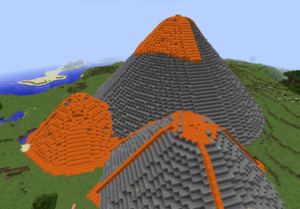
DANGER ADDING THIS TO YOUR WORLD CAN CAUSE DESTRUCTION LIKE YOU'VE NEVER SEEN BEFORE with the DEFAULT SETTINGS.
Feel free to add this mod to existing worlds both single player and multiplayer. I have code in it that blocks Volcano formation in any chunk where a tileEntity already exists. Signs, chests, furnaces, and more are tileEntities and common in player builds.
REMEMBER TO BACKUP FIRST THO!

Modpacks
Don't ask just add. A link back to this page would be appreciated but not required.
Youtube - Twitch - Etc
Go ahead and please share the link so I can feature it.
Help a Veteran today
I am Veteran of United States Army. I am not legally disabled. But I do love to make these mods and modpacks for you guys. Please help me to help you by Donating at .
.
Available Versions
How to Install Lava Dynamics on Your Server
Order Server
Order a Minecraft Java server with at least 3 GB RAM (4 GB recommended).
Set forge Loader
In the panel under "Egg", select the forge loader and matching Minecraft version (1.16.5).
Install Mod
Open the mod browser in the dashboard and search for "Lava Dynamics". Click "Install" – done! Alternatively, upload the .jar via SFTP to the /mods folder.
Compatibility
Mod Loaders
Minecraft Versions
1.16.5, 1.12.2
Server-side
✓ RequiredRecommended RAM
4 GB(min. 3 GB)Frequently Asked Questions
Lava Dynamics server crashes on startup – what to do?
Most common cause: wrong forge version or insufficient RAM. Check the server log (latest.log) for "OutOfMemoryError" or "Mixin" errors. With Mado Hosting: ensure at least 3 GB RAM is allocated and the loader matches the mod version (1.16.5). You can switch loaders with one click in the panel.
Is Lava Dynamics compatible with forge?
Lava Dynamics officially supports forge for Minecraft 1.16.5, 1.12.2. The Mado dashboard automatically detects incompatible loader combinations.
Server lagging with Lava Dynamics – how to optimize performance?
Recommended RAM: 4 GB (per 8 players). Use /spark profiler to check if Lava Dynamics consumes the most tick time. Common fixes: reduce server view-distance to 8-10, install "performant" or "starlight" as supplementary mods on Forge. With Mado Hosting, your server runs on NVMe SSDs with dedicated CPU cores for minimal latency.
Rent Modded Server
Install Lava Dynamics with just one click on your server.