
Lava Java
Skeletons selling coffee in the Nether.
Screenshots
About this Mod
Lava Java
Lava Java's Lava Javas will warm your blackened bones! Each cup is a melody of unique flavors that will ensure you are able to face the rest of your day. With Lava Javas starting at only 4 gold nuggets, our prices are affordable by any standard. Our friendly staff are always working to improve, so every time you visit they will have new and exciting Lava Javas waiting for you to try. Please forward all complains and concerns to the branch manager.
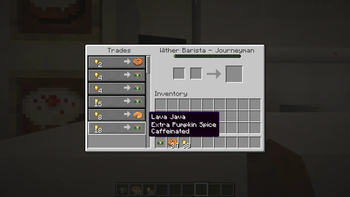
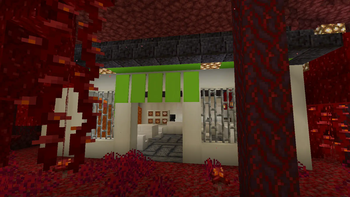
Lava Java adds a structure to the Nether: the Lava Java Café. Within the café is a pair of friendly baristas who will sell you snacks and Lava Javas in exchange for gold nuggets. Each Lava Java will grant one or more buffs based on the drink's flavor and freshness. As you trade with a particular barista it will become more skilled, selling more drinks at once and making more complex brews.
Data Packs
Lava Java uses datapacks to determine the flavors that drinks can have. It looks for json files under data/lavajava/lava_java_flavor. They are formatted like so:
{
  "flavorID": "spellbound:bubbly",
  "statusID": "spellbound:shielded",
  "isDrawback": false,
  "duration": 7200,
  "magnitude": 4,
  "weight": 30,
  "value": 15,
  "namePriority": 0,
  "exclusions": [
    "spellbound:extra_bubbly",
    "spellbound:very_bubbly"
  ]
}
flavorID: the ID of your flavor. This is mandatory. Unlike the name of the json file, this must be unique. Otherwise it may conflict with other flavors.
statusID: the ID of the status effect your flavor provides. This is mandatory.
isDrawback: determines if the flavor decreases or increases the cost of a Lava Java. Defaults to false. In the future, may effect the conditions under which it can be selected.
duration: how many ticks the flavor's effect will last. This is mandatory, and must be a positive integer.
magnitude: determines the magnitude of the effect. This is optional, but recommended. If provided, must be a non-negative integer. Defaults to 0. Keep in mind that internally effect magnitudes are one lower than they are displayed in game. Strength II is actually magnitude 1, for example.
weight: determines how common the flavor is. This is mandatory, and must be a positive integer. Flavor generation may be seen like a raffle where tickets are pulled from a box, and this is how many tickets point to this flavor if chosen. 45 is for common flavors like Sweet or Creamy, 30 is for flavors that are neither common nor uncommon like Spicy, and 10 is for rare flavors like Thick or Filling. Generally, superior versions of a flavor (such as Extra Spicy) should be 5 times as rare as their lesser variants.
value: how much the flavor influences prices. This is mandatory, and must be a positive integer. A Lava Java with just your flavor will cost about one quarter this number. If the flavor is negative, it instead determines how much the price is reduced. Generally, superior versions of a flavor (such as Very Creamy) should cost twice as much as their lesser variants.
namePriority: currently does nothing. This is optional. If provided, must be an integer. Default value is 0. Once implemented, it will determine the order that flavors are listed in a Lava Java's name. Higher priorities will be listed later in the drinks name (a Sweet Spicy Lava Java rather than a Spicy Sweet Lava Java)
exclusions: a list of flavorIDs that prevents this flavor from co-existing with the listed flavors. This is optional. If it would be selected but an excluded flavor was first, or if an excluded flavor has been selected but it had been selected first, than the second flavor will be rerolled. These flavors do not need to exist. This allows you to exclude flavors that come from other mods, even if you do not use that mod as a dependency.
Once you have created your flavor, add a line to your language file in the format "flavor.spellbound.bubbly": "Bubbly", to set the display name of the flavor.
Available Versions
How to Install Lava Java on Your Server
Order Server
Order a Minecraft Java server with at least 4 GB RAM (6 GB recommended).
Set fabric Loader
In the panel under "Egg", select the fabric loader and matching Minecraft version (1.20.4).
Install Mod
Open the mod browser in the dashboard and search for "Lava Java". Click "Install" – done! Alternatively, upload the .jar via SFTP to the /mods folder.
Compatibility
Mod Loaders
Minecraft Versions
1.20.4, 1.20.3, 1.20.2 (+5 more)
Server-side
✓ RequiredRecommended RAM
6 GB(min. 4 GB)Frequently Asked Questions
Lava Java server crashes on startup – what to do?
Most common cause: wrong fabric version or insufficient RAM. Check the server log (latest.log) for "OutOfMemoryError" or "Mixin" errors. With Mado Hosting: ensure at least 4 GB RAM is allocated and the loader matches the mod version (1.20.4). You can switch loaders with one click in the panel.
Is Lava Java compatible with fabric?
Lava Java officially supports fabric for Minecraft 1.20.4, 1.20.3, 1.20.2. The Mado dashboard automatically detects incompatible loader combinations.
Server lagging with Lava Java – how to optimize performance?
Recommended RAM: 6 GB (per 5 players). Use /spark profiler to check if Lava Java consumes the most tick time. Common fixes: reduce server view-distance to 8-10, install "performant" or "starlight" as supplementary mods on Forge. With Mado Hosting, your server runs on NVMe SSDs with dedicated CPU cores for minimal latency.
Similar Mods




![CobbleDollars [Cobblemon Addon]](https://cdn.modrinth.com/data/s7N7AsqL/684040a264fc1d7f9b856ec5d2da39767398c7ad.png)
Rent Modded Server
Install Lava Java with just one click on your server.