
Leathered Boots
Comfy and sturdy boots!
Screenshots

About this Mod










📝 Description
Tired of leather boots being the only way to walk safely on powdered snow? With Leathered Boots, you can upgrade your existing armor boots with leather — keeping full protection and gaining snow safety!
No more freezing, no more falling through powdered snow — and yes, your new leathered boots are dyeable and stylish too!

✨ Features
- 🥾 Leathered versions of every Vanilla boot.
- ❄️ Walk safely on powdered snow — no more sinking or freezing!
- 🎨 Dye your leathered boots to your favorite color!
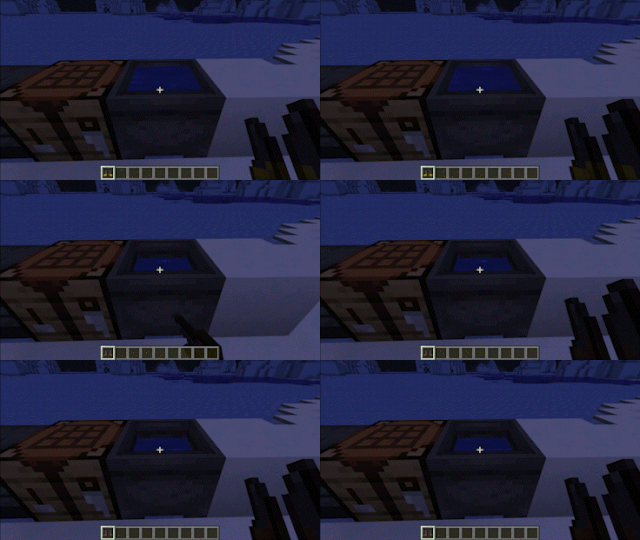
- 🧼 Remove color by right-clicking a cauldron.
- ✂️ Trim support (Minecraft 1.20+)
- 📦 Loot & Trades (Minecraft 1.20+): leathered boots appear in igloos, snowy villages, and are tradeable with Leatherworkers.
- 🧭 Smithing Template (1.20+): found in igloos, outposts, shipwrecks, and trail ruins in snowy/frozen biomes.
- 🏆 Advancement compatibility: Vanilla advancements like Suit Up, Oh Shiny, and Cover Me in Debris now support leathered boots.
- 🤝 Mod compatibility — see below
🛠️ Crafting
⬆️ Minecraft 1.20+
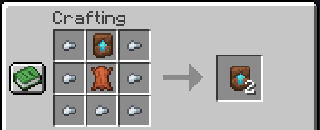
- 🧬 Duplicate the Leather Upgrade Smithing Template as usual.
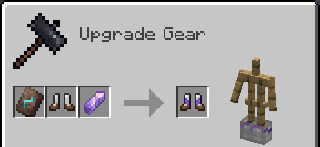
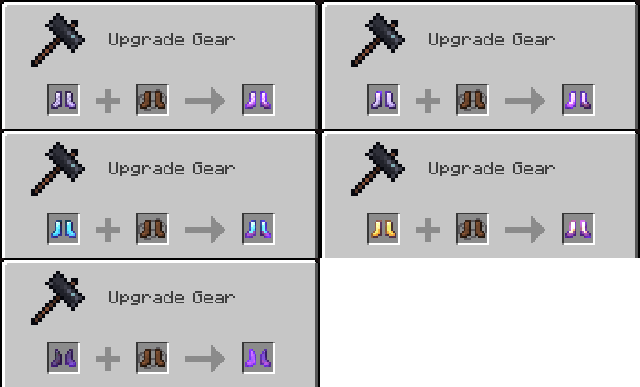
- ⚒️ Upgrade regular boots to leathered boots using the template.
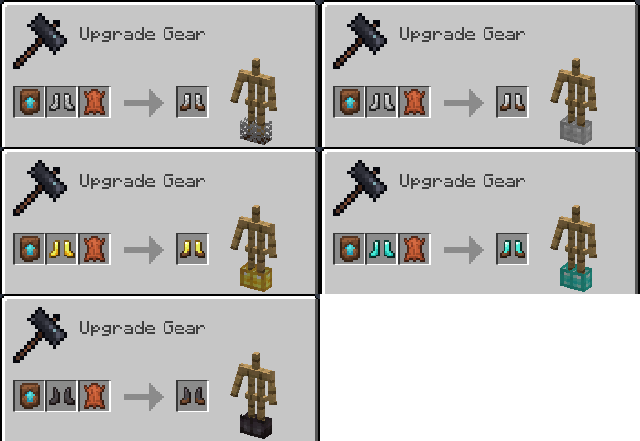
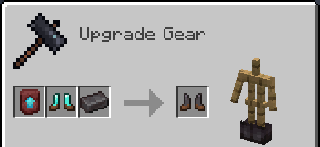
- 🔥 Upgrade diamond to netherite leathered boots.
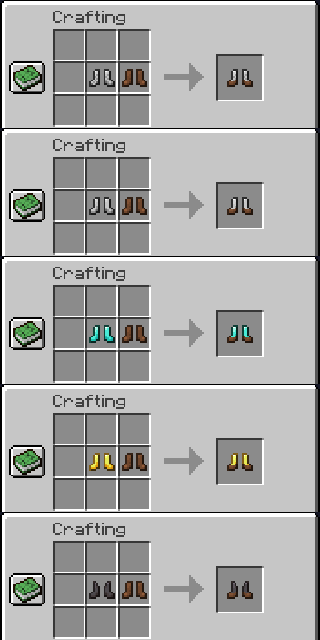
⬇️ Before 1.20
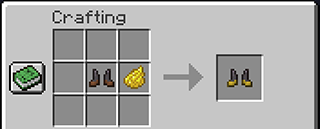
- 🧵 Combine normal boots + leather boots in the crafting table.
- ⚒️ Smite diamond leathered boots into netherite leathered boots.
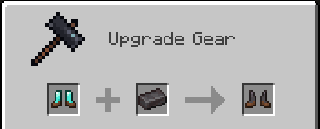
- 🔨 Use a smithing table to upgrade to netherite — keeps enchantments.
🤝 Compatibility
Want modded boots to work like leathered boots?
- 🧊 Use the Soft Step enchantment for snow walking.
- 🧩 Developers can use the provided API to register their own leathered boots (see For Developers).
- 🗣️ Want support for another mod’s boots? Open an issue on that mod’s tracker — we provide the API, it’s up to them to use it!
✅ Out-of-the-box compatibility with Detail Armor Bar (Fabric only)
🔗 Dependencies
| Mod | Loader | Requirement |
|---|---|---|
| Cobweb | All | Required |
📜 License and right of use
Feel free to use this mod for any modpack or video, just be sure to give credit and possibly link here.
This project is published under the Crystal Nest Community License v1.
💻 For Developers
Want to add leathered versions of your custom boots?
- 🧰 Use the built-in API for easy support
- 📚 Follow the setup guide in the Developer Wiki
❤️ Support us







Available Versions
How to Install Leathered Boots on Your Server
Order Server
Order a Minecraft Java server with at least 3 GB RAM (4 GB recommended).
Set fabric Loader
In the panel under "Egg", select the fabric loader and matching Minecraft version (1.21.10).
Install Mod
Open the mod browser in the dashboard and search for "Leathered Boots". Click "Install" – done! Alternatively, upload the .jar via SFTP to the /mods folder.
Compatibility
Mod Loaders
Minecraft Versions
1.21.10, 1.21.8, 1.21.7 (+13 more)
Server-side
✓ RequiredRecommended RAM
4 GB(min. 3 GB)Frequently Asked Questions
Leathered Boots server crashes on startup – what to do?
Most common cause: wrong fabric version or insufficient RAM. Check the server log (latest.log) for "OutOfMemoryError" or "Mixin" errors. With Mado Hosting: ensure at least 3 GB RAM is allocated and the loader matches the mod version (1.21.10). You can switch loaders with one click in the panel.
Is Leathered Boots compatible with fabric and forge and neoforge?
Leathered Boots officially supports fabric, forge, neoforge for Minecraft 1.21.10, 1.21.8, 1.21.7. Note: Forge and Fabric mods are NOT cross-compatible – pick one loader and stick with it. The Mado dashboard automatically detects incompatible loader combinations.
Server lagging with Leathered Boots – how to optimize performance?
Recommended RAM: 4 GB (per 8 players). Use /spark profiler to check if Leathered Boots consumes the most tick time. Common fixes: reduce server view-distance to 8-10, install "performant" or "starlight" as supplementary mods on Forge. With Mado Hosting, your server runs on NVMe SSDs with dedicated CPU cores for minimal latency.
Similar Mods




Rent Modded Server
Install Leathered Boots with just one click on your server.