
LegacyChecker
A fail-safe utility mod that ensures players have all mandatory mods installed before entering the game.
Screenshots
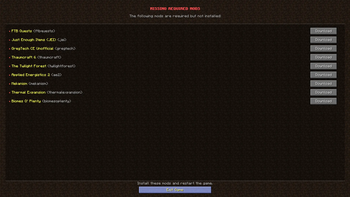
About this Mod
LegacyChecker
A lightweight, fail-safe utility mod that ensures players have all mandatory mods installed before entering the game.
It elegantly solves license restrictions (like All Rights Reserved / ARR) that prevent modpack authors from bundling specific mods directly into modpack files.
Inspired by the concept of FTBChecker. This mod is exclusively for 1.12.2 and will not be ported to newer versions — please use modern alternatives for newer game versions.
REQUIRES CLEANROOM
📦 Configuration (legacychecker-common.yaml)
The mod automatically generates a YAML configuration. You can specify as many required mods as your pack needs.
    # List of required mods that must be installed for the game to run.
    # If any mod is missing, an error screen will block startup or show a warning.
    #
    # Structure per mod:
    #   - modId:   "The exact internal ID of the mod"
    #   - modName: "The friendly name displayed to the player"
    #   - url:     "Direct download link (CurseForge, Modrinth, etc.)"
    requiredMods:
      - modId: "jei"
        modName: "Just Enough Items (JEI)"
        url: "[https://www.curseforge.com/minecraft/mc-mods/jei](https://www.curseforge.com/minecraft/mc-mods/jei)"
      - modId: "gregtech"
        modName: "GregTech CE Unofficial"
        url: "[https://www.curseforge.com/minecraft/mc-mods/gregtech-ce-unofficial](https://www.curseforge.com/minecraft/mc-mods/gregtech-ce-unofficial)"

    # If true, the "Continue" button appears, allowing players to skip the warning.
    # If false, players must install the mods or exit the game.
    canPlayerLoadGame: false
Available Versions
How to Install LegacyChecker on Your Server
Order Server
Order a Minecraft Java server with at least 3 GB RAM (4 GB recommended).
Set forge Loader
In the panel under "Egg", select the forge loader and matching Minecraft version (1.12.2).
Install Mod
Open the mod browser in the dashboard and search for "LegacyChecker". Click "Install" – done! Alternatively, upload the .jar via SFTP to the /mods folder.
Compatibility
Mod Loaders
Minecraft Versions
1.12.2
Server-side
✗ UnsupportedRecommended RAM
4 GB(min. 3 GB)Frequently Asked Questions
LegacyChecker server crashes on startup – what to do?
Most common cause: wrong forge version or insufficient RAM. Check the server log (latest.log) for "OutOfMemoryError" or "Mixin" errors. With Mado Hosting: ensure at least 3 GB RAM is allocated and the loader matches the mod version (1.12.2). You can switch loaders with one click in the panel.
Is LegacyChecker compatible with forge?
LegacyChecker officially supports forge for Minecraft 1.12.2. The Mado dashboard automatically detects incompatible loader combinations.
Server lagging with LegacyChecker – how to optimize performance?
Recommended RAM: 4 GB (per 8 players). Use /spark profiler to check if LegacyChecker consumes the most tick time. Common fixes: reduce server view-distance to 8-10, install "performant" or "starlight" as supplementary mods on Forge. With Mado Hosting, your server runs on NVMe SSDs with dedicated CPU cores for minimal latency.
Similar Mods





Rent Modded Server
Install LegacyChecker with just one click on your server.
Details
- License
- Creative Commons Attribution Non Commercial 4.0 International
- Server-side
- Unsupported