
LevelsPlus
Simple weapon and armor leveling mod
Screenshots
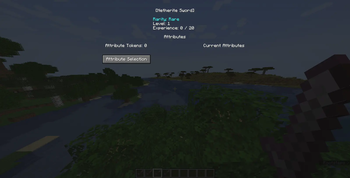
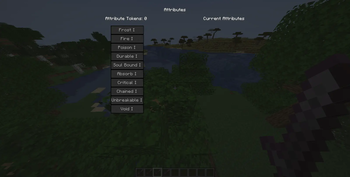
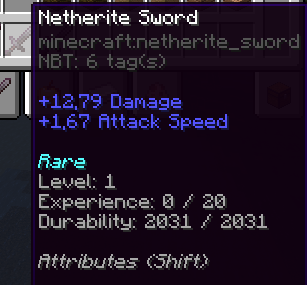
About this Mod
Levels Plus
This is a fork of Levels, the underlying code is almost completely different as
I abstracted most of the logic into a common package, this allows this version to be:
- Fully configurable (the cfg file now has way more entries, you can configure for instance how long "Fire" lasts or how much "Absorbs" takes, and their max levels)
- Easily implemented in other platforms (Right now supports Bukkit, Forge and Fabric)
- Possibly allow sub mods to define their own attributes and register them, thanks to a registry instead of enums
- Allow more or less than 3 levels, without being limited (eg: Soulbound in the past had 3 levels which behaved the exact same way, this has been fixed)
- Better support for displaying upgrade summary (before each level had a custom description, now it has a placeholder for the value calculated based on the level)
- Safer network implementation (old version could allow you to send fake packets and upgrade stuff without the necessary tokens and more)
Available Versions
How to Install LevelsPlus on Your Server
Order Server
Order a Minecraft Java server with at least 3 GB RAM (4 GB recommended).
Set bukkit Loader
In the panel under "Egg", select the bukkit loader and matching Minecraft version (1.21.8).
Install Mod
Open the mod browser in the dashboard and search for "LevelsPlus". Click "Install" – done! Alternatively, upload the .jar via SFTP to the /mods folder.
Compatibility
Mod Loaders
Minecraft Versions
1.21.8, 1.21.7, 1.21.6 (+11 more)
Server-side
✗ UnsupportedRecommended RAM
4 GB(min. 3 GB)Frequently Asked Questions
LevelsPlus server crashes on startup – what to do?
Most common cause: wrong bukkit version or insufficient RAM. Check the server log (latest.log) for "OutOfMemoryError" or "Mixin" errors. With Mado Hosting: ensure at least 3 GB RAM is allocated and the loader matches the mod version (1.21.8). You can switch loaders with one click in the panel.
Is LevelsPlus compatible with bukkit and fabric and forge and paper and spigot?
LevelsPlus officially supports bukkit, fabric, forge, paper, spigot for Minecraft 1.21.8, 1.21.7, 1.21.6. Note: Forge and Fabric mods are NOT cross-compatible – pick one loader and stick with it. The Mado dashboard automatically detects incompatible loader combinations.
Server lagging with LevelsPlus – how to optimize performance?
Recommended RAM: 4 GB (per 8 players). Use /spark profiler to check if LevelsPlus consumes the most tick time. Common fixes: reduce server view-distance to 8-10, install "performant" or "starlight" as supplementary mods on Forge. With Mado Hosting, your server runs on NVMe SSDs with dedicated CPU cores for minimal latency.
Similar Mods




![[TaCZ] Timeless and Classics Zero](https://cdn.modrinth.com/data/SzzJttH8/fd27766d2bb8390d284696b1dbd358f87e081439_96.webp)

Rent Modded Server
Install LevelsPlus with just one click on your server.