
LevelZ Refabricated
Unofficial port of LevelZ by Globox_Z for newest minecraft versions
Screenshots
About this Mod
LevelZ Refabricated
Unofficial port of LevelZ by Globox_Z — ported to Minecraft 1.21.11 with Mojang Mappings (Fabric).
All credit for the original mod goes to Globox_Z.
About LevelZ
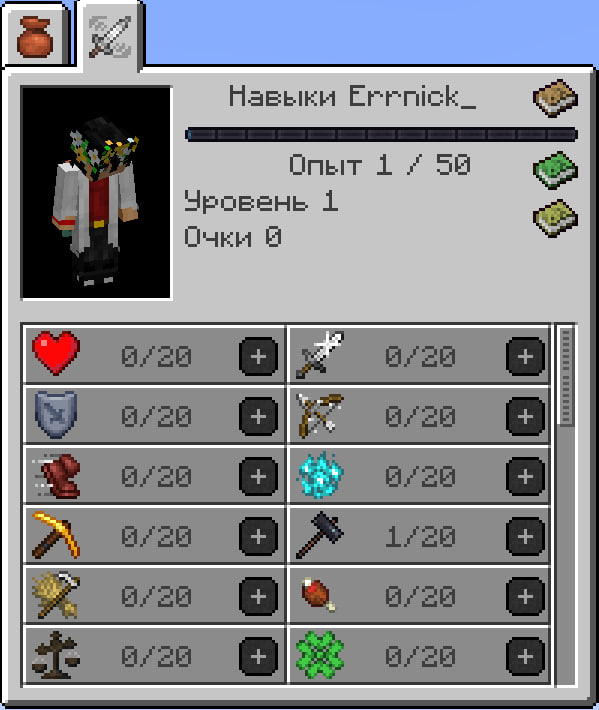
LevelZ is a progression-based RPG skill system for Minecraft.
Players gain experience and level up skills to unlock access to tools, weapons, armor, blocks, enchantments and other content.
Instead of immediately using higher-tier equipment, players must develop their character through gameplay. The mod allows server owners and modpack creators to create custom progression systems through configuration files and datapacks.
Default keybind: K (Skill Menu)
What's changed in this port
Port Changes
- Ported to Minecraft 1.21.11
- Migrated from Yarn to Mojang Mappings
- Adapted to work correctly with Minecraft 1.21.11 changes
Additional Features
Extended Crafting Restrictions
Restrictions now apply to:
- Crafting Tables
- Smithing Tables
- Anvils
- Player 2x2 Crafting Grid
Level-Based Requirements
Datapack restrictions can now require a player level in addition to skill requirements.
  "experience_vial_lock": {
    "replace": false,
    "level": 15,
    "skills": {},
    "items": [
      "levelz:experience_vial"
    ],
    "blocks": [],
    "mining": [],
    "crafting": [],
    "entities": [],
    "enchantments": {}
  }
Experience Vials
Added configurable Experience Vials:
- Store experience with Shift + Right Click
- Retrieve experience with Right Click
- Configurable maximum capacity
- Obtainable through loot and fishing
- Supports empty and randomly filled variants
Rare Candy Improvements
Rare Candy can now grant:
- Skill Points
- Experience
Requirements
Original mod
- Modrinth: https://modrinth.com/mod/levelz
- GitHub: https://github.com/Globox1997/LevelZ
- Author: Globox_Z
Original license: GPL-3.0. This port is distributed under the same terms.
Available Versions
How to Install LevelZ Refabricated on Your Server
Order Server
Order a Minecraft Java server with at least 3 GB RAM (4 GB recommended).
Set fabric Loader
In the panel under "Egg", select the fabric loader and matching Minecraft version (1.21.11).
Install Mod
Open the mod browser in the dashboard and search for "LevelZ Refabricated". Click "Install" – done! Alternatively, upload the .jar via SFTP to the /mods folder.
Compatibility
Mod Loaders
Minecraft Versions
1.21.11
Server-side
✓ RequiredRecommended RAM
4 GB(min. 3 GB)Frequently Asked Questions
LevelZ Refabricated server crashes on startup – what to do?
Most common cause: wrong fabric version or insufficient RAM. Check the server log (latest.log) for "OutOfMemoryError" or "Mixin" errors. With Mado Hosting: ensure at least 3 GB RAM is allocated and the loader matches the mod version (1.21.11). You can switch loaders with one click in the panel.
Is LevelZ Refabricated compatible with fabric?
LevelZ Refabricated officially supports fabric for Minecraft 1.21.11. The Mado dashboard automatically detects incompatible loader combinations.
Server lagging with LevelZ Refabricated – how to optimize performance?
Recommended RAM: 4 GB (per 8 players). Use /spark profiler to check if LevelZ Refabricated consumes the most tick time. Common fixes: reduce server view-distance to 8-10, install "performant" or "starlight" as supplementary mods on Forge. With Mado Hosting, your server runs on NVMe SSDs with dedicated CPU cores for minimal latency.
Similar Mods




Rent Modded Server
Install LevelZ Refabricated with just one click on your server.