
LG's Command Items - Easy Custom Items
This datapack adds a way to add commands directly as a component to items! Great way to add custom items with some additional features like cooldowns!
Screenshots
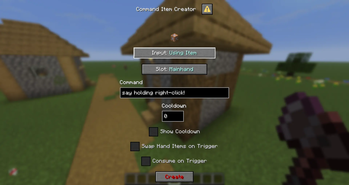
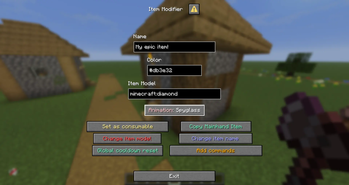

About this Mod
🔀 LG's Command Items datapack
This datapack adds a way to add commands directly to items when triggering a specific event, events stacks meaning you can have a command for Right-Click as well as a command when attacking a mob or getting attacked!
Usage Tutorial
Use /function a:open_menu command, then click Add Commands button, select your input and slot, then confirm with the red "Confirm" button, it will add the command to your selected input + slot combination
Current Triggers & Slots
Triggers
- Tick (20 times per second)
- Use Item (on right-click, requires the item to be consumable, the Item Modifier makes it easy to turn an item into consumable, check commands)
- Using Item (Triggers whenever you're using the item)
- Player Hurt Entity (whenever player attacks an entity)
- Player Killed Entity (whenever player kills an entity)
- Entity Hurt Player (whenever the player gets damaged)
- Inventory Changed (whenever players' inventory changes)
Slots
- Mainhand
- Offhand
- Head
- Chest
- Legs
- Feet
Limitations
You can only put one command into each trigger + slot combo, to use several commands, it is recommended to use functions
For any ticking trigger, I recommend not using cooldowns simply for optimization purposes, it won't fry your ticks if you don't do so, but with several players using those, it may very likely affect your performance negatively
Other Additions
- Cooldowns - You can easily add cooldowns to your commands, they generate no scoreboards and are bound directly to items
- Swap Hand Items - Simply swaps your mainhand and offhand items
- Show Cooldown - When on cooldown, displays the cooldown on the chat, not recommended to use on ticking triggers so not to flood your chat
- Consume On Trigger - Once triggered, consumes 1 of the used items
⚠️ Important commands!
/function a:open_menu
/function a:copy_item
/function ci:reset_cds
🔴 YouTube Showcase
Available Versions
How to Install LG's Command Items - Easy Custom Items on Your Server
Order Server
Order a Minecraft Java server with at least 3 GB RAM (4 GB recommended).
Set datapack Loader
In the panel under "Egg", select the datapack loader and matching Minecraft version (26.1.2).
Install Mod
Open the mod browser in the dashboard and search for "LG's Command Items - Easy Custom Items". Click "Install" – done! Alternatively, upload the .jar via SFTP to the /mods folder.
Compatibility
Mod Loaders
Minecraft Versions
26.1.2, 26.1.1, 26.1 (+6 more)
Server-side
✓ RequiredRecommended RAM
4 GB(min. 3 GB)Frequently Asked Questions
LG's Command Items - Easy Custom Items server crashes on startup – what to do?
Most common cause: wrong datapack version or insufficient RAM. Check the server log (latest.log) for "OutOfMemoryError" or "Mixin" errors. With Mado Hosting: ensure at least 3 GB RAM is allocated and the loader matches the mod version (26.1.2). You can switch loaders with one click in the panel.
Is LG's Command Items - Easy Custom Items compatible with datapack and fabric and forge and neoforge and quilt?
LG's Command Items - Easy Custom Items officially supports datapack, fabric, forge, neoforge, quilt for Minecraft 26.1.2, 26.1.1, 26.1. Note: Forge and Fabric mods are NOT cross-compatible – pick one loader and stick with it. The Mado dashboard automatically detects incompatible loader combinations.
Server lagging with LG's Command Items - Easy Custom Items – how to optimize performance?
Recommended RAM: 4 GB (per 8 players). Use /spark profiler to check if LG's Command Items - Easy Custom Items consumes the most tick time. Common fixes: reduce server view-distance to 8-10, install "performant" or "starlight" as supplementary mods on Forge. With Mado Hosting, your server runs on NVMe SSDs with dedicated CPU cores for minimal latency.
Similar Mods




![[TaCZ] Timeless and Classics Zero](https://cdn.modrinth.com/data/SzzJttH8/fd27766d2bb8390d284696b1dbd358f87e081439_96.webp)

Rent Modded Server
Install LG's Command Items - Easy Custom Items with just one click on your server.