Lidar
Replaces the game renderer with projected particles that are cast onto surfaces from the player's line of sight.
Screenshots
About this Mod

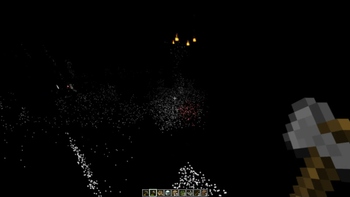
LIDAR is a mod that dramatically transforms Minecraft's visibility into an environment of dots and particles projected from the player onto surfaces around them. This makes the game super difficult to play! And also pretty spooky.
This mod is inspired from the game "Lidar.exe" by KenForest - if you enjoy this mod, be sure to check out the original game!
Music
This mod additionally customizes the in-game music - most of the included tracks can be found at soundcloud.com/fennifith or fennifith.bandcamp.com :)
Configuration
For now, the mod's configuration can be edited manually in config/lidar-lidarconfig.json. Be aware that invalid values in this file can crash the game. An in-game config menu should be added to address this in a future update.
{
    // whether the mod rendering is enabled
    "isActive": true,
    // a mapping of block identifier -> particle color
    "blockColorMap": {
        "default": "#FFFFFF",
        "minecraft:water": "#0000FF",
        "minecraft:seagrass": "#0000FF"
    },
    // a mapping of entity identifier -> particle color
    "entityColorMap": {
        "default": "#ff7e7e",
        "peaceful": "#61cf66",
        "hostile": "#ff7e7e",
        "minecraft:enderman": "#7e009e",
        "minecraft:creeper": "#008f07"
    },
    // entities that are excluded from the particle system, and should be rendered normally
    "entityRender": [
        "minecraft:item",
        "minecraft:item_frame",
        "minecraft:glow_item_frame",
        // if you remove the ender dragon from this list, it will actually crash the game when it renders - so don't do this :)
        "minecraft:ender_dragon"
    ],
    // whether particles should follow entities as they move (looks super cheesy, turned off by default)
    "entityParticleFollow": false,
    // if enabled, particles project onto entity models more accurately, at the cost of performance
    "entityParticleModel": true,
    // if enabled, particles from other entities will render on the current player (blocks the player's view, turned off by default)
    "entityParticlesOnSelf": false,
    // amount of lidar projections created by non-player entities, per tick
    "entityLidarCount": 20,
    // distance (blocks) that lidar particles should be cast
    "lidarDistance": 10.0,
    // radius/spread of particles, in degrees
    "lidarSpread": 30.0,
    // amount of lidar projections created for player entities, per tick
    "lidarCount": 100,
    // amount of ticks that particles cast onto blocks should remain
    "lidarDurationBlock": 100,
    // amount of ticks that particles cast onto entities should remain
    "lidarDurationEntity": 20,
    // whether a bloom effect should be rendered for the lidar particles
    "lidarBloom": true
}
Keybinds
This mod has one keybind to toggle between particle/normal rendering modes, which is bound to K by default. You can change this in "options > controls > key binds".
Mod Compatibility
This mod is likely incompatible with most other fabric mods due to how it modifies the rendering logic. It is known to be incompatible with Sodium/Iris/etc. Use at your own risk.
License
Copyright (c) 2023 James Fenn

This Source Code Form is subject to the terms of the Mozilla Public
License, v. 2.0. If a copy of the MPL was not distributed with this
file, You can obtain one at https://mozilla.org/MPL/2.0/.
Available Versions
How to Install Lidar on Your Server
Order Server
Order a Minecraft Java server with at least 3 GB RAM (4 GB recommended).
Set fabric Loader
In the panel under "Egg", select the fabric loader and matching Minecraft version (1.19).
Install Mod
Open the mod browser in the dashboard and search for "Lidar". Click "Install" – done! Alternatively, upload the .jar via SFTP to the /mods folder.
Compatibility
Mod Loaders
Minecraft Versions
1.19
Server-side
✗ UnsupportedRecommended RAM
4 GB(min. 3 GB)Frequently Asked Questions
Lidar server crashes on startup – what to do?
Most common cause: wrong fabric version or insufficient RAM. Check the server log (latest.log) for "OutOfMemoryError" or "Mixin" errors. With Mado Hosting: ensure at least 3 GB RAM is allocated and the loader matches the mod version (1.19). You can switch loaders with one click in the panel.
Is Lidar compatible with fabric?
Lidar officially supports fabric for Minecraft 1.19. The Mado dashboard automatically detects incompatible loader combinations.
Server lagging with Lidar – how to optimize performance?
Recommended RAM: 4 GB (per 8 players). Use /spark profiler to check if Lidar consumes the most tick time. Common fixes: reduce server view-distance to 8-10, install "performant" or "starlight" as supplementary mods on Forge. With Mado Hosting, your server runs on NVMe SSDs with dedicated CPU cores for minimal latency.
Similar Mods





Rent Modded Server
Install Lidar with just one click on your server.