
Life-Size Bdubs
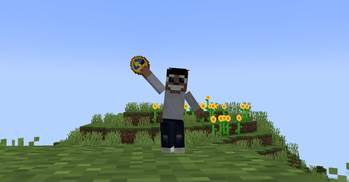
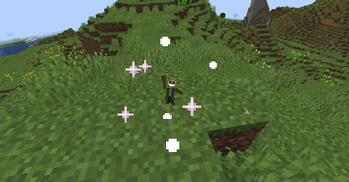
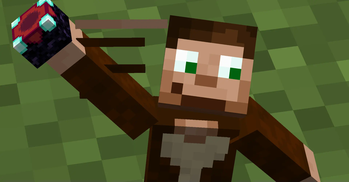
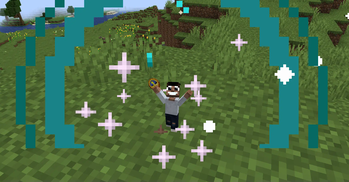
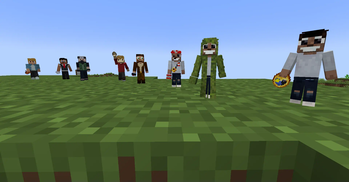
Befriend a life-size replica of BDoubleO100(Bdubs)! Or add your own friends with data-driven variants! Made for ModFest 1.21!
Screenshots
About this Mod
Life-Size Bdubs
Befriend your own life-size Bdubs!
Made for Modfest 1.21!
Ever get tired of being by yourself? Ever wish you could have your own little BDoubleO100(Bdubs) friend? Well now you can!
Good Times With Bdubs
Simply give Bdubs a clock, and he'll do anything for you!
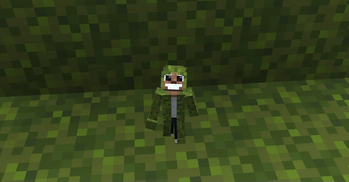
But clocks aren't the only items you can give Bdubs. Giving him a moss block gives him a mossy costume, and giving him a tnt block... well, he becomes slightly unhinged.
Upon giving a Bdubs an item, that Bdubs becomes yours! You can now right-click him to put him on your shoulder! Bdubs tells you little fun facts and quotes while on your shoulder! How fun? (On NeoForge, the messages sent from Bdubs on your shoulder can be disabled in the client config.)
Notice: Giving sugar to Bdubs may result in unexpected consequences. You have been warned!
Additional items can also be given for different variants.
- A ladder for Etho
- A Heart of The Sea for GeminiTay
- An enchanting table for GoodTimesWithScar
- An egg for Grian
- A redstone dust for Impulse
- A snowball for Skizzleman
- A verdant froglight(the green one) for SmallishBeans(Joel)
- A saddle for SolidarityGaming(Jimmy/Timmy)
- A redstone block for TangoTek
- A sea pickle or pearlescent froglight(the purple one) for PearlescentMoon
Bdubs doesn't want to cause lag on your world though, so after 5 minutes of no interaction from the Bdubs owner, he'll disappear without a trace!
Note: As of Life-Size Bdubs v1.0.0, there is no way of finding a Bdubs entity in survival. He can only be spawned in creative. This may change in the future if I can find a nice vanilla-friendly way to implement it.
Shoulder Entity Locking
If there is an entity on your shoulder, right-clicking a slime ball will toggle the newly added shoulder entity locking. If your shoulder entities are locked, they cannot be removed from your shoulder under most circumstances.
This was done so that you can jump and fly around with Bdubs on your shoulders without needing to worry about him falling off! Do note that there are still ways for them to fall off, like changing gamemodes and dying.
Data Driven Variants
It turns out Bdubs taught data how to drive! Additional Bdubs variants can be added thanks using datapacks. It's quite simple really - so simple even Scar could do it(okay maybe not because the resource packs thing is weird but beyond that its a probably)!
The texture is the exact same as a Minecraft skin, so you can simply copy-paste a skin to add your own variant!
Custom Skins Variant via Commands
Alternatively, you can spawn a Bdubs with a custom skin via commands, just like player heads!
/summon lifesizebdubs:bdubsentity ~ ~ ~ {profile:"<username here>"}
This Bdubs will then take any item without changing skins.
Extras & Special Thanks
This mod was a mod created by a fan of HermitCraft(and friends of the Hermits), and means no harm towards any of the creators mentioned. It was originally a reference to the one bit ZombieCleo did where she made a tiny armor stand of Bdubs.
While all the skin textures were recreated by me to better fit the smaller entity and my art style, it is in no means supposed to undermine the work, creativity, and originality of the creator's original skins and their respective artist.
All the creator's mentioned via built-in Bdubs variants can be found here:
- BDoubleO100 (referred to as Bdubs): https://www.youtube.com/@bdoubleo
- EthosLab (referred to as Etho): https://www.youtube.com/@EthosLab
- GeminiTay (referred to as Gem): https://www.youtube.com/@GeminiTayMC
- Grian: https://www.youtube.com/@Grian
- GoodTimesWithScar (referred to as Scar): https://www.youtube.com/@GoodTimesWithScar
- ImpulseSV (referred to as Impulse): https://www.youtube.com/@impulseSV
- Skizzleman (referred to as Skizz): https://www.youtube.com/@MCSkizzleman
- SmallishBeans (referred to as Joel): https://www.youtube.com/@SmallishBeans
- SolidarityGaming (referred to as Timmy): https://www.youtube.com/@SolidarityGaming
- TangoTek (referred to as Tango): https://www.youtube.com/@TangoTekLP
- PearlescentMoon (referred to as Pearl): https://www.youtube.com/@PearlescentMoon
Dependencies & Compat
GeckoLib v4 is required.
For Life-Size Bdubs 1.0.1-1.0.5, Ears features are not supported/rendered, BUT Ears skins (including those with wings enabled) do not cause any transparency issues so long as Ears is installed.
For Life-Size Bdubs 1.1.0+, Ears features have not been tested. Should any issues happen, support might be (re)implemented.
Have fun!!
Adding your own life-size friend!
Adding your own Bdubs variant can be done with a datapack. This page does not tell you how to create a datapack.
Built-in examples: https://github.com/Superkat32/LifesizeBdubs/tree/main/src/main/generated/data/lifesizebdubs/lifesizebdubs/bdubs_variant
Note: The built-in examples assume the resource pack is from the resources folder. If you aren't working with a mod, you'll need to create your own resource pack along with the datapack.
For this example, we will be adding a new variant called "Booga". Let's begin!
Template Json (WIP)
Place your variant texture in your resource pack:resources/assets/<your pack name>/textures/bdubs/<your variant name>.png
Copy-paste the following template into your data pack:data/<your pack name>/lifesizebdubs/bdubs_variant/<your variant name>.json
and fill out the information using the guide below.
Note: As of Life-Size Bdubs 1.1.0+, multiple variants CAN use the same item! A random one is chosen at first, then it cycles alphabetically.
{
  "name": "",
  "texture": "",
  "item": "",
  "alt_item": "",
  "messages": [
    "",
    ""
  ],
  "timed_messages": [
    {
      "msg": "",
      "time": 12500
    }
  ]
}
Json explained
- name: The name shown when the Bdubs variant sends messages and dies (Text component).
- item: The item needed to give a Bdubs entity to turn it into that variant (Item).
- alt_item*: An alternative item to give the Bdubs entity (Item).
- texture: The texture used for the Bdubs variant (Resource location).
- messages* : The list of possible messages the Bdubs variant can send once on their owner's shoulder (Text component array)
- timed_messages*: A list of messages to be sent at a specific time to the owner if the Bdubs entity is on their shoulder (Array of Pair of Text component & Integer).
- msg: The message sent at the specific time (Text component)
- time: The time of day the message of
msgshould be sent. (Integer 0-24000)
*Optional fields - should not be added if you don't plan on using it.
Adding your own variant (WIP)
For this example, we will be adding a new variant called "Booga". Let's begin!
Add your skin texture
Add a Minecraft skin texture in:resources/assets/<your pack name>/textures/bdubs/booga.png
Add your json file
Create a new json file in:data/<your pack name here>/lifesizebdubs/bdubs_variant/booga.json
Copy-paste the template above into that newly created json file.
Change all the instances of <pack name here> to your pack name(sometimes referred to as pack id). Replace all instances of booga with your variant name, if you want a different one.
For rest of this example, the pack name is boogapack
{
  "name": "Mini Booga",
  "texture": "boogapack:textures/bdubs/booga.png",
  "item": "minecraft:diamond",
  "messages": [
    "Booga message 1",
    "Booga message 2 electric boogaloo"
  ],
  "timed_messages": [
    {
      "msg": "Timed booga!",
      "time": 12500
    }
  ]
}
And that's it! Load up the game and try giving your new variant the item you defined in your json(a diamond in this case).
You can add as many messages as you like too. The messages and timed_messages fields are optional, meaning you can remove them if you don't use them.
You can summon a Bdubs with a specific variant using/summon lifesizebdubs:bdubsentity ~ ~ ~ {variant:"<pack name>:<variant name>"}
For our example Booga, it would be/summon lifesizebdubs:bdubsentity ~ ~ ~ {variant:"boogapack:booga"}
If you want to showoff your Bdubs entity, there's a special NBT tag for that!/summon lifesizebdubs:bdubsentity ~ ~ ~ {variant:"<pack name>:<variant name>", showcaseMode:true}
This will summon a Bdubs entity of your variant who doesn't despawn, can't be pushed, and can't be damaged(in non-creative mode)!
If you want to make sure nobody can change the variant, set its owner to yourself./summon lifesizebdubs:bdubsentity ~ ~ ~ {variant:"<pack name>:<variant name>", showcaseMode:true, Owner:"<your username>"}
Available Versions
How to Install Life-Size Bdubs on Your Server
Order Server
Order a Minecraft Java server with at least 3 GB RAM (4 GB recommended).
Set fabric Loader
In the panel under "Egg", select the fabric loader and matching Minecraft version (1.21.1).
Install Mod
Open the mod browser in the dashboard and search for "Life-Size Bdubs". Click "Install" – done! Alternatively, upload the .jar via SFTP to the /mods folder.
Compatibility
Mod Loaders
Minecraft Versions
1.21.1
Server-side
✓ RequiredRecommended RAM
4 GB(min. 3 GB)Frequently Asked Questions
Life-Size Bdubs server crashes on startup – what to do?
Most common cause: wrong fabric version or insufficient RAM. Check the server log (latest.log) for "OutOfMemoryError" or "Mixin" errors. With Mado Hosting: ensure at least 3 GB RAM is allocated and the loader matches the mod version (1.21.1). You can switch loaders with one click in the panel.
Is Life-Size Bdubs compatible with fabric and neoforge?
Life-Size Bdubs officially supports fabric, neoforge for Minecraft 1.21.1. The Mado dashboard automatically detects incompatible loader combinations.
Server lagging with Life-Size Bdubs – how to optimize performance?
Recommended RAM: 4 GB (per 8 players). Use /spark profiler to check if Life-Size Bdubs consumes the most tick time. Common fixes: reduce server view-distance to 8-10, install "performant" or "starlight" as supplementary mods on Forge. With Mado Hosting, your server runs on NVMe SSDs with dedicated CPU cores for minimal latency.
Similar Mods





Rent Modded Server
Install Life-Size Bdubs with just one click on your server.