
Lightroot
Introduces a new biome within the nether that contains tons of new fauna, and adds a nice change of pace.
Screenshots
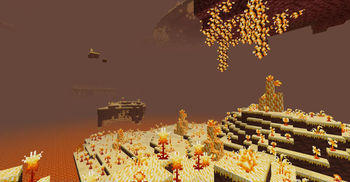
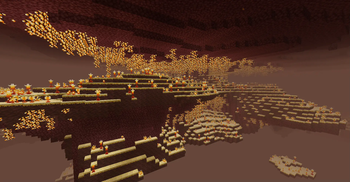

About this Mod

Lightroot is a small QOL mod that adds in a new biome to the nether, the Infernal Caverns, somewhat being a nether variant of my other mod, Glowroot.
Within the Infernal Caverns, you can find a new enjoyable experience to the game, bringing a peaceful side to the hellish nether. Large patches of beaming vines hang from the ceiling, along with beautiful and varied light-emitting flowers that are scattered amongst the cavern. You can find large fossils, similar to those in Soul Sand Valleys, here aswell! Along with all of these features, you can come across large chunks of a new crystal, Infernoprase.

Infernoprase is a new crystal item found only within the Infernal Caverns, though it is craftable. It resembles the embodiment of summer and light, and can be crafted into items that function as such! Using Infernoprase, you can craft some new functional items, such as the Infernoprase Light, which acts similar to a flashlight, along with the Fireball, which can be thrown and cause large firey explosions!
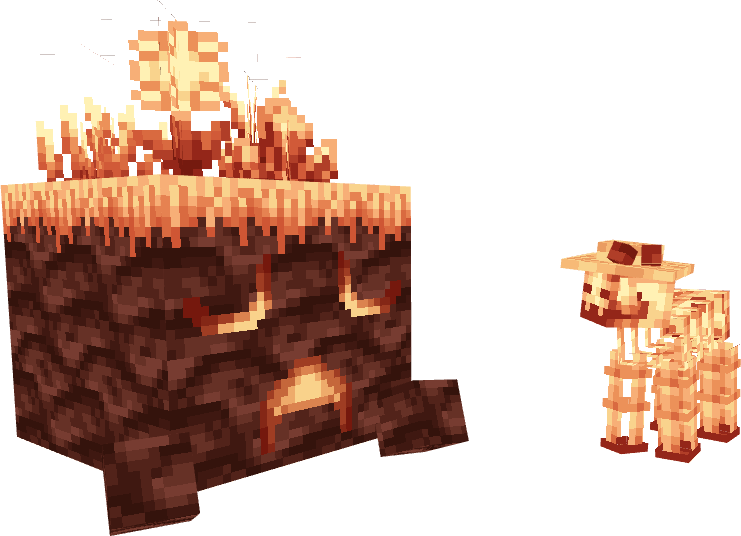
Along with all these features, two new mobs are introduced: the Infernal Sheep, and the Infernoprase Extant. Both peaceful mobs can be found roaming around the caverns. The Infernal Sheep will drop the wool from its sunhat, which can be used as a replacement for regular wool with it's inflammable and light-emitting properties, or be crafted into another sunhat. The Extant can be ridden around within the caverns, but it can't be controlled. It also drops a block of infernoprase upon death.
New building blocks using the Lightroot stone and Infernoprase can be crafted, and blocks can be forged with Infernoprase to create new variants, such as glass and other blocks.
Feel free to use this mod for modpacks! I do not permit anyone to reupload this mod onto any other website without my permission. Please report any project not following this guideline towards me. Any other questions you may ask me directly through the discord link.
Credit to ItzFredTLC for some of the textures!
Created for the Voxelprint Glowroot Modjam.
Available Versions
How to Install Lightroot on Your Server
Order Server
Order a Minecraft Java server with at least 4 GB RAM (6 GB recommended).
Set forge Loader
In the panel under "Egg", select the forge loader and matching Minecraft version (1.20.1).
Install Mod
Open the mod browser in the dashboard and search for "Lightroot". Click "Install" – done! Alternatively, upload the .jar via SFTP to the /mods folder.
Compatibility
Mod Loaders
Minecraft Versions
1.20.1
Server-side
✓ RequiredRecommended RAM
6 GB(min. 4 GB)Frequently Asked Questions
Lightroot server crashes on startup – what to do?
Most common cause: wrong forge version or insufficient RAM. Check the server log (latest.log) for "OutOfMemoryError" or "Mixin" errors. With Mado Hosting: ensure at least 4 GB RAM is allocated and the loader matches the mod version (1.20.1). You can switch loaders with one click in the panel.
Is Lightroot compatible with forge?
Lightroot officially supports forge for Minecraft 1.20.1. The Mado dashboard automatically detects incompatible loader combinations.
Server lagging with Lightroot – how to optimize performance?
Recommended RAM: 6 GB (per 5 players). Use /spark profiler to check if Lightroot consumes the most tick time. Common fixes: reduce server view-distance to 8-10, install "performant" or "starlight" as supplementary mods on Forge. With Mado Hosting, your server runs on NVMe SSDs with dedicated CPU cores for minimal latency.
Similar Mods




Rent Modded Server
Install Lightroot with just one click on your server.