
Limbo
A standalone lightweight solution for AFK or waiting rooms in your server network.
Screenshots

About this Mod

Development Builds & Scheme Download for Default Spawn Island
Video
Want video demonstrations? Here are some videos made by some awesome people!
Video by KasaiSora in English:
About
If your server always has a few players that AFK forever and causes a waste of server resources, or if you want something that can hold lots of players like a waiting room or server lobby, you can consider using a Limbo server.
Currently, the program is still under development and things will continue to be added.
Limbo Server is built against 26.1.1 and wouldn't work with other versions. However, you can use the Limbo plugin ViaLimbo do make it possible!
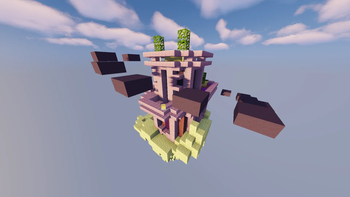
A small .schem can be loaded as the default world (the current sponge/worldedit schematic format) and player skins are also supported.
Limbo Server also has an API which allows you to create simple plugins and change the behaviour of the Limbo, such as listening to chat events, adding custom commands, sending custom packets, or even adding more worlds.

A screenshot from the demo server, download the scheme here
Demo Limbo Server
Want to take a look at a live demo?
IP: mc.loohpjames.com

Installation
- Put Limbo.jar in a folder you like
- Start the server just like any other spigot server with
java -jar Limbo.jar --nogui(Or without --nogui flag if you for some reason like the annoying GUI) - Edit the server.properties
- Restart the server
- Set up and link the server to your bungeecord proxy if you use that (Remember to set bungeecord to true in step 3)
Data usage
Usage statistics at https://bstats.org/plugin/server-implementation/Limbo will be visible to the public with your server included in the statistics. No private information of your server is sent.

Available Versions
How to Install Limbo on Your Server
Order Server
Order a Minecraft Java server with at least 3 GB RAM (4 GB recommended).
Set java-agent Loader
In the panel under "Egg", select the java-agent loader and matching Minecraft version (26.1.2).
Install Mod
Open the mod browser in the dashboard and search for "Limbo". Click "Install" – done! Alternatively, upload the .jar via SFTP to the /mods folder.
Compatibility
Mod Loaders
Minecraft Versions
26.1.2, 26.1.1, 26.1 (+28 more)
Server-side
✓ RequiredRecommended RAM
4 GB(min. 3 GB)Frequently Asked Questions
Limbo server crashes on startup – what to do?
Most common cause: wrong java-agent version or insufficient RAM. Check the server log (latest.log) for "OutOfMemoryError" or "Mixin" errors. With Mado Hosting: ensure at least 3 GB RAM is allocated and the loader matches the mod version (26.1.2). You can switch loaders with one click in the panel.
Is Limbo compatible with java-agent?
Limbo officially supports java-agent for Minecraft 26.1.2, 26.1.1, 26.1. The Mado dashboard automatically detects incompatible loader combinations.
Server lagging with Limbo – how to optimize performance?
Recommended RAM: 4 GB (per 8 players). Use /spark profiler to check if Limbo consumes the most tick time. Common fixes: reduce server view-distance to 8-10, install "performant" or "starlight" as supplementary mods on Forge. With Mado Hosting, your server runs on NVMe SSDs with dedicated CPU cores for minimal latency.
Similar Mods






Rent Modded Server
Install Limbo with just one click on your server.