
Limitless Logistics
Ultimate solution for bottomless energy transfers.
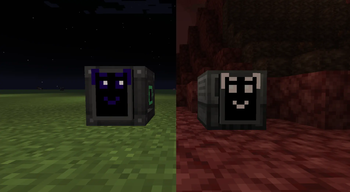
Screenshots
About this Mod
Limitless Logistics
Looking how to simplify your life? Maybe enhance your project with higher limits? Or you just love big numbers? This is the exact mod you are looking for - lightweight architecture that helps to overcome default integer limitations and transfer massive amounts of energy.
Features
- Thanks to a custom API, this mod completely bypasses 32-bit limitations(2,147,483,647) and expands it up to 64-bits(9,223,372,036,854,775,807)
- Each player has their own network ensuring zero interference or cross-contamination.
- Simple configuration without any linking tools, frequency channels or confusing GUIs. It just works
Getting Started
- Place Extraction Node on your generator or any appropriate source of energy.
- Place Insertion Node on your block that you want to supply with energy.
- That's it! Energy will instanly move around your network.
🛠Information for Developers
This mod includes API providing custom capability. Integrating it will allow logistics functionality to communicate with your mod and efficiently transfer large amounts of energy.
Available Versions
How to Install Limitless Logistics on Your Server
Order Server
Order a Minecraft Java server with at least 3 GB RAM (4 GB recommended).
Set neoforge Loader
In the panel under "Egg", select the neoforge loader and matching Minecraft version (1.21.1).
Install Mod
Open the mod browser in the dashboard and search for "Limitless Logistics". Click "Install" – done! Alternatively, upload the .jar via SFTP to the /mods folder.
Compatibility
Mod Loaders
Minecraft Versions
1.21.1
Server-side
✓ RequiredRecommended RAM
4 GB(min. 3 GB)Frequently Asked Questions
Limitless Logistics server crashes on startup – what to do?
Most common cause: wrong neoforge version or insufficient RAM. Check the server log (latest.log) for "OutOfMemoryError" or "Mixin" errors. With Mado Hosting: ensure at least 3 GB RAM is allocated and the loader matches the mod version (1.21.1). You can switch loaders with one click in the panel.
Is Limitless Logistics compatible with neoforge?
Limitless Logistics officially supports neoforge for Minecraft 1.21.1. The Mado dashboard automatically detects incompatible loader combinations.
Server lagging with Limitless Logistics – how to optimize performance?
Recommended RAM: 4 GB (per 8 players). Use /spark profiler to check if Limitless Logistics consumes the most tick time. Common fixes: reduce server view-distance to 8-10, install "performant" or "starlight" as supplementary mods on Forge. With Mado Hosting, your server runs on NVMe SSDs with dedicated CPU cores for minimal latency.
Similar Mods


Rent Modded Server
Install Limitless Logistics with just one click on your server.