
LinearReader
Make Minecraft worlds take up less space.
Screenshots


About this Mod
LinearReader replaces Minecraft's region format in order to reduce
world size and improve storage efficiency. Chunk data is compressed to
the .linear format, instead of vanilla Minecraft's .mca format. The.linear format was created by Xymb-endcrystalme, and can be found on
Github.
LinearReader:
- has an automatic region file backup system
- uses a region cache to improve performance
- has a built-in backup system
- can convert both ways between the
.mcaand the.linearformats.
For a full description of all of LinearReader's features, see the
wiki.
WARNING: LinearReader modifies the way chunk data is saved and makes
it more complex. Corruption may occur due to bugs or in unexpected
edge cases. Backup your worlds before installing LinearReader.
DISCLAIMER: AI was used to code this mod. I have manually tested
and verified that it all works as intended. If you run into any
issues please report them on my GitHub
and I will try to resolve them as fast as possible.
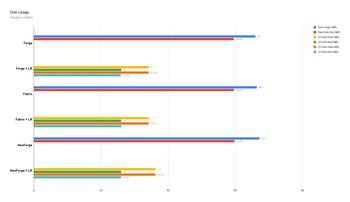
A note on the graphs:
I performed three tests per platform, using the same seeds for the tests.
The data used for the graphs was the combined data of the three tests.
All the tests were done with LinearReader version 1.1.0 on my M4 MacBook
Air with a render distance of 32 chunks. (Basically, all the tests were
performed under identical conditions.)
As mentioned in the wiki,
LinearReader initially compresses to a level much lower than 22 (unless
otherwise configured). So for LinearReader's disk usage data, I measured
both the initial size (which was level 2 compression at the time) of the region files,
and then their final size after recompressing them to level 22. Backup
files were not included when calculating disk usage.
Total read/write time was calculated as amount of operations x average
time for that operation. (For example, Fabric performed roughly triple
the amount of read operations that all other platforms did, resulting in
Fabric having a much larger total read time value.)
LinearReader can show higher max latency spikes, but those occur
primarily during the initial world load. The p95 and p99 values are
much closer to what average gameplay is like.
Available Versions
How to Install LinearReader on Your Server
Order Server
Order a Minecraft Java server with at least 3 GB RAM (4 GB recommended).
Set fabric Loader
In the panel under "Egg", select the fabric loader and matching Minecraft version (26.2).
Install Mod
Open the mod browser in the dashboard and search for "LinearReader". Click "Install" – done! Alternatively, upload the .jar via SFTP to the /mods folder.
Compatibility
Mod Loaders
Minecraft Versions
26.2, 26.1.2, 26.1.1 (+20 more)
Server-side
✓ RequiredRecommended RAM
4 GB(min. 3 GB)Frequently Asked Questions
LinearReader server crashes on startup – what to do?
Most common cause: wrong fabric version or insufficient RAM. Check the server log (latest.log) for "OutOfMemoryError" or "Mixin" errors. With Mado Hosting: ensure at least 3 GB RAM is allocated and the loader matches the mod version (26.2). You can switch loaders with one click in the panel.
Is LinearReader compatible with fabric and forge and neoforge?
LinearReader officially supports fabric, forge, neoforge for Minecraft 26.2, 26.1.2, 26.1.1. Note: Forge and Fabric mods are NOT cross-compatible – pick one loader and stick with it. The Mado dashboard automatically detects incompatible loader combinations.
Server lagging with LinearReader – how to optimize performance?
Recommended RAM: 4 GB (per 8 players). Use /spark profiler to check if LinearReader consumes the most tick time. Common fixes: reduce server view-distance to 8-10, install "performant" or "starlight" as supplementary mods on Forge. With Mado Hosting, your server runs on NVMe SSDs with dedicated CPU cores for minimal latency.
Similar Mods






Rent Modded Server
Install LinearReader with just one click on your server.