
Liquid Lab
A fluid API to streamline the creation of custom fluids and gasses.
Screenshots
About this Mod
Description
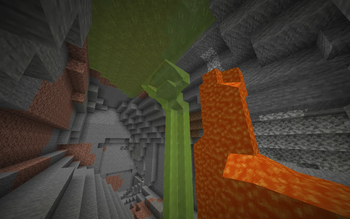
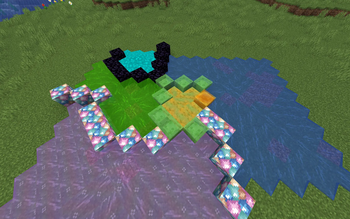
Liquid Lab is a fluid API to streamline the creation of custom fluids, as most fluid attributes are hardcoded. Some features include setting fog color, custom mixing behavior, and the creation of gaseous fluids that flow upwards. This mod exists because fluids on fabric have limited functionality and it would be useful to have a way to create a high quality custom fluid.
Features
Base Fluid Changes
Lots of utility methods added to the base Fluid class
Fluid Mixing
- Done through
onFluidMix - Immediately called when your fluid touches another fluid
- Params:
- World the fluid is in
- Block Positon of the calling fluid
- Side the fluid was touched from
- Fluid state that was interacted with
Entity Splashing
- Done through
onEntityEntry - Called when an entity first touches the fluid
- Params:
- World the entity is in
- Entity that touched the fluid
Entity Interactions
- Done through
onEntityCollision - Called while an entity is within the fluid
- Params:
- World the entity is in
- Block Position of the fluid
- Entity that is within the fluid
Entity Viscosity
- Done through
getFluidMotion - Used for the fluid's push force and viscosity
- Params:
- World the entity is in
- Returns:
- XYZ velocity multiplier for an entity
- Push force of the fluid
- Movement speed for an entity actively moving
Item Viscosity
- Done through
getItemMotion - Used for an item entity's buoyancy and viscosity
- Params:
- World the entity is in
- Returns:
- XYZ velocity multiplier for an item
- Maximum vertical velocity of an item
- How fast an item rises in the fluid
Fog
- Done through
getFogProperties - Enables the fluid to have special fog
- Params:
- World the entity is in
- Position of the cameara
- Entity that is viewing the fog
- Returns:
- Fog start in blocks
- Fog End in Blocks
- RGB color of the fog
Rain Particles
- Done through
getRainParticle - Gives the fluid unique splash particles when rain falls onto it
- Returns:
- The particle to use when the fluid is rained on
Bucket Sounds
- Done through
getBucketEmptySound - Enables the fluid to not only have a custom filling sound, but also a custom emptying sound
- Returns:
- The sound to make when a bucket is emptied
Pathfinding
- Done through
canPathfindThrough - Allows a fluid to directly identify weather something should try to pathfind through it
- Params:
- The type of navigation an entity has
- Returns:
- If it is valid to pathfind through this fluid
Fluid Tags
7 fluid tags are added by the API:
liquid_lab:diveable- Defines that this fluid is swimmable and has sprint swimming
liquid_lab:swimmable- Defines if this fluid can be swum in
liquid_lab:drowns- Defines if this fluid will drown entities submerged within it
liquid_lab:evaporates- Defines if the fluid cannot be placed in the nether
liquid_lab:fall_damage_reducing- Makes the fluid affect fall damage the same way lava does
liquid_lab:fall_damage_resetting- Makes the fluid affect fall damage in the same way as water
liquid_lab:gaseous- Simply marks the fluid as a gas, does not have any other functionality
Gaseous Fluids
Additionally, the API also adds reversed fluids that flow upwards. Gas fluids are registered in the same way as regular fluids, except the block form is created with GasFluidBlock and the fluid form is created by extending FlowableGasFluid. To correctly render a gas fluid, use SimpleGasFluidRenderHandler, rather than SimpleFluidRenderHandler in your client initializer.
Utility
Some simple utility methods are added by the API to make registering certain aspects of fluids simpler.
Particle Utils
Contains methods related to registering block leak particles. The class allows for registering dripping, falling, and landing particles independently or all at once for fluids and gasses.
Available Versions
How to Install Liquid Lab on Your Server
Order Server
Order a Minecraft Java server with at least 3 GB RAM (4 GB recommended).
Set fabric Loader
In the panel under "Egg", select the fabric loader and matching Minecraft version (1.21.1).
Install Mod
Open the mod browser in the dashboard and search for "Liquid Lab". Click "Install" – done! Alternatively, upload the .jar via SFTP to the /mods folder.
Compatibility
Mod Loaders
Minecraft Versions
1.21.1
Server-side
✓ RequiredRecommended RAM
4 GB(min. 3 GB)Frequently Asked Questions
Liquid Lab server crashes on startup – what to do?
Most common cause: wrong fabric version or insufficient RAM. Check the server log (latest.log) for "OutOfMemoryError" or "Mixin" errors. With Mado Hosting: ensure at least 3 GB RAM is allocated and the loader matches the mod version (1.21.1). You can switch loaders with one click in the panel.
Is Liquid Lab compatible with fabric?
Liquid Lab officially supports fabric for Minecraft 1.21.1. The Mado dashboard automatically detects incompatible loader combinations.
Server lagging with Liquid Lab – how to optimize performance?
Recommended RAM: 4 GB (per 8 players). Use /spark profiler to check if Liquid Lab consumes the most tick time. Common fixes: reduce server view-distance to 8-10, install "performant" or "starlight" as supplementary mods on Forge. With Mado Hosting, your server runs on NVMe SSDs with dedicated CPU cores for minimal latency.
Similar Mods



Rent Modded Server
Install Liquid Lab with just one click on your server.