
Litematica Backup
Litematica Backup is Fabric mod that automatically backs up schematics
Screenshots
About this Mod
Eu:
Litematica Backup - mod that automatically backs up your Litematica schematics.
It saves all files from the schematics folder to C:\Users\{YourUserName}\LitematicaBackups with timestamped folders for easy organization.
Features:
- Automatic backups on game login or at set intervals (every 3 or 7 days).
- Only backs up new or modified schematics to save space.
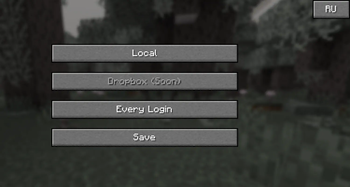
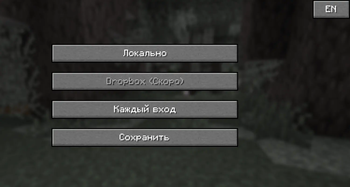
- Simple configuration screen on first launch to choose backup frequency and language (English or Russian).
- Local storage support (Dropbox WIP)
Ru:
Litematica Backup - это мод, который автоматически создаёт резервные копии ваших схем Litematica.
Все файлы из папки schematics сохраняются в C:\Users\{YourUserName}\LitematicaBackups с папками, помеченными датой и временем.
Функции:
- Автоматический бэкап при входе в игру или по расписанию (каждые 3 или 7 дней).
- Копирует только новые или изменённые схемы для экономии места.
- Простой экран настроек при первом запуске для выбора частоты бэкапа и языка (английский или русский).
- Поддержка локального хранения (Dropbox wip).
Available Versions
How to Install Litematica Backup on Your Server
Order Server
Order a Minecraft Java server with at least 3 GB RAM (4 GB recommended).
Set fabric Loader
In the panel under "Egg", select the fabric loader and matching Minecraft version (1.21.10).
Install Mod
Open the mod browser in the dashboard and search for "Litematica Backup". Click "Install" – done! Alternatively, upload the .jar via SFTP to the /mods folder.
Compatibility
Mod Loaders
Minecraft Versions
1.21.10, 1.21.9, 1.21.8 (+8 more)
Server-side
✗ UnsupportedRecommended RAM
4 GB(min. 3 GB)Frequently Asked Questions
Litematica Backup server crashes on startup – what to do?
Most common cause: wrong fabric version or insufficient RAM. Check the server log (latest.log) for "OutOfMemoryError" or "Mixin" errors. With Mado Hosting: ensure at least 3 GB RAM is allocated and the loader matches the mod version (1.21.10). You can switch loaders with one click in the panel.
Is Litematica Backup compatible with fabric?
Litematica Backup officially supports fabric for Minecraft 1.21.10, 1.21.9, 1.21.8. The Mado dashboard automatically detects incompatible loader combinations.
Server lagging with Litematica Backup – how to optimize performance?
Recommended RAM: 4 GB (per 8 players). Use /spark profiler to check if Litematica Backup consumes the most tick time. Common fixes: reduce server view-distance to 8-10, install "performant" or "starlight" as supplementary mods on Forge. With Mado Hosting, your server runs on NVMe SSDs with dedicated CPU cores for minimal latency.
Similar Mods






Rent Modded Server
Install Litematica Backup with just one click on your server.